As requested.
Legend. I installed the version in the container, but I still seem to be sw transcoding for some reason. Can provide more logs if it’s helpful
Definitely need DEBUG log files which capture what it’s not doing.
I have success on native N5105 – even on a QNAP
Debug logging was already turned on before, I think prior to retrieving the logs, but I also enabled Verbose logging on this latest run as well. I ran the transcode test quickly before retrieving these logs, so hopefully it has the information you need to investigate.
I upgraded the kernel from the default 5.15.0 to 5.18.0 on Ubuntu 22.04 and the HW transcoding worked on the PMS 1.29.2 preview you were kind enough to share with me above. 4K HEVC HDR10 to 4K H.264 40mbps transcode is only using ~20-25% CPU in total on the system.
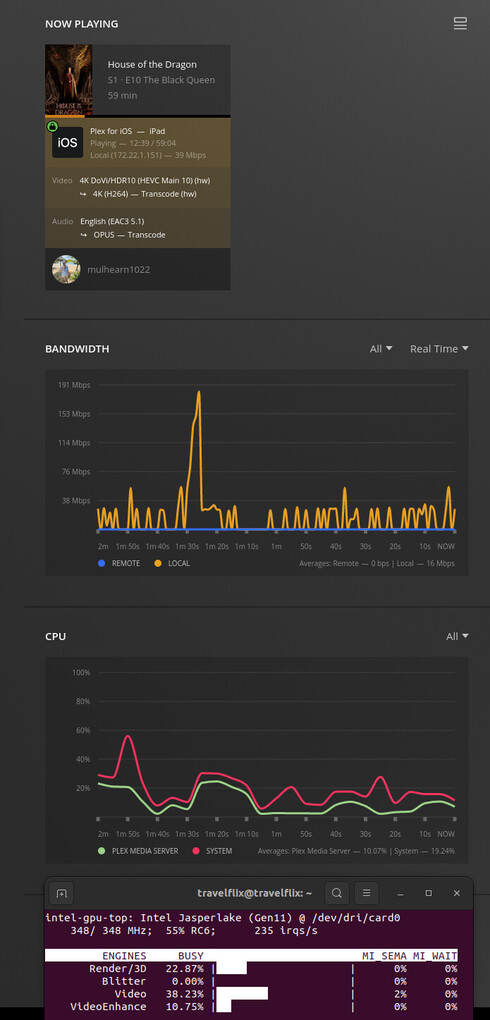
I’m going to stick with these versions for now until the official PMS release catches up. Thanks for all your help @ChuckPa
Hey folks,
I’m on Plex Version 1.29.2.6364 with an N5105 and struggling to get HW transcoding working myself.
I’m on Debian 11, with Kernel 6.0.0-0.deb11.2-amd64
The GPU is being shared/seen by the container that Plex is running inside of, and the critical lines that pop up in the logs is as follows:
[Req#2f08/Transcode/6AE8C404-8DF5-4061-B067-E68703001E18/45fe529a-aecd-4473-a675-9a8108c6fa7b] [h264_vaapi @ 0x7fec7adbd040] Driver does not support any RC mode compatible with selected options (supported modes: CQP).
[Req#3c32/Transcode/1A479E53-0725-4DE5-BDE8-FFB8AE5A0F77/017f03f4-defd-470d-b4ab-35b0fc9537c6] Error initializing output stream 0:0 -- Error while opening encoder for output stream #0:0 - maybe incorrect parameters such as bit_rate, rate, width or height
Here’s the log file anyway:
Plex Media Server Logs_2022-12-11_23-43-06.zip (1.3 MB)
intel_gpu_top shows some activity for a split second when I first try to transcode and also the (hw) also shows up momentarily before disappearing again in the Dashboard for the server in the web interface.
I feel like it’s really close … but I can’t quite crack it!
Thanks for any insight/assistance!
Please use only the supported (distributed) kernel.
Get off the 6.0 kernel.
Dec 11, 2022 23:07:14.350 [0x7f4e0c687b38] INFO - Plex Media Server v1.29.2.6364-6d72b0cf6 - Docker Docker Container (LinuxServer.io) x86_64 - build: linux-x86_64 debian - GMT 10:00
Dec 11, 2022 23:07:14.354 [0x7f4e0c687b38] INFO - Linux version: 6.0.0-0.deb11.2-amd64, language: en-US
Dec 11, 2022 23:07:14.354 [0x7f4e0c687b38] INFO - Processor: 4-core Intel(R) Celeron(R) N5105 @ 2.00GHz
Dec 11, 2022 23:07:14.354 [0x7f4e0c687b38] INFO - Compiler is - Clang 11.0.1 (https://plex.tv 9b997da8e5b47bdb4a9425b3a3b290be393b4b1f)
Dec 11, 2022 23:07:14.354 [0x7f4e0c687b38] INFO - /usr/lib/plexmediaserver/Plex Media Server
This is what solved it - back on 5.16 here now.
(EDIT: it also DOES NOT work for me on 5.18 or 5.19)
I had to specifically install it as my latest OMV 6 release install (which comes with Debian 11) install as it defaulted to giving me kernel 6.0 … which is technically the current stable kernel I guess.
Thanks for your time and the tip 
New Linux kernel versions often require later device firmware versions which are not available in the distribution being run. In this case, it is likely that either a newer GuC or HuC firmware is required when running 5.18.x, 5.19.x, or 6.0.x.
Boot to a kernel version which is not working and then run the following:
sudo dmesg | grep -i i915
Have a look at the output (or paste it here); look for indications that it was unable to find/load a required firmware.
OMV isn’t supported because they do things like this. It’s unfortunate.
6.0 is WAY out ahead of the mainstream and not supportable because of it.
Debian 11 isn’t on the 6.0 kernel so ???  Why?
Why?
hey @ChuckPa i am on 5.16 Kernel and i get following error
Dec 12, 2022 13:11:09.550 [0x7f27d8929b38] WARN - [GPU] Failed to load PCIID map: Failed to locate a readable PCIID database
Dec 12, 2022 13:11:09.550 [0x7f27d8929b38] DEBUG - [GPU] Got device: , intel@builtin, default true, best true, ID /dev/dri/renderD128, DevID [8086:4e71], flags 0xde
any clue why or what i got do ?
here my full log
Plex Media Server Logs_2022-12-12_13-21-38.zip (1014.8 KB)
i have more details on how i ended up here in this forum
5.15.0 didn’t work for me (5.16.0 may have similar issues). Upgrading to 5.18.0 worked for me. Try giving that a shot
Yeah that’s a super good question - I’ve just bounced back into running a machine with Linux after a number of years away and was definitely unaware that something considered a ‘usable distribution’ (to my judgment!) would be quite so bleeding edge - just noticed 6.0 is barely months old.
Yes I recall this from earlier debugging actually … I think it wasn’t able to load ehl_guc_70.1.1.bin
The reason 6.0 shouldn’t be used YET is because the support modules (especially the i915) aren’t ready.
Intel QSV transcoding requires it all to be in sync.
You need a distro, with drivers & firmware, all in sync for it to work and 6.0 is NOT mainstream distro for anyone yet.
Before telling me OMV is… I will remind that OMV isn’t supported because of non-standard behavior such as this.
Everyone who has backed down to a 5.04 → 5.15 kernel has immediate success.
I recommend using the Distro Default Kernel and not deviating from that.
This is one example of how much kernels & support drivers are out of sync and why we all need be very cautious with each change.
I forget the details but know updated drivers can be manually installed to go with the newer kernels IFF they support those newer kernels.
If you look in /dev/dri/ inside the container are both entires in there?
I’ve also got this in my /etc/modprobe.d/i915.conf
options i915 force_probe=4e55
options i915 enable_guc=2
My machine is an N5105 so I’m sure they’re all a bit different.
If I may add here. This is keeping it as simple as can be with no tuning whatsoever required.
-
PMS version - 1.29.2
-
Processor - N5105
[~] # cat /proc/cpuinfo | grep 'model name' | uniq
model name	: Intel(R) Celeron(R) N5105 @ 2.00GHz
- Kernel - 5.10.60 (qnap generic)
[~] # uname -a
Linux QNAP-TS264 5.10.60-qnap #1 SMP Sat Oct 22 01:04:01 CST 2022 x86_64 GNU/Linux
- PMS HW transcode and tonemapping
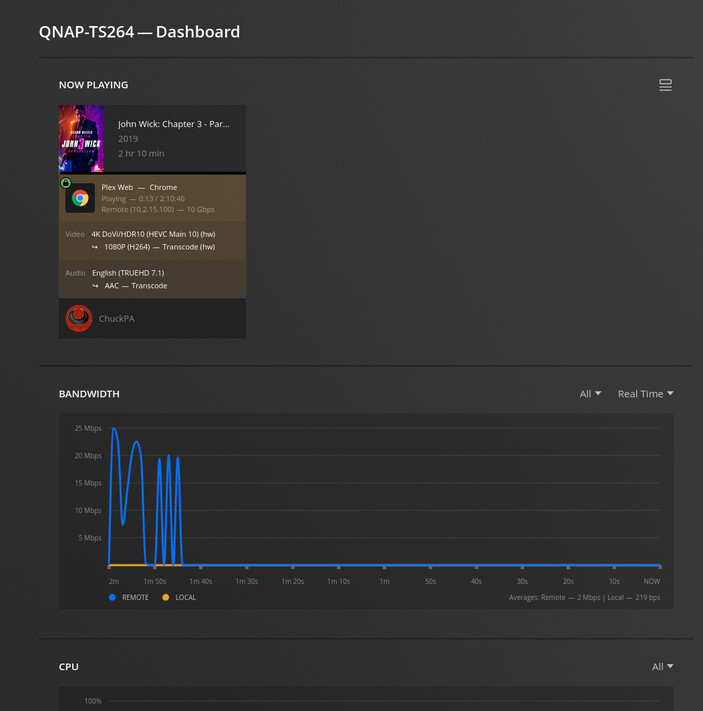
QNAP does not allow kernel tuning so this is as stock as it gets.
Sorry I missed responding to this:
- Ignore it. The PCIID database is what’s built into PMS.
- The work there is ongoing.
- If you look further down in the log, you’ll find where it preemptively loads the drivers anyway. All good at that point

hey @ChuckPa i loaded the 5.10 kernal but i get error saying
`cannot probe codecs and giving up
and the
cd /sys/module/i915/drivers
ls -la
ls -la pci:i915/
output this
total 0
drwxr-xr-x 2 root root 0 Dec 13 11:36 .
drwxr-xr-x 7 root root 0 Dec 13 11:29 ..
lrwxrwxrwx 1 root root 0 Dec 13 11:36 pci:i915 -> ../../../bus/pci/drivers/i915
root@homeserver:/sys/module/i915/drivers# ls -la pci:i915/
total 0
drwxr-xr-x  2 root root    0 Dec 13 11:29 .
drwxr-xr-x 22 root root    0 Dec 13 11:29 ..
--w-------  1 root root 4096 Dec 13 11:36 bind
lrwxrwxrwx  1 root root    0 Dec 13 11:36 module -> ../../../../module/i915
--w-------  1 root root 4096 Dec 13 11:36 new_id
--w-------  1 root root 4096 Dec 13 11:36 remove_id
--w-------  1 root root 4096 Dec 13 11:29 uevent
--w-------  1 root root 4096 Dec 13 11:36 unbind
sudo dmesg | grep -i i915
[    3.320190] i915 0000:00:02.0: Your graphics device 4e71 is not properly supported by the driver in this
               kernel version. To force driver probe anyway, use i915.force_probe=4e71
               module parameter or CONFIG_DRM_I915_FORCE_PROBE=4e71 configuration option,
[   64.302289] snd_hda_codec_hdmi hdaudioC0D2: No i915 binding for Intel HDMI/DP codec
i already have this
i915.force_probe=4e71
added but doesn’t seems to be working
im running this
Linux homeserver 5.10.0-19-amd64 #1 SMP Debian 5.10.149-2 (2022-10-21) x86_64 GNU/Linux
What are you running there?
I did not intend for you to load 5.10 because all the other support modules would be needed too (which you’re seeing don’t work) because you only changed the kernel.
QNAP – 5.10 works
Ubuntu 20.04 - 5.15.0-56 works
on ASUSTOR -
admin@ASUSTOR-AS6704T:/volume1/home/admin $ uname -a
Linux ASUSTOR-AS6704T 5.13.x #1 SMP Mon Sep 26 00:16:10 CST 2022 x86_64 GNU/Linux
admin@ASUSTOR-AS6704T:/volume1/home/admin $
Every distro is different but the “default shipping kernel” (with exception of 6.x kernel) is almost always the preferred kernel
A poor analogy here:
You can’t change kernel like dropping a 455 CID V8 into a Ford Pinto without all the other pieces needed to support it also being included.
