Ubuntu22.04 hardware transcoding not work

Server Version#: 1.32.4.7195
Player Version#: 1.74.1.3913-9baac009
<If providing server logs please do NOT turn on verbose logging, only debug logging should be enabled>

cpu: ryzen 1700

gpu: gtx1060 3g

system: ubuntu22.04-server docker (esxi)

I use plex on docker

docker -v
Docker version 20.10.21, build 20.10.21-0ubuntu1~22.04.3

docker-compose -v
Docker Compose version v2.19.1

I install nvidia driver 470

nvidia-smi
Wed Jul 19 13:52:23 2023       
+-----------------------------------------------------------------------------+
| NVIDIA-SMI 525.125.06   Driver Version: 525.125.06   CUDA Version: 12.0     |
|-------------------------------+----------------------+----------------------+
| GPU  Name        Persistence-M| Bus-Id        Disp.A | Volatile Uncorr. ECC |
| Fan  Temp  Perf  Pwr:Usage/Cap|         Memory-Usage | GPU-Util  Compute M. |
|                               |                      |               MIG M. |
|===============================+======================+======================|
|   0  NVIDIA GeForce ...  Off  | 00000000:03:00.0 Off |                  N/A |
| 38%   39C    P8     6W / 120W |      2MiB /  3072MiB |      0%      Default |
|                               |                      |                  N/A |
+-------------------------------+----------------------+----------------------+
                                                                               
+-----------------------------------------------------------------------------+
| Processes:                                                                  |
|  GPU   GI   CI        PID   Type   Process name                  GPU Memory |
|        ID   ID                                                   Usage      |
|=============================================================================|
|  No running processes found                                                 |
+-----------------------------------------------------------------------------+

and libnvidia-encode, libnvidia-decode, nvidia-docker2…

my docker-compose file

version: '3'
services:
  plex:
    image: plexinc/pms-docker
    restart: unless-stopped
    container_name: plex
    networks:
      macvlan_1:
        ipv4_address: 192.168.2.50
    ports:
      - 32400:32400
    environment:
      PLEX_CLAIM: claim-QPYejXj3EXisyQNxwF3B
      NVIDIA_VISIBLE_DEVICES: all
      NVIDIA_DRIVER_CAPABILITIES: compute,video,utility
      VERSION: docker
      PUID: 1000
      PGID: 1000
      PLEX_UID: 1000
      PLEX_GID: 1000
      TZ: Asia/Shanghai
    volumes:
      - /mnt/double/docker/005plex2:/config
      - /mnt/double/cache/000plex:/transcode
      - /mnt:/mnt
    devices:
      - /dev/dri:/dev/dri
      - /dev/nvidia0:/dev/nvidia0
      - /dev/nvidiactl:/dev/nvidiactl
      - /dev/nvidia-modeset:/dev/nvidia-modeset
      - /dev/nvidia-uvm:/dev/nvidia-uvm
      - /dev/nvidia-uvm-tools:/dev/nvidia-uvm-tools
    labels:
      - "traefik.enable=true"
    deploy:
      resources:
        limits:
          cpus: '0.5'
          memory: 2G
        reservations:
          cpus: '0.05'
          memory: 64M
          # devices:
          #   - capabilities: [gpu]
    runtime: nvidia

networks:
  macvlan_1:
    external: true
    driver: macvlan

transcoding option is checked

The above is my configuration.

anyway,

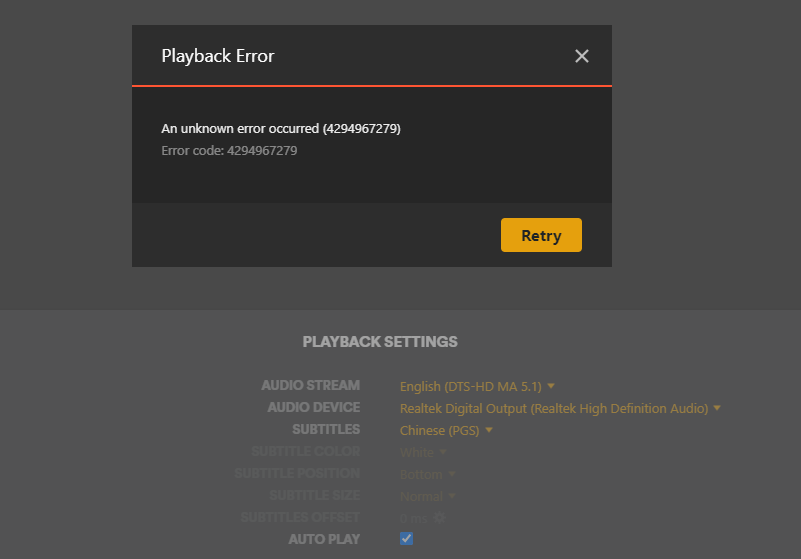
When I try transcoding to play a movie, I get error 4294967283.

Frist,

I think maybe my compose file has problem. I keep revising until the current state.

It doesn’t work

And,

I think maybe 470 mvidia drive has problem, then i create a new ubuntu22.04, install 535 and 525

(because 535 drivers have not yet been tested.)

image-20230719220902266

It doesn’t work

finaly

I create a new plex rollback to a old version

It doesn’t work

This is my first plex logs

Plex Media Server Logs_2023-07-18_19-17-34.zip (87.2 KB)

and drive 525 logs

Plex Media Server Logs_2023-07-19_21-44-58.zip (810.5 KB)

Please help me, I try any thing i can do. but doesn’t work.

  1. Nvidia 535 drivers have been verified to work OK. I was able to complete that work over the weekend.

  2. Nvidia 470 drivers are now too old to use

  3. I have no idea what is going on with the proprietary nvidia GPU manager service (SR-IOV) but every time I see it – It’s causing failures.

      - /dev/nvidia0:/dev/nvidia0
      - /dev/nvidiactl:/dev/nvidiactl
      - /dev/nvidia-modeset:/dev/nvidia-modeset
      - /dev/nvidia-uvm:/dev/nvidia-uvm
      - /dev/nvidia-uvm-tools:/dev/nvidia-uvm-tools

I have a clean installation without issue.

Last login: Wed Jul 19 18:35:26 2023 from 192.168.0.13
[chuck@glockner ~.2001]$ nvidia-smi
Wed Jul 19 18:38:47 2023       
+---------------------------------------------------------------------------------------+
| NVIDIA-SMI 535.54.03              Driver Version: 535.54.03    CUDA Version: 12.2     |
|-----------------------------------------+----------------------+----------------------+
| GPU  Name                 Persistence-M | Bus-Id        Disp.A | Volatile Uncorr. ECC |
| Fan  Temp   Perf          Pwr:Usage/Cap |         Memory-Usage | GPU-Util  Compute M. |
|                                         |                      |               MIG M. |
|=========================================+======================+======================|
|   0  Quadro P2200                   On  | 00000000:07:00.0 Off |                  N/A |
| 49%   40C    P8               4W /  75W |      4MiB /  5120MiB |      0%      Default |
|                                         |                      |                  N/A |
+-----------------------------------------+----------------------+----------------------+
                                                                                         
+---------------------------------------------------------------------------------------+
| Processes:                                                                            |
|  GPU   GI   CI        PID   Type   Process name                            GPU Memory |
|        ID   ID                                                             Usage      |
|=======================================================================================|
|  No running processes found                                                           |
+---------------------------------------------------------------------------------------+
[chuck@glockner ~.2002]$ ls -la /dev/dri
total 0
drwxr-xr-x   3 root root        120 Jul 15 19:23 ./
drwxr-xr-x  21 root root       5820 Jul 15 19:23 ../
drwxr-xr-x   2 root root        100 Jul 15 19:23 by-path/
crw-rw----+  1 root render 226,   0 Jul 15 19:23 card0
crw-rw----+  1 root render 226,   1 Jul 15 19:23 card1
crw-rw----+  1 root render 226, 128 Jul 15 19:23 renderD128
[chuck@glockner ~.2003]$

In ESXi. I have always passed the physical GPU – NOT a virtual GPU node.
It looks like you’re trying to pass the whole virtual GPU manager (nvidia0 and control nodes – which won’t work)

PMS wants:

  1. card0 or card1
  2. renderD128 or renderD129

Keep it simple.

I try delete nvidia map option, Keep Only

- /dev/dri:/dev/dri

But it still doesn’t work

On my host

ls -la /dev/dri
total 0
drwxr-xr-x  3 root root        140 Jul 19 12:54 .
drwxr-xr-x 20 root root       4240 Jul 19 12:55 ..
drwxr-xr-x  2 root root        120 Jul 19 12:54 by-path
crw-rw----  1 root video  226,   0 Jul 19 12:54 card0
crw-rw----  1 root video  226,   1 Jul 19 12:54 card1
crw-rw----  1 root render 226, 128 Jul 19 12:54 renderD128
crw-rw----  1 root render 226, 129 Jul 19 12:54 renderD129

On plex container

ls -la /dev/dri
total 0
drwxr-xr-x 2 root root        120 Jul 20 12:12 .
drwxr-xr-x 6 root root        440 Jul 20 12:12 ..
crw-rw---- 1 root video  226,   0 Jul 20 12:12 card0
crw-rw---- 1 root video  226,   1 Jul 20 12:12 card1
crw-rw---- 1 root video1 226, 128 Jul 20 12:12 renderD128
crw-rw---- 1 root video1 226, 129 Jul 20 12:12 renderD129

I use esxi to directly connect the graphics card to ubuntu, container don’t have “by-path” floder. Is it related to this?

In ESXi,

You ADD the PCI Device (the GPU card) to the VM.

(This is the physical addition/allocation)

When the OS starts. if the drivers are installed on the Guest OS in the VM, the card will be seen.

Do not forget you need libnvidia-decode and libnvidia-encode packages
(check this)

Yes, I have already installed these two packages(525)

Here are my transcoder settings (P2200 GPU)

  1. Verify your Nvidia driver. Rebuild initramfs as appropriate / recompile DKMS. These logs show the version is too low. ( Did you install 525 on the host or in the guest?)
Jul 18, 2023 19:15:57.185 [140126118656824] ERROR - [Req#13b/Transcode] [FFMPEG] - Cannot load libnvidia-encode.so.1
Jul 18, 2023 19:15:57.185 [140126118656824] ERROR - [Req#13b/Transcode] [FFMPEG] - The minimum required Nvidia driver for nvenc is 455.28 or newer
Jul 18, 2023 19:15:57.277 [140126118656824] WARN - [Req#13b/Transcode] Codecs: avcodec_open2 returned -1 for encoder 'h264_nvenc'
Jul 18, 2023 19:15:57.277 [140126118656824] DEBUG - [Req#13b/Transcode] Codecs: testing hevc (decoder) with hwdevice vaapi
Jul 18, 2023 19:15:57.281 [140126118656824] DEBUG - [Req#13b/Transcode] Codecs: hardware transcoding: testing API vaapi
  1. After upgrading the drivers - select the Nvidia GPU and SAVE
Jul 18, 2023 19:13:30.489 [140126134827832] DEBUG - [GPU] Got device: GP106 [GeForce GTX 1060 3GB], nvidia@unknown, default true, best true, ID /dev/dri/renderD129, DevID [10de:1c02:10de:0000], flags 0x70
Jul 18, 2023 19:13:30.489 [140126134827832] DEBUG - [GPU] Got device: Unknown, unknown@builtin, default false, best false, ID /dev/dri/renderD128, DevID [15ad:0405:15ad:0405], flags 0x0
Jul 18, 2023 19:13:30.505 [140126134827832] DEBUG - Grabber: Cleaning up orphaned grabs.
  1. Start the playback (15 seconds) in the web browser.

  2. I would like to see DEBUG log files ZIP which captures the start of transcoding
    (first 15 seconds).

wow, I update plex image latest, delete this option

NVIDIA_DRIVER_CAPABILITIES: compute,video,utility

I don’t know which step worked, now i can see my card in plex setting
H1SXOVU6$2Q@@Y`QUWDPAA_tmb

But I encountered a new problem,
image
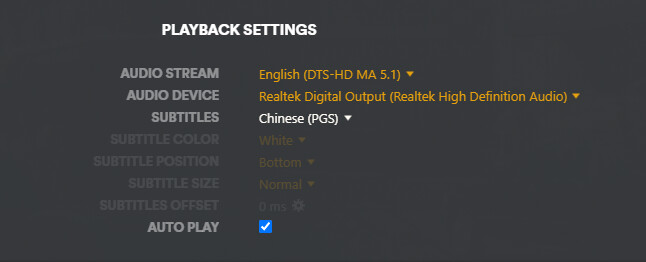
There is no transcoding option on the playback interface

Sometimes they can work, but used cpu, Very sluggish.

Sometimes error

o, you show the logs is driver 470, now i am 525

nvidia-smi
Thu Jul 20 07:45:47 2023       
+-----------------------------------------------------------------------------+
| NVIDIA-SMI 525.125.06   Driver Version: 525.125.06   CUDA Version: 12.0     |
|-------------------------------+----------------------+----------------------+
| GPU  Name        Persistence-M| Bus-Id        Disp.A | Volatile Uncorr. ECC |
| Fan  Temp  Perf  Pwr:Usage/Cap|         Memory-Usage | GPU-Util  Compute M. |
|                               |                      |               MIG M. |
|===============================+======================+======================|
|   0  NVIDIA GeForce ...  Off  | 00000000:03:00.0 Off |                  N/A |
| 38%   40C    P8     6W / 120W |      2MiB /  3072MiB |      0%      Default |
|                               |                      |                  N/A |
+-------------------------------+----------------------+----------------------+
                                                                               
+-----------------------------------------------------------------------------+
| Processes:                                                                  |
|  GPU   GI   CI        PID   Type   Process name                  GPU Memory |
|        ID   ID                                                   Usage      |
|=============================================================================|
|  No running processes found                                                 |
+-----------------------------------------------------------------------------+

and this is my new logs

Plex Media Server Logs_2023-07-20_15-46-23.zip (641.6 KB)

I think I’m close

image

no(hw)

I try to update 535,but not work.
then i switch to ubuntu which used 470,
they can work
image

thanks
oh god, they can work , oh god… :sob:

This topic was automatically closed 90 days after the last reply. New replies are no longer allowed.