Server Version#: 1.20.4.3517
Player Version#: 4.46.2
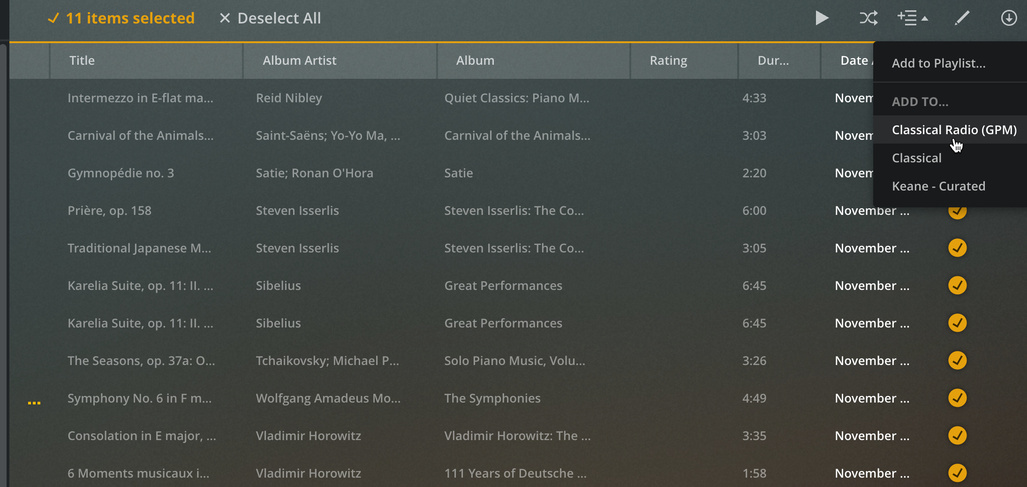
Since the upgrade to 1.20.4.3517, I’ve been unable to add items in bulk to a playlist. The culprit appears to be ERROR - LPE: invalid url: library://x/directory/ each time I add in bulk from the Web UI. If I add them individually, the playlist is created correctly.
Relevant Plex Media Server.log (debug enabled)
DEBUG - Auth: authenticated user 1 as jshank
DEBUG - Request: [10.1.10.1:54914 (Allowed Network (WAN))] PUT /playlists/29517/items?uri=server%3A%2F%2Fd6553cdd917018a7a70d00de3a37046c28e3667e%2Fcom.plexapp.plugins.library&includeExternalMedia=1 (23 live) TLS GZIP Signed-in Token (jshank)
DEBUG - PlayQueue: Converted 'server://d6553cdd917018a7a70d00de3a37046c28e3667e/com.plexapp.plugins.library' to 'library://x/directory/'
ERROR - LPE: invalid url: library://x/directory/
DEBUG - Updating metadata item (save) (Classical Radio (GPM)) with ID 29517
DEBUG - Completed: [10.1.10.1:54914] 200 PUT /playlists/29517/items?uri=server%3A%2F%2Fd6553cdd917018a7a70d00de3a37046c28e3667e%2Fcom.plexapp.plugins.library&includeExternalMedia=1 (23 live) TLS GZIP 8ms 714 bytes (pipelined: 16)
I rolled the docker image back to plexinc/pms-docker:1.20.3.3437-f1f08d65b and the issue persisted. I then logged directly into the server (https://plex.my.domain) and was able to successfully add the music to the playlist. Notice the PlayQueue: Converted message now shows a proper library://x/directory/XXXXX
DEBUG - Request: [127.0.0.1:49694 (Loopback)] GET /identity (19 live) Signed-in
DEBUG - Completed: [127.0.0.1:49694] 200 GET /identity (19 live) 0ms 398 bytes (pipelined: 1)
DEBUG - Auth: authenticated user 1 as jshank
DEBUG - Request: [192.168.32.1:57934 (Subnet)] POST /playlists?uri=server%3A%2F%2Fd6553cdd917018a7a70d00de3a37046c28e3667e%2Fcom.plexapp.plugins.library%2Flibrary%2Fmetadata%2F29452%2C29450%2C29448%2C29446%2C29447%2C29444%2C29445%2C29442%2C29440%2C29439%2C29438&includeExternalMedia=1&title=Plex%20Test&smart=0&type=audio (19 live) GZIP Signed-in Token (jshank)
DEBUG - Added new metadata item (Plex Test) with ID 29546
DEBUG - HubCache: Expiring '1/home.ondeck/1/hubs/promoted/enexternal-media,indirect-media/contentDirectoryID=8%2C1%2C2%2C6%2Cplaylists%2C4&count=12&includeMeta=1' because of event plex.event.item.created.
DEBUG - HubCache: Expiring '1/home.playlists/1/hubs/promoted/enexternal-media,indirect-media/contentDirectoryID=8%2C1%2C2%2C6%2Cplaylists%2C4&count=12&includeMeta=1' because of event plex.event.item.played.
DEBUG - PlayQueue: Converted 'server://d6553cdd917018a7a70d00de3a37046c28e3667e/com.plexapp.plugins.library/library/metadata/29452,29450,29448,29446,29447,29444,29445,29442,29440,29439,29438' to 'library://x/directory/%2Flibrary%2Fmetadata%2F29452%2C29450%2C29448%2C29446%2C29447%2C29444%2C29445%2C29442%2C29440%2C29439%2C29438'
DEBUG - Updating metadata item (save) (Plex Test) with ID 29546
DEBUG - Completed: [192.168.32.1:57934] 200 POST /playlists?uri=server%3A%2F%2Fd6553cdd917018a7a70d00de3a37046c28e3667e%2Fcom.plexapp.plugins.library%2Flibrary%2Fmetadata%2F29452%2C29450%2C29448%2C29446%2C29447%2C29444%2C29445%2C29442%2C29440%2C29439%2C29438&includeExternalMedia=1&title=Plex%20Test&smart=0&type=audio (19 live) GZIP 390ms 680 bytes (pipelined: 1)
@OttoKerner - I am able to successfully add multi-selections using the local web app. I’m just not able to with the plex.tv - Launch redirect (remote web?)