Error message “Unable to open: No such file or directory (2)” whenever navigating to Artist in Music library.
I have removed and remade the Music library with various settings enabled or not and still get this error message. All files play correctly in all my Libraries of movies, tv, etc. Only the music library gives the error.
I get the error message for any track in my entire library and yet they play without issue.
The error message is generated whilst navigating to a track (in any player including plexamp). So if I start an album I will get an error message for the first track but the rest of the album plays without any further error messages. Next time I navigate to a sound then a fresh error message is generated.
I have done as you requested.
As I said in the original post, the error is generated before any file is actually played. I just go into the artists page and then the error message is generated, I don’t even have to play a track for it to happen. It makes me think it is something to do with the Agent or Library not the actual files. But I’ll let you look at the logs.
Edit: I just tried changing the Music Library display to Folders instead of Artist or Album and no error messages are generated navigating around.
 11, 2025 07:41:18.401 [140082363173688] INFO - Linux version: 6.12.11-200.fc41.x86_64, language: en-US
Feb 11, 2025 07:41:18.401 [140082363173688] INFO - Processor: 4-core Intel(R) N100
Feb 11, 2025 07:41:18.401 [140082363173688] INFO - Compiler is - Clang 11.0.1 (https://plex.tv 9b997da8e5b47bdb4a9425b3a3b290be393b4b1f)
Feb 11, 2025 07:41:18.401 [140082363173688] INFO - /usr/lib/plexmediaserver/Plex Media Server
Feb 11, 2025 07:41:18.455 [140082365774480] INFO - [CERT/OCSP] Successfully retrieved response from cache.
Feb 11, 2025 07:41:18.456 [140082365774480] INFO - Running migrations. (EPG 0)
Feb 11, 2025 07:41:18.477 [140082365774480] INFO - Running migrations. (EPG 0)
Feb 11, 2025 07:41:19.834 [140082307668792] INFO - Refreshing paths watched by LibraryUpdateManager
Feb 11, 2025 07:41:20.352 [140082348460856] WARN - [EventSourceClient/pubsub/139.162.170.32:443] MyPlex: attempted a reachability check but we're not yet mapped.
Feb 11, 2025 07:41:20.400 [140082273856312] WARN - Crash: Crash reporting disabled
Feb 11, 2025 07:41:32.299 [140082314230584] WARN - NAT: PMP, got an error: Not Supported by gateway.
Feb 11, 2025 07:41:32.301 [140082322791224] WARN - [HttpClient/HCl#29] HTTP error requesting GET https://192-176-52-167.2d3e184f1e5b431286f7d8c09c78e432.plex.direct:32400/identity (7, Couldn't connect to server) (Failed to connect to 192-176-52-167.2d3e184f1e5b431286f7d8c09c78e432.plex.direct port 32400 after 1 ms: Couldn't connect to server)
Feb 11, 2025 07:41:39.478 [140082292841272] WARN - [Req#60] Missing X-Plex-Container-Size header. This will fail with status code 400 in the future.
Feb 11, 2025 07:41:39.478 [140082271746872] WARN - [Req#62] Missing X-Plex-Container-Size header. This will fail with status code 400 in the future.
Feb 11, 2025 07:41:39.478 [140082299870008] WARN - [Req#5e] Missing X-Plex-Container-Size header. This will fail with status code 400 in the future.
Feb 11, 2025 07:41:41.281 [140082292841272] INFO - [Req#7c] AutoUpdate: no updates available
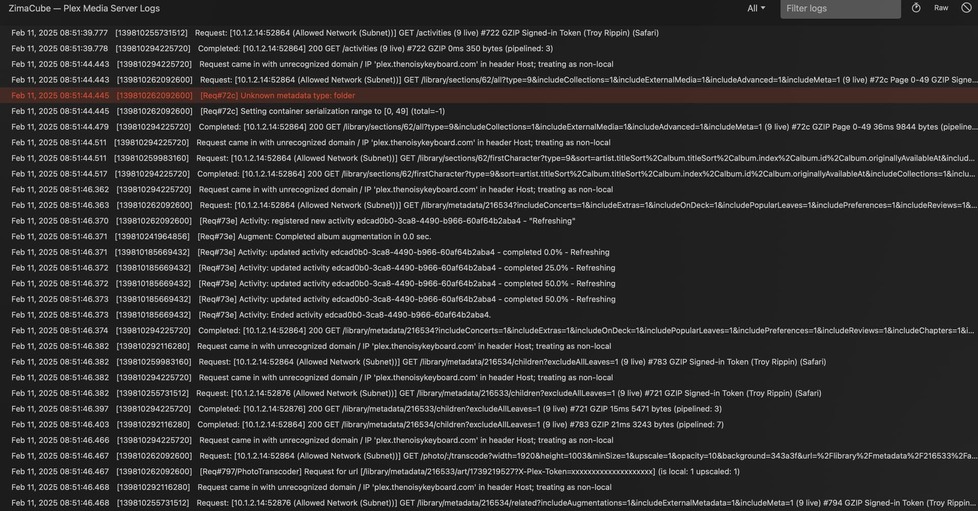
Feb 11, 2025 07:41:41.859 [140082226195256] ERROR - [Req#98] Unknown metadata type: folder
Feb 11, 2025 07:41:41.860 [140082226195256] WARN - [Req#98] QueryParser: Invalid field 'contentDirectoryID' found, ignoring.
Feb 11, 2025 07:41:41.860 [140082226195256] WARN - [Req#98] QueryParser: Invalid field 'pinnedContentDirectoryID' found, ignoring.
Feb 11, 2025 07:41:42.189 [140082228304696] ERROR - [Req#99] Unknown metadata type: folder
Feb 11, 2025 07:41:42.190 [140082228304696] WARN - [Req#99] QueryParser: Invalid field 'contentDirectoryID' found, ignoring.
Feb 11, 2025 07:41:42.190 [140082228304696] WARN - [Req#99] QueryParser: Invalid field 'pinnedContentDirectoryID' found, ignoring.
Feb 11, 2025 07:41:46.148 [140082228304696] ERROR - [Req#a2] Unknown metadata type: folder
Feb 11, 2025 07:44:28.352 [140082299870008] WARN - [Req#138] Invalid library metadata ID 5d07c182403c64029084e584 passed.
Please go to Settings - Server - General - Show Advanced.
Check the box to enable DEBUG logging
Click SAVE
Sorry, I enabled the debug in the Plex Web…
Done correctly now. Files attached.
More info: I’m using a Docker image. No such error messages with TV or Movie libraries. I have even created a fresh instance of Plex server (stopped service and made new data directory for Plex). Only added a Music library and still get the same error message whilst navigating music artists of albums.
The only error I see is your network configuration.
Feb 11, 2025 08:34:07.368 [139810292116280] DEBUG - Request came in with unrecognized domain / IP ‘plex.thenoisykeyboard.com’ in header Host; treating as non-local
This tells me you haven’t loaded your certificate (cert, key, and CA) into a P12 file and given it to PMS to use as validation for the incoming connection.
Can you get me a screenshot?
It might help to give me the entire ZIP rather than what you think I need as obviously info is missing
When I stop the server, I deleted the old logs so you didn’t have so much to go through. I then recreated the situation to create the error and then sent you the logs directly from Plex.
This is a screenshot directly from the console as I click on an artist to see the albums.
Do you have any information on “loaded your certificate (cert, key, and CA) into a P12 file and given it to PMS to use as validation for the incoming connection.” Trying to get Plex to work correctly through my reverse proxy has been challenging.
Here is another screen recording. You can see that playing an album doesn’t trigger the error but only when I enter into the Artist page. Screen Recording 2025-02-11 at 10.07.18.zip (7.1 MB)