Windows 11 OS
Plex v 1.40.1.8227
I have previously shared Playlists with users - just click on the dot menu for Playlists and choose “grant access”. That option is no longer appears. Cannot find in release notes if this was intended (I hope not). Thus, my new users cannot access Playlists I have created as Admin.
For existing users who have access to Playlist, it used to be named Shared items. Shared has now been renamed to Media and shows all content, not just Playlists - even when you choose the option to show only Playlists. Again, is this intended (and again, I hope not.)
Which client type?
Are the users full plex.tv accounts or are they managed users?
They are managed users on Roku devices.
Just checked and the same behavior exists on web browser (both firefox 125.0.1 and chrome 123.0.6312.123).
The option isn’t gone. can you take a screenshot of what you see?
Hi BigWheel -
Attach 1: Previously, when clicking the dot menu on Playlists, there used to be an option named Grant Access. Thus you could share all your playlists and any new playlists added were automatically available to users who had been granted access previously. But that option is now missing.
Attach 2: On the user side, instead of showing Shared items in the menu, it now lists Media.
Attach 3: Once in Media, when you choose the filter to show only Playlists, it still shows everything shared to that user rather than filtering out only the Playlists.
No attachment - I have created a new user and cannot share Playlists. Since reading your post, I have shared a couple individually and they are not showing up for her. She does not have a menu item labeled Share or Media in her menu; nor are the Playlists showing up in her menu item labeled Playlists.
If I need to share individual Playlists now, I’ll adjust. But hoping the developers bring back the ability to share Playlists with in one click.
Thanks!


None of your screen shots show the menu open with anything missing.
I as I mentioned above and showed a screenshot from it didn’t go anywhere.
You cannot reshare from the “Media” library which is things granted access to you. You need to do so from the main library.
As in my above screenshot from Music library. this is my movie library which you can see the option there.

So, if you look again at the Playlists menu screenshot, the option for Grant Access is not listed. Only Unpin and Reorder.
Attach 4: Going into Playlists library still does not offer the option to Grant Access.
There is no issue with the other libraries (Movies, TV, etc.), only Playlists.
Also, please don’t ignore the other issues listed (there are 4 total).
Thanks!
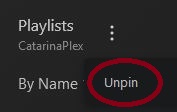
which is how it has always been
The “Playlist” source and “Media” source are two different things.
Playlists which has always been called that, shows playlist the logged in account created themselves from all libraries they have access to.
Media ( which did used to be called “Shared”) has always showed all media types that was individually granted access to them. This is the support document on it https://support.plex.tv/articles/shared-media/
The Playlist sources is it not the same as a regular library it just combines all the playlists from all library types of the ones you make. I don’t believe you have ever been able to share the Playlist source as a whole
That at is why the feature is called “single item access” which is the only way to grant access a Playlist. There has never been a way to share all of them at once from the Playlist source menu in side bar because the Playlist source is not technically a library. You need to share each playlist individually
Hi BigWheel -
Thanks for the response. Perhaps it was a bug in the single access that got corrected, but I was able to share the entire Playlist library in a single-click until recently.
Two issues left: 
Issue 1: The filter in Media allows an option to filter by Playlists. In the past, when choosing the option Playlists, it would show only the Playlists I had shared with that user (and ones they may have created as well). However now, it shows all libraries including Movies, TV, etc. (See attach 2 and 3 in previous reply. All the items in the menu are shown in Media when filtered for Playlists only.)
Issue 2: My new user cannot see or access the Playlists I individually shared with her. The menu item Media does not show up for her as it does for the other users. I did as you instructed and manually shared the Playlists individually with her.
Thanks!
ah ok I see that issue. I will make a report for that
It is not under More> either? They may have to hit More on the bottom of the side bar to see all sources and they can then pin it to home screen from there.
Just went into the new account and clicked on Media tab - it shows the Playlists I shared, so it’s in the database somewhere. Went back into her user profile and now it’s showing up for her. Maybe it was a syncing issue.
Thanks again for your time.
===
Neglected to mention that it was not showing up under More>.
Thought it might be a syncing issue, but it’s been over 30 minutes since I shared 2 playlists and they aren’t showing for her. Sharing Movies, TV, etc. were immediate so I assumed Playlists would be the same. Am I being too impatient?
They should be.
When you are logged into your account and go to Plex Home or Manage LIbrary Access
https://app.plex.tv/desktop/#!/settings/plex-home
or
https://app.plex.tv/desktop/#!/settings/manage-library-access
(I’m not sure which type of user they would be for you but will be in one of those list.)
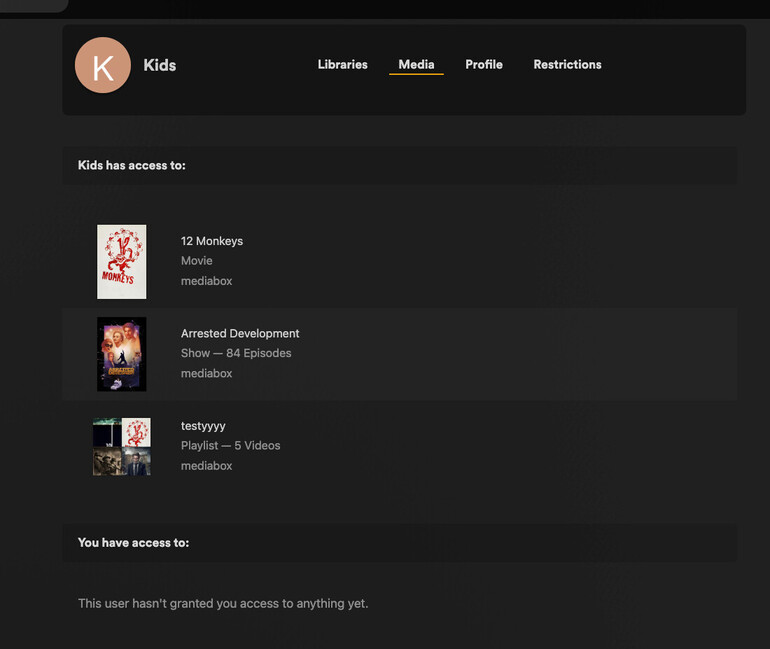
Please find them in that list click on them and them to see what is shared with them. When clicking on the “Media” tab at the top does it show the playlist and other single items they were given access to?
As an example this is the the single items i gave access to this account
Hi BigWheel -
Yea! The Media menu item appeared for the user after doing that. So, I think we’re good.
Again, thanks for your time and assistance.