hmmm, in the terminal it reads “permission denied, please try again” after asking for a password
No problem.
DSM 6.2 or better?
Are you signing in as your normal Syno username or the name admin (to which you assigned a known password) ?
yes running on DSM 6.2.2-24922 Update 4. Attempting to log in on my username which is also an admin. I just logged out of Synology’s web browser and logged back in, so I’m sure this password is correct; However, terminal is telling me that permission is denied
I actually just noticed there is supposed to be a “.” in my user name, which is omitted within the terminal command. This was automatically written in terminal, do you know how to edit this?
ok… let’s do it this way.
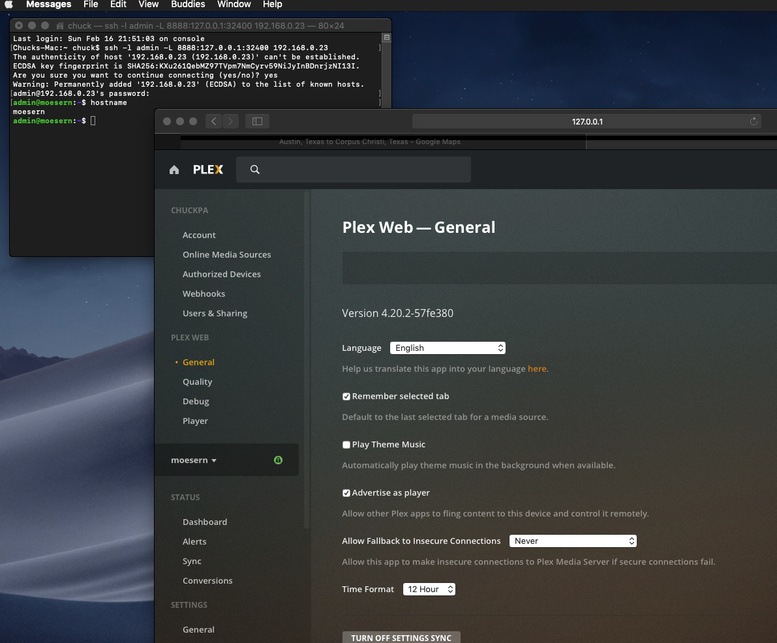
ssh -l admin -L 8888:127.0.0.1:32400 ip.addr.of.syno
Now it will ask for admin’s password
Ok that got me through. I then go to chrome (http://127.0.0.1:8888/web) and receive this error in terminal: channel 3: open failed: administratively prohibited: open failed. Web page says this site can’t be reached.
let me try that on my mac VM… that’s not right
Yes I’m currently on MacOS Majave v 10.14.6… not sure what to do?
Wait, I think I got it 
Success! Many many many thanks!! You are the best!!
My pleasure. Glad I could help. I thought a screenshot might help provide something to light the way!
This topic was automatically closed 90 days after the last reply. New replies are no longer allowed.
