The last couple of times I have upgraded, it has created a ‘new’ server.
This has caused me lots of grief, and I wish to not have it happen again. Each time it does it, I have to spend the time to set all the shares back up again for friends/family.
What can be done to prevent this from happening???
The installer expressly looks for /var/lib/plexmediaserver (Plex’s home directory) by seeing if user plex already exists. If it does, that entire phase of creating the ‘home’ directory is skipped. This is how your existing metadata is left intact.
would you be kind enough to run a search for me?
sudo find / -name Preferences.xml -print
Let’s see where it really thinks it is because something is not right.
Well, i would check for you, but… my server has quit all together now. (the plex server that is)
came home tonight, an I can no longer connect to it. keeps saying its unreachable. I restarted the plex service, and even restarted the actual server, with no luck…
very bummed, after a long hard day, i just wanted to watch something!!
When you’re refreshed, I’ll need the logs to find out what happened.
Open a terminal window
As root, tar cfz /tmp/Logs.tar.gz "/var/lib/plexmediaserver/Library/Application Support/Plex Media Server/Logs"
When it finishes, attach that gz file here and I’ll look at what happened.
In the interim, ps -ef to verify it’s running. If not, sudo journalctl -xe | grep -i plex to see what happened. Also looking at systemctl status plexmediaserver wouldn’t hurt either
I’ve never had any reports of PMS creating a new instance during upgrade. The only thing I can think causing this is an uninstall & purge (dpkg -e --purge) type operation before upgrading. PMS just doesn’t wipe out the existing indiscriminately
It will read the new location from the configuration override file (which points to where you have your Library data) and all will be good again. Most importantly, it will persist from now on.
Alternatively, you can use my documented procedure for how to do it with an editor of your choice.
I am not sure which is ‘current’ at this point, but I know where I would prefer it to be…
I have always had my media in the /data/media directory - its actually a separate drive set on my VM. That way if something were to happen to the OS, I can always recover it as needed.
so… basically if I create the override, the override will always persist, even through updates, etc.
furthermore, it sounds like if I ever had to replace the OS, and reinstall plex, I would just need to set the override again, and my entire plex server would still be intact.
The odd thing is, through all of this, it has kept track of what has been watched and everything. while I have had to go ‘claim’ the server again, i have never had to set up the libraries… just had to rebuild the shares each time the server gets ‘lost’
so… before I do anything at all, i need to be sure I am doing the RIGHT thing!
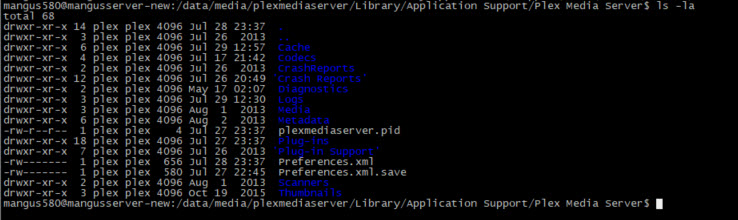
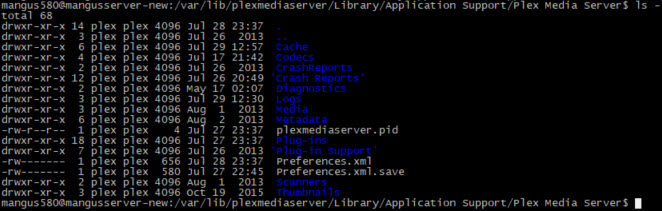
specifically - what 2 locations do you want a directory listing from?
The sticking point there… “The OS has its own virtual drive”.
By default, PMS installs in the root partition where the OS lives.
This is why it’s important to know if you had remapped the OS’s /var/lib/plexmediaserver default home directory (which would be inside the VM’s hd) to somewhere else outside the VM.
Couple this all together and it should now be obvious why I don’t understand how updating PMS can create a new server unless the default service definition is modified. Worst case should be:
/var/lib/plexmediaserver is (re) created and populated as a new server
/data/media/plexmediaserver is ignored
Yes, you’re correct, there is little difference between the actual host and the VM guest. Properly configured, it appears as if a completely free-standing host on the LAN. The primary distinction between native host OS and guest OS for PMS is accessibility of Hardware Transcoding. By default, the VM insulates the guest from the host at that level.
To solve this so it doesn’t happen again and make sure you have the correct data,
It looks like /data/media/plexmediaserver is your real server ?
There are two methods available to you because of the VM
2a. Mount & map the host directory to VM directory /var/lib/plexmediaserver in the VM config
2b. Make /data available to the VM guest system and then create the normal override to point there.
I dont understand at this point. As far as the OS knows that Plex is running on, all the drives are ‘native’ to it?
the Ubuntu system has its normal file system. all of my media lives in the /data directory.
If my system were to ever fail, I would prefer to have all my plex ‘settings’ and information kept in the /data directory so it exists along with my other data.
If you uninstall PMS or upgrade it, this file endures. Should you need to reinstall, this is the only ‘configuration’ file (other than your plex data itself) you need worry about