thanks much. joined the beta to get this and initial testing is going well once i got to actually downloading but was a bumpy road getting there.
Samsung Galaxy Tab 5e, Android 11
feedback:
after installing the v8.28.0.29859-beta and first start-up, my Sync library was not available when selecting the “Downloads & Sync” sidebar. it showed the same display i had seen when i was testing Downloads and there was no downloaded content. looked at the Settings screen and saw “Downloads” in the list instead of “Sync” as i had previously. click on “Downloads” and see the Enable new downloads" is enabled/checked. prior to installing the beta it was disabled/unchecked). i unchecked it and the app restarted but still no Sync content available. the external storage amount indicated there was still Synced content on the microSD card (256GB card, about 210GB of synced content and 30GB free) but it didn’t appear in the main UI; no libraries, the “manage” button didn’t appear, nothing to do. figured best to plow forward and force the deletion of synced content so i switched to internal storage, app restarted, switched back to external storage, content deletion appears to freeze the app so just waited for the app to restart on its own. after that cleared the external storage back to normal levels i reset download limits back to my normal levels, enabled the new Downloads feature, app restart and started downloading.
Music Playlist downloads first - these are going much faster than last time and about the same as the Sync feature. great work!!
not sure if this is new since my prior testing of downloads never really completed any playlist downloads but the “Downloads->Items” display seems to be more informative than before. each playlist shows progress and storage use as the download progresses.
it would be nice to have a “Pause” button either on a per-playlist/download group or on the overall Downloads as there was in Sync.
the first item will definitely frustrate users switching from Sync so i definitely suggest smoothing that process quickly. my guess is that the beta is forcing the new downloads setting to be on at first startup and that led to the further issues i saw but have no way of knowing for sure.
i am still working through what i need to download but this is many orders of magnitude faster than prior. thanks to both you and the devs for getting this out before the holidays.
and to y’all too. this makes my coming travels much more enjoyable.
I’ve tried another download this morning and it’s still doing the same just “waiting to download”. Once my download library is empty in a weeks time I can uninstall the app and try again from scratch with my SD card empty. I can switch between internal/external for some more fault finding.
this beta appears to continue downloads in the background. i exited the app and the "Downloading x/yyy’ notification continues to show and progress continues as well.
while i like this option it makes the need for a “Pause” function in the app more important.
Ok so I wanted to give my feedback about this, for some reason on my IOS devices (Iphone 12 Pro Max and M1 Ipad Pro 12 inch) when on remote connection, the upload speed on the server (since we cannot check the download speed on the device, come on guys, add that will ya?) tops at 8/9mbps. And it’s not connection bandwidth connection, both ends of the connection are on 500/100mbps connections, (so server has a 100mbps upload limit and client has a 500mbps download limit). BUT, if I download from a plex client running on windows on the same exact connection, the upload speed on the server is topping at 90/95 mbps, exactly what is expected… Also, this speed problem only affects downloads, regular remote streaming from the IOS client tops are 95/100 mbps as expected…
Again, this only affects remote connections, if Ipad is in the same local network as the server it pretty much uses the full gigabit connection making downloads extremely fast, it just affects remote connections on IOS devices.
The plot thickens! So today, I discovered something amazing.
When playing a downloaded episode from anywhere (Home screen, Continue Watching, Library, anywhere but the Downloads section), the subtitles are not shown, as previously reported. UNLESS… you’re streaming things to Chromecast – then suddenly, things are working perfectly as expected, subtitles, webhooks, all the bells and whistles.
Even more amusingly, playing video from the Downloads section is currently the only workaround to get subtitles working (as previously reported), right? Yet again, Chromecast turns the equation upside down, where trying to stream content directly from the Downloads section only resulted in a “Sorry, something went wrong.” error.
This is my current experience with downloads to an iOS device, except it’s all on a local network, not remote.
It just took 4 hours to download a 600mb show to an iPad…
i should have added: PMS server 1.25.1.5286 on Nvidia Shield Pro (2019)
additional feedback:
my initial enthusiasm for the transfer speed when downloading to external storage has dulled but is not completely gone. the first playlist i downloaded went along quickly; 58 tracks in less than an hour - not lightning fast but definitely better than the absolute glacial speeds on earlier. looking at the server graphs it was clicking along at a quick download of a track in 10s or so and then about 30s of waiting. i assumed this was the write process onto the external card. however, later playlists slowed to a crawl - still faster than before but now the wait time between track downloads (seen by an increment in the track counter and a quick 15-20Mbps spike of data out of the PMS server) and then a minute or longer (and appeared to be growing) until the next track would begin. this continued into the evening so i queued up a couple of playlists in the hopes the transfer would finish overnight. well…
so i left the Plex app on the Downloads->Items screen so it would keep it awake. sometime overnight (appears to have been about 2 hours after last look at the progress based on the number of tracks left to be transferred when i started it again in the morning) the transfers stopped. so, this experience echos other users’ notes that the “keep screen on” has a time limit and eventually the screen goes off and transfers stop - i have no idea which order or the triggering event.
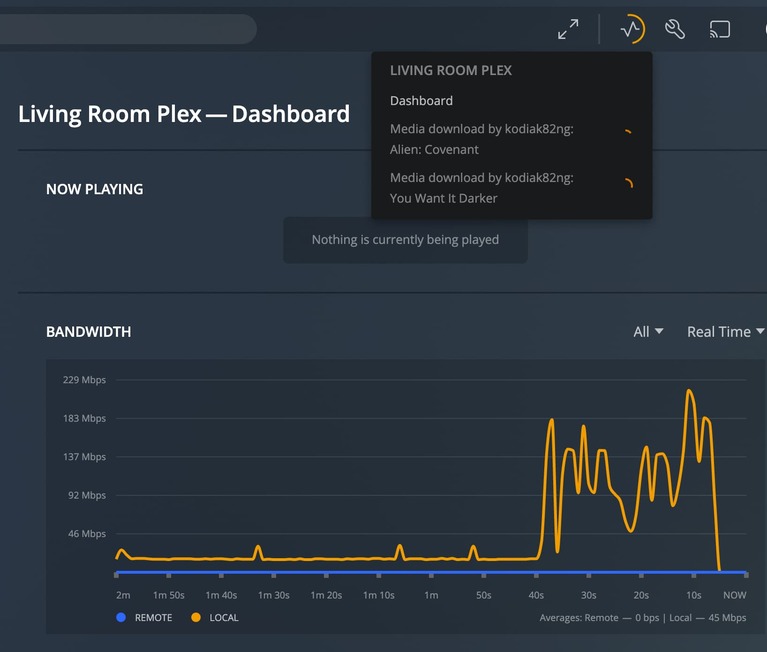
since i’m now in crunch time to finish packing and getting ready to travel, i decided to trim back to just movies on my tablet and burn some of my internal storage space on my Pixel 6 for music. downloads to my Pixel 6 (with the beta) go along quite well until i started the movie downloads to my tablet at the same time. when i started the movie downloads to my tablet it cut the transfer rate out of my PMS server from 160-200Mbps down to 18-20Mbps and stalled the Music download to my Pixel 6. at some point the downloads to my Pixel 6 ramped back up again and then gets throttled again. below is a capture of the ramp up - the plateau on the left is a movie download to my tablet, the higher rate on the right is when my Pixel 6 starts transferring tracks again.
one thing i notice now that i’m downloading movies to the tablet with external storage: it is constantly downloading at about 18Mbps without any breaks; it doesn’t appear to need to take a break to write to the external storage as i had supposed was happening for music. so, a couple of observations:
music downloads could really get much faster if there wasn’t the break between tracks.
the fact Plex can download from my server at 160-200Mbps for the internal storage on my Pixel 6 shows there is some kind of artificial limiter going on to keep the external storage transfers slow. it would seem there is a lot of room for improvement here.
even the Music downloads to internal storage on my Pixel 6 get stalled at some point and they have to wait to get going again. that wait doesn’t seem to have any rhyme or reason.
there seems to be a resource limiter somewhere (either on the client or server) that is keeping both of my devices from utilizing full bandwidth and available resources.
currently the Movie playlist download to my tablet and external storage is moving along steadily at about 18Mbps. hopefully that continues through the full playlist.
the download display (seen on both the Pixel 6 using internal storage and the Tab 5e to external storage) seems to indicate the download process dies and restarts at some point in long download sessions. for example, on the Pixel 6 i am watching right now started with a playlist download of ~1150 tracks and went through a couple of episodes of high download rate/stalled/high rate/stall and then the display changed to “Downloading 1/828 – 7.52GB” and it is stuck there now for 15-20m. this is where i long for a “pause” and “restart” button to kick it again. there doesn’t seem to be any way to get it going again short of completely rebooting the phone; stopping the plex app doesn’t appear to do anything since the download notification never goes away and entering the Plex app doesn’t have any effect.
i’m focused on getting ready for travel right now so may not have much more to report in the short term. hopefully i can get through the downloads before i leave. hopefully this long diatribe is useful to the devs.
Giving it a try on my Motorola One 5g Ace, and I’m definitely not getting the speeds I had before with sync. It’s a bit snappier than before the beta, but still fairly slow with the waiting time in between each song on an album. I’m getting the same results again as @kodiak82ng. Here’s my log: Plex Media Server Logs_2021-12-16_20-58-07.zip (4.0 MB)
My Beta version won’t download anything now. Just gets stuck in the “waiting to download” SD or internal. Went back to the public version and it worked straight away.
one more quick update on the “keep screen on” issue: downloading movies does not have this issue - my tablet continued chugging away on the movie downloads overnight without stopping. so, at least for my experience, this appears to happen during Music downloads where there are multiple smaller items and some delay between items. the movie downloads do not appear to have a long delay between titles but i haven’t caught the change to inspect for sure.
Downloads doesn’t support casting so when you do this it is streaming from your server not the local copy on your device. That’s why it works properly.
Yes, this has been clearly documented. It’s one of the core features which I use the most with sync, the ability to be able to cast content from my iPad to any Chromecast enabled device while on the go. If we may please add that to the listing above, the way I understand it, it’s something that is on the roadmap for re-implementation.
Is there any update on this. I still haven’t had any feedback on my latest logs from weeks ago and the Sync feature is due to be turned off in January when there are still no fixes for significant issues and the DNS Rebinding issue is still not fixed in the client (instead of making people who are willing to change their networks, do so.)
At what point is the turning off of Sync delayed to enable customers to continue using the service they pay for?