Hello Sir…My Plex Username is The Grover Family. I am not overly tech savvy when it comes to the distinct advanced details of Plex itself, but I would consider myself intermediate when it comes to understanding most computer/software related ideas and terms.
I am experiencing the same problem as this gentleman did after upgrading to the newest update of Plex. My plex.app crashes within about 5-10 seconds of starting up and I need that fixed so that I can use that app. Thanks for your help. What will you need from me? Every moment that it doesn’t work is a moment that I can’t be successful in using the app. Thank you for your help I appreciate it very much.
Respecrtfully,
Jared
1 Like
I presume this is on the Mac where you are currently running 1.19.4.2935-79E214EAD but trying to update to the latest public release 1.19.5.3112-B23AB3896 ?
I cannot see any evidence of any shared servers with custom server access url / domain - so it would not be the same issue that was investigated in this forum thread
Could you make sure debug logging is enabled on the server see
https://support.plex.tv/articles/201643703-reporting-issues-with-plex-media-server/
and then go through the upgrade to the new version and when it crashes - revert back to the older version and capture the server logs zip and attach here
https://support.plex.tv/articles/200250417-plex-media-server-log-files/
Also could you see if there are any crash diagnostic reports related to plex captured by Mac OS - see folders
~/Library/Logs/CrashReporter/
~/Library/Logs/DiagnosticReports/
Hello Sir. Thanks for your reply. I will send you a private message to discuss this further. Thank you.
Thanks for your message. I will respond here because support is through the forum.
There is confusion here because the forum topic you posted in, is about the Plex Media Server crashing, but from the diagnostic reports list screenshot on Mac OS that you sent me, what is crashing appears to be the plex client app - the Plex for Mac app and not the Plex Media Server

Would need diagnostics from the Plex app - having server diagnostics could be beneficial
I will move the posts to a new forum thread as it is not related to this topic.
For the Plex for Mac app crashes - i would need the logs from the Plex for Mac app plus the zipped crash reports from the DiagnosticReports folder - ones that correspond to the logs that you will capture from the app
The logs from this app would be here
~/Library/Logs/Plex/
Please see this support article
https://support.plex.tv/articles/windows-mac-app-logs/
and server logs as before
Ok.SOrry about that. Unfortunately the plex for mac app is the issue. It won’t stay open for more than 5 seconds. Could you please send specific detail how I would get you the both the zipped files that you are asking for as well as how to get the diagnostic logs please? I’m a bit of a beginner when it comes to the intricate detail of the Plex back info, so thank you for your clarity and patience. I really want to get this app working tonight if possible. I have tried to delete it and then reinstall it, but after doing that it still closes almost a few seconds into starting and opening up.
Plex.log (92.1 KB)
I look forward to hearing back from you. Thank you. Will I hear from you this evening? Thanks.
If you are available I can communicate back and forth with you quickly here tonight? The forums are a little bit slow in terms of hoping to be able to use a working plex app tonight. Much appreciated.
Thanks,
Jared
@The-Grover-Family I moved the posts to this new topic
Could you copy out the last few diagnostic reports that you found here
And zip the copies and attach as compressed zip file - I need the one that goes with the Plex.log which was at 19:46 on 5th August
(I am mobile at the moment)
The log shows download attempt for The Truman Show not starting because of insufficient disk space - I do not know at this stage if disk space is related in anyway to the crash but it is an area you can look into
Plex Crash Logs.zip (179.4 KB)
Please let me know if this is enough of them or if you would like more. Thanks.
I did attempt to download The Truman Show, and strangely enough it did download the whole file. I don’t believe that storage is currently the issue. Whether or not it triggered a problem back when there were initial storage issues, I don’t know. Currently I have about 28 gigs of storage left on my MacBook…but I will be releasing more soon.
Let me know of any other questions that you may have. Thank you very much. I appreciate it.
Jared
Thanks
Can you also get me the log files you find in the folder
/Users/jaredgrover2019/Library/Application Support/Plex/Plex Media Server/Logs
Copy out the files and compress them into a zip file
(these are part of the app and are separate from the real Plex Media Server logs)
Also in the folder where you got the Plex.log from - could you copy out all the files there and zip the copies into 1 zip
the folder being
/Users/jaredgrover2019/Library/Application Support/Plex/Logs
Thanks
When did you try to launch the app last time. The disk space error I mentioned was logged at 2020-08-05T19:46:39.272
Hello Sir…could you tell me your name so that I can address you by your name instead of just sir? Thanks.
Here is the zip file of the log files in the first folder that you asked for above.
After that…the second folder that you asked for that is for the Plex app rather than the Plex Media App seems to have no logs in it. Please see the screen shot that I took. This is why remote sessions and or live chat options are better and quicker for all involved because this issue would have likely been resolved in the first day if we were able to do that.I say that with all due respect and gratefulness for your continued help. Thank you.
Can we do a live chat at least? I had been told by another person within the forum that sometimes they can do chats. I have a bit of a learning disability that sometimes translates into struggling with following and focus. If that is not an option then I will continue to speak with you here in in this manner.
What can I do next for you? Thank you Sir.
JaredPlex Media Server Logs_Grover.zip (64.5 KB)
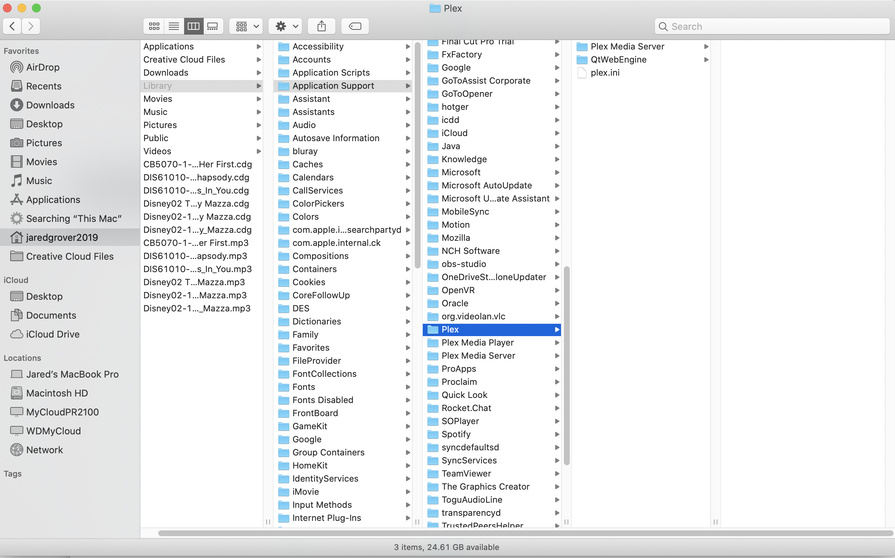
I am sorry but the forums is the way to get help
Sorry about that - it is different on a Mac. They would be here
~/Library/Logs/Plex/
Thanks for these logs. They show that before each crash we had an aborted download of the “The Truman Show” due to there being insufficient disk space. The movie appears to be massive - close to 30Gb according to the log file
Aug 05, 2020 19:46:36.934 [0x7000143bf000] WARN - Low disk space: 29.63GB source file, 233.47GB capacity, 25.07GB available on "/Users/jaredgrover2019/Library/Application Support/Plex/Plex Media Server/Sync/1/1/.grab/96315f95c93b14fe82f60ddc7788b3a953a28824-hvc65xseuza5so7j6jm9xk1k/The Truman Show (1998).mkv"
You mentioned you had about 28 Gb free - but if these movies are truely large - as being recorded in the log - then would need a lot more than that - so I suggest you do not do anymore downloads - until there is a lot more space
We could try to reset your Plex for Mac app configuration and start afresh and see if that stops the crashes
So try deleting all files and directories in this path
/Users/jaredgrover2019/Library/Application Support/Plex
and then relaunch the App and connect to your MyCloudPR2100 server
With regards to your question:
Tell me if it is possible to have only one server, but to be pulling music and photo files from one WDMycloud device and seperately my video files from my new WDPR2100 device?
You can add music and photos to the same server - the WD PR2100 but you need to find out how to make these files available to the PR2100 and what to enter as the media folder paths when creating the libraries.
Local Plex App Logs_Grover.zip (70.7 KB)
So in terms of The Truman Show, I must not have been paying attention to the file size. I am not sure how much space I can free up on my MacBook right now, so I was hoping that you could tell me how I could move my sync folder from my local drive to the PR2100 instead. Is there anyway to change the download location of the sync folder? This is where The Truman Show was downloading too when it stalled.
If I was to reset the Plex for Mac configuration, what would that entail in terms of my library currently? Is this essentially deleting the server and “restarting it” so it would have to reload and resync all of the movies in the library or is it just background changes that are happening.
The movie is already in your server on the MyCloudPR2100. Why would you need the sync download folder for the Mac to be on the MyCloudPR2100? The download feature is to allow you to have local offline copy on your Mac regardless of whether your MyCloudPR2100 server is available or not. So if you think having the file on the MyCloudPR2100 device meets your need, then this means you have no need for downloading as it is already on the MyCloudPR2100 and you can stream it from the Plex Media Server library there
This does not affect your library or server. Your server is on the WD PR2100. We are only resetting the Plex for Mac for app. What you would lose is any media that you downloaded into the app from the server - like what you were trying to do with The Truman Show. So the downloads media in the Plex for Mac app would go.
Do you need sync to the Mac ? You were suggesting earlier for the downloads sync directory be relocated to the WD PR2100.
Deleting this /Users/jaredgrover2019/Library/Application Support/Plex would purge all synced media
I know that “The Truman Show” is currently on my PR2100 device, but the whole reason for wanting to move the sync folder to the PR2100 is because I can’t fit all of the movies that I want on my Mac, so I would like everything to sync to my PR2100, that way I don’t have to worry about the space issue on my Mac. The PR2100 is in my home, in my own personal network.
Could you help me to move the sync folder to the PR2100 please? It’s all about saving space. I do a lot of other critical video work on my MacBook and can’t have my movies on the laptop. Thanks for your help.
I didn’t get your name sir. What can I call you?
I was using the sync for mac before all of this issue arose because I do most of the editing on my MacBook Plex for Mac app rather than logging into my PR2100 backend to make changes. Is that the wrong way to do it? It seemed to work…SO…when I download movies within Plex they were automatically starting the download process locally rather than on my PR2100…and because of my storage constraints I tried to download 1-2 at a time to see how it would go, but it didn’t work out.
How can I tell the Plex for Mac app to download to the PR2100 instead?
Thanks.
Sorry - I was assuming that you were downloading your own films ! Looking more closely, I can see now that you are downloading media from shared server Cobra Kai
I am afraid you cannot move the download location for the Plex for Mac app. The feature is not intended for adding to your media by downloading other users media.
The download feature is there to allow you to have offline copies of your own media on a mac or windows PC running the Plex app - so it is designed to be on that Mac or windows PC - where the Plex app runs.
Ok. Can we proceed with restoring the Plex for Mac app please and thank you?
