Server Version#: 1.16.6.1592
Player Version#: Plex 7.21.0.12323 (a3621a18) on NVidia Shield TV
Can’t play 4k direct play anymore and sometimes 1080p is even hanging and just gives a black screen. The Plex app after awhile will sometimes crash. Before this upgrade, direct play was fine even on 4k.
I am running Plex on Nvidia Shield TV and it’s hard wired, not wifi.
server logs attached, including XML of Dunkirk 4k that is one of the movies i played which showed the issue (but any 4k movie on my server has same issue).
Hey how’s it going? I’ve been taking a look through your server log.
Good job with capturing that for us.
I can see the attempt. It fails with Connection reset by peer, a player issue.
I snipped out a few things I observed:
The request:
Sep 14, 2019 13:04:59.240 [0x148f7d1e8700] DEBUG - Request: [192.168.1.64:55148 (Subnet)] GET /video/:/transcode/universal/decision?audioBoost=100&autoAdjustQuality=0&directPlay=1&directStream=1&directStreamAudio=1&fastSeek=1&hasMDE=1&location=lan&maxVideoBitrate=200000&mediaBufferSize=209664&mediaIndex=0&partIndex=0&path=%2Flibrary%2Fmetadata%2F19903&protocol=*&session=520ca39ae7732b93-com-plexapp-android&subtitleSize=100&videoBitrate=200000&videoQuality=100&videoResolution=3840x2160 (20 live) TLS GZIP Signed-in Token (tmchow)

The decision that Direct Play is okay:
Sep 14, 2019 13:04:59.248 [0x148fc4913700] DEBUG - Completed: [192.168.1.64:55148] 200 GET /video/:/transcode/universal/decision?audioBoost=100&autoAdjustQuality=0&directPlay=1&directStream=1&directStreamAudio=1&fastSeek=1&hasMDE=1&location=lan&maxVideoBitrate=200000&mediaBufferSize=209664&mediaIndex=0&partIndex=0&path=%2Flibrary%2Fmetadata%2F19903&protocol=*&session=520ca39ae7732b93-com-plexapp-android&subtitleSize=100&videoBitrate=200000&videoQuality=100&videoResolution=3840x2160 (20 live) TLS GZIP 7ms 5078 bytes (pipelined: 25)

Some content go out in Direct Play:
Sep 14, 2019 13:05:00.006 [0x148facbb4700] DEBUG - Request: [192.168.1.64:55176 (Subnet)] GET /library/parts/69659/1568263431/file.mkv?autoAdjustQuality=0&hasMDE=1&location=lan&mediaBufferSize=209664 (22 live) TLS Signed-in Token (tmchow)
Sep 14, 2019 13:05:00.010 [0x148facbb4700] DEBUG - Content-Length of /media-movies/movies-4k/Dunkirk.(2017)/Dunkirk.2017.Remux-2160p.EPSiLON.mkv is 10718 (of total: 48745148967).
Sep 14, 2019 13:05:00.011 [0x148fc4b14700] DEBUG - Completed: [192.168.1.64:55176] 206 GET /library/parts/69659/1568263431/file.mkv?autoAdjustQuality=0&hasMDE=1&location=lan&mediaBufferSize=209664 (22 live) TLS 5ms 10718 bytes (range: bytes=48745138249-)

Then the Android App on the Client cuts out:
Sep 14, 2019 13:05:00.019 [0x148fc4b14700] DEBUG - Failed to stream media, client probably disconnected after 5079040 bytes: 104 - Connection reset by peer
So If you want to get an idea of where this issue puts you,
you can search for connection reset by peer and sort by latest topic.
Previous attempts to debug it didn’t result in people uploading
the requested information, which was for their player logs in debug mode
capturing the incident.
I did a search but didn’t see anything jump out at me. Do you have a specific link or set of things I should collect/enable so this can be troubleshooted?
The video bandwidth of 200,000 for this media seems a little bit odd. I own the original 4K Dunkirk and it’s max required video bandwidth is around 120,000. Avg. video bandwidth is around 60,000.
However I’m using Unraid as well with this Plex release running in a docker container. Everythings ok here. Perhaps a restart of the client does help.
It’s also HDR. And it’s loaded with PGS subs, not SRT.
While it would be easy to blame the TV’s android app, I think there’s a lot to consider from
the 4K FAQ I linked below. I realize the OP said that it worked before. It’s definitely okay to roll the server back to one that works. That being said…
To answer you question…
The ninja asked the user for server and player logs in debug mode but didn’t get em.
The Dunkirk video is a remux rip from the Bluray (and is HDR), and came with the PGS subtitles. I don’t have those turned on and everything is indicating it shoudl be direct playing both audio and video. Here is info about the video track from mkvinfo in case it’s helpful:
| + Track number: 1 (track ID for mkvmerge & mkvextract: 0)
| + Track UID: 4466500218081524490
| + Track type: video
| + Lacing flag: 0
| + Codec ID: V_MPEGH/ISO/HEVC
| + Name: MPEG-H HEVC Video / 58221 kbps / 2160p / 23.976 fps / 16:9 / Main 10 Profile 5.1 High / 4:2:0 / 10 bits / HDR / BT.2020
| + Video track
| + Pixel width: 3840
| + Pixel height: 2160
| + Display width: 3840
| + Display height: 2160
| + Codec’s private data: size 140 (HEVC profile: Main 10 @L5.1)
| + Default duration: 00:00:00.041708333 (23.976 frames/fields per second for a video track)
I’ve tried that, didn’t help unfortunately
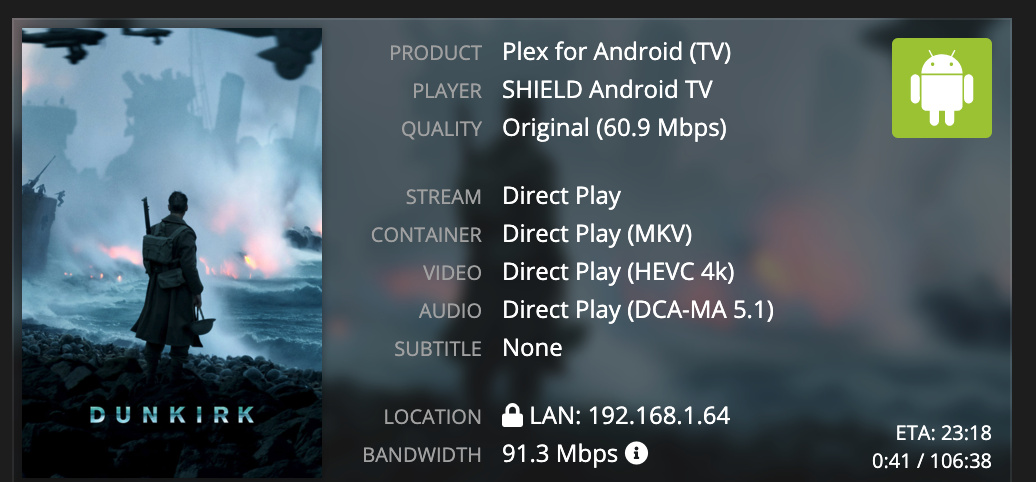
This is the info from Tautilli when I"m trying to playback:
Lastly, when it did show something on the screen, the display was all garbled as the video skipped like crazy. I’ve never seen plex do this to any type of content so totally confused as well by this:
After reading the rules of 4K, are you 100% sure that all hardware in your chain can direct play a HEVC 4K Main10@L5.1@High? That’s a pretty intense video. Let me explain.
The minimum a 4K HEVC SDR can be encoded at is Main@L5@Main (up to 100 Mb/s)
The minimum a 4K HEVC HDR can be encoded at is Main10@L5@Main (up to 100 Mb/s)
However many 4K HEVC HDR are encoded at Main10@L5.1@High (up to 160 Mb/s)
I’d like you to download jellyfish-120-mbps-4k-uhd-hevc-10bit because it is fairly close to matching your films and is Main10@L5.1@High. There is no audio and no subs to get in the way of this test.
You uploaded shield-tv-network-logging.txt which contains no attempts to play a HEVC.
It was not logging in debug mode. Every video that I read about was direct played,
but there were nearly a dozen. So I got bored.
I realize you did the following to some extent. Please let’s simplify the logs, showing a fresh restart of all hardware and then a single example of the issue.
Please put the player in debug mode. Check the article on Log Files for directions.
Please put the server in debug mode (if not already) and make a test case:
Settings - General (lower one) - Show Advanced
Check DEBUG logging (set it on)
Uncheck VERBOSE logging (set this off)
Click SAVE
Reboot the all hardware, and wait 10min.
Start Playback
Play 30 seconds or until failure
Wait 30 seconds
Settings - Troubleshooting - Download Logs
ZIP the entire folder it gives you, and attach it with your next post
My setup is PMs running in a docker container on Unraid with the Remux HDRs stored on the array. Nvidia Shield TV is hardwired via Gigabit ethernet. My soundbar is a Sonos Playbar which can’t play the formats (even DTS), and that seems to be a gotcha here in the 5th and 6th rule of 4k in that guide you linked to.
I did think that PMS would transcode the audio like other formats for non-4k video, and that audio transcode isn’t crazy for my CPU, but maybe I’m wrong? I could then convert the audio track to say AC3 and add it as an additional track in a post-processing step to the remux videos.
But even with this potential issue, doesn’t explain the video issue that you can see in the screenshot i posted at end of my last post which shows the video not even really showing correctly.
I’ll try this tonight when I’m home and report back.
No idea what happened there… sorry! I’ll re-do the logs tonight when I’m home.