This could be a feature request if nobody can point me in the right direction.
I quite like the online metadata collection in Plex - great at getting the correct titles for movies etc and saving me from having to edit file metadata directly, or rename things directly in Plex.
I also like my library to look ‘just so’ and so collect and store posters and background that fit my specific taste for my library.
I want to tell plex to prefer online metadata for everything except posters/backgrounds.
eg. if there is a ‘poster.png’ in a folder, or a ‘MovieName (####).jpeg’ in the movie library, then use that, but for everything else use thetvdb or Plex agent or whatever.
Anyone know how to achieve this?
If it’s not possible - Plex peeps can we make this the default behaviour? Obviously if a user goes to the trouble of collecting, renaming and storing artwork that can be recognised then they would like to use it as the default (similar to how offline subtitles are preferred if they exist)
Cheers. So the short answer is that what I’ve described can’t be done?
A bunch of the media I have is not replaceable w/ mkv equivalent and remuxing a few terabytes of video doesn’t sound fun…likewise manually editing tags on all the files.
Well, plex people, consider this a feature request (why is this not already possible? seems silly).
If I read you right you’d like Plex to auto-select some artwork - and you’re even willing to add the artwork. Is that correct?
I tested this a moment ago.
I have no metadata in my files to confuse things.
I have Local Media Assets DEMOTED under every tab - everywhere - in Shows and Movies.
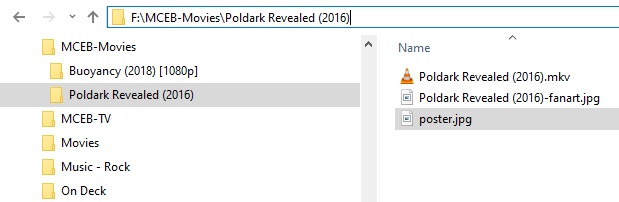
I fiddled with Poldark - 'cause it was handy. I had a poster image I just made for something else and an odd background laying around - I did this:
The Odd Background snapped right in. <-because there was no online background
The Poster did not, but it is in the selections to pick if you edit.
All the other details appeared normally, the artwork will too, but it can be changed.
The flip side is Plex will auto-select those images in that folder if LMA is in priority at the top of the list (I’m pretty sure - I mean why do that have it there by default otherwise?), but that requires your files are NOT mp4/m4v files, or do NOT have any embedded metadata - which will create a completely different brand of chaos.
Plex actually works in ‘Chaos Mode’ right out of the box.
What I’m after is: all metadata matched and taken from online sources except imagery. That’s it.
One of the great things about Plex is that it will ignore any BS metadata and match a file based on the file name, saving you the hassle of manually updating metadata yourself if it’s wrong or silly.names.GROUP.encoding.1080p.yomumma.sofat. type things.
On the flip side there would be a decent chunk of users (myself for instance) who quite like to curate the visual display of the library by gathering posters and backgrounds that work together on the screen.
I want to let Plex do the grunt work matching things as normal and updating synopsis, names, years, blah blah blah, then I want to make it pretty without manually changing the poster and background for every movie, series, episode, whatever, in my library.
Appreciate the attempts by all to resolve the issue, but it looks like something Plex would need to address at the application level.
You get exactly that by following the approach in my first response.
100% local posters / art (where you provide it)
100% online metadata for the rest (= titles, descriptions etc. + posters where you didn’t provide them)
Perhaps, but a solution that requires me to replace half my library with a different file type, or manually go through and edit the metadata out of those files types, doesn’t really serve the purpose in a user-friendly manner. If I wanted to do everything manually i could just curate my media and create a basic front-end of my own - plex is supposed to make life easier
Plex is currently previewing / testing a new agent for movie metadata. That currently includes a flag to determine if Plex will look into the embedded metadata (for supported files) or not. So you might get a more comfy solution with one of the next major updates (unless there’s some unexpected changes to that feature)