Hello, PLEX newbie here…anyone know how to create static IP and Port Fowarding on this device? help
Same issue here… plex keeps dropping remote connections consistently with this new router…
plex pass subcriber here and i am having same issue… any headway on this?
I am not trying to access remotely at the moment but I am having issues while direct playing a file if there is anyone else using the internet and nvm I get a log error for dnsmasq.
[SYS.4][SYS]possible DNS-rebind attack detected:(PMS servers ip address).abcdefghijklmnopqrstuvwxyz012345.plex.direct
Not sure if its related.
I don’t think this has anything to do with this thread’s topic.
See https://support.plex.tv/articles/206225077-how-to-use-secure-server-connections#toc-4
I’ve been running a PLEX Server for over 5 years, with NO issues… UNTIL I got this new Verizon router. My speeds over WiFi and everything else have been great, but no matter how I set this Router up, Static IPs, Turning UPnP on and Off, manual configuration of Port Forwarding, multiple reboots… I just cant seem to set it up and get it to stay.
Settings->Network
Make sure your showing Advanced settings top right hand corner
- “Preferred network interface” should show an ethernet interface and the address of the server not “Any”
- “LAN Networks” Should be your network and subnet Ex. 192.168.1.0/24
- “List of IP addresses and networks that are allowed without auth” Should be the same exact entry as #2… EX. 192.168.1.0/24
If you still have issues after the above try 4 below.
4.Check the box next to “Treat WAN IP As LAN Bandwidth”
Jeffro,
My server is 192.168.1.50. I’m not following what you mean by the /24 parts of #2 and #3. I think with the 192.168.1.0 your telling Plex ANY machine on 192.168.1.x is valid, right? But what’s the 24?
I’m also getting on, but have a problem where ALL connections are showing in Plex as Indirect even though the server says everything is just great and should be providing Full connection.
No.
/24 means 24 bits of the “network mask”
See Classless Inter-Domain Routing - Wikipedia
@JeffroDevro I’m still having problems with my remote access – it keeps going on and off. I tried your steps, and even added manual port forwarding in the g3100 settings. In the system logs for the g3100, I see the log error for dnsmasq, same as @icullus posted above.
So the /24 just means your subnet mask is 255.255.255.0 its CIDR notion that plex supports. So you have to put 192.168.1.0/24 so plex knows to treat all addresses from 192.168.1.1 to 192.168.1.254 as your private network.
So I am not sure how it looks in your router but manual port forwarding should look something like your plex server IP as the destination and the port your set up in plex which by default should be 32400 under remote settings.
If you have done the above you should only use 192.168.1.0/24 if your router uses 192.168, I have saw some comcast routers use 10. addresses. So we would need to know your local LAN subnet then you can put it in plex according to the steps above.
@JeffroDevro My router (verizon g3100) has the gateway IP address 198.168.1.1 . My Synology NAS running Plex has LAN IP address 192.168.1.242 . I have tried adding this in the Settings–>Network on Plex.
I have correctly set up port forwarding in my router, and when I manually enter it in Plex, and click “Apply”, it works. Then after a few minutes, or after refreshing that page often, it says that it is not available outside my network. When this happens, I click “retry” next to the manual port, and it fails once or twice, but then it finally works again…
In the router system log, I see a “possible DNS-rebind attack detected: <192-168-1-242..plex.direct” warning message. However, I’m not sure how to fix this…
Switch that detection off for the plex.direct domain. It is wrong.
https://support.plex.tv/articles/206225077-how-to-use-secure-server-connections/
That’s what I thought I needed to do… But how? It doesn’t seem that I can access the DNS rebinding configs with the g3100 router…
Could you perhaps use a different router?
Or install an alternative firmware?
Unfortunately it’s not my router nor my house… It seems that the router has the latest firmware from Verizon (currently 1.3.6.27).
The only other idea I could think of is to use a second router. It should be one which does have the menu item to influence the ‘DNS rebinding protection’.
The only downside to this approach is that you practically separate your own network from that of the landlord. You also have to set up the port forwarding in both routers, or remote access won’t be possible.
‘dd-wrt’ or ‘tomato’ alternative firmware is available for a lot of router models. You can get one that is compatible relatively cheap in the second hand market.
This alternative firmware provides the necessary settings.
I have a G3100 and I also had a problem setting this up, but I did figure it out.
First, in your server settings, check the box for manually setting port to 32400.
Then in the G3100 router under firewall settings and port forwarding:
- Click Advanced.
- Then select the options in the screenshot.
This should do the trick. It worked for me.
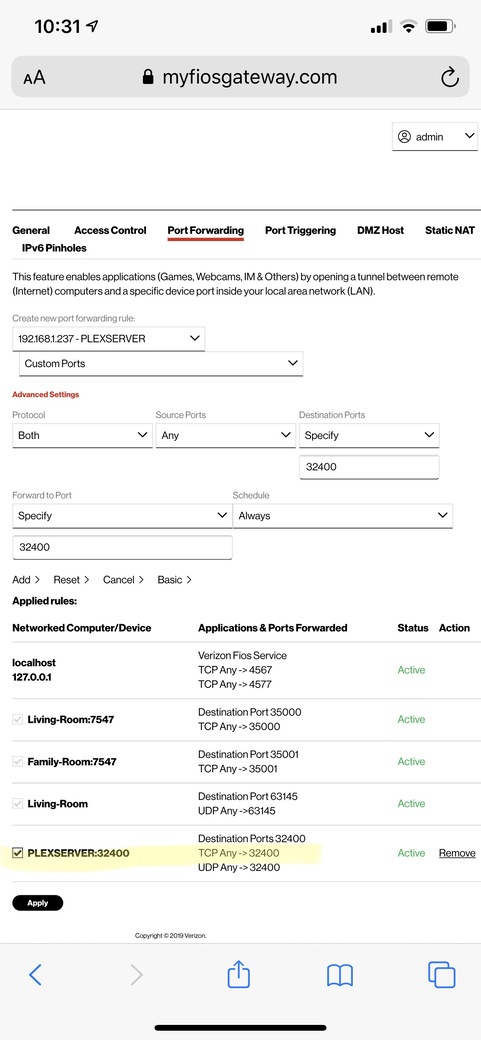
Change the protocol setting from “Both” to “TCP”.
