I have invested a lot of time building the media for my Plex server, let alone custom posters I made personally, metadata, custom collections, etc…
I host it on a NAS (WD My Cloud PR4100) 16 TB with raid, so available 8TB data storage. I currently have 7TB used for my Plex.
There are several online storage options out there today… cloud storage, VPS (Virtual Private Servers), RSS (Remote Storage System), etc… and I have searched the forums here but all discussions I have found here about current Online / VPN / RSS / Cloud Backup options are either unanswered or obsolete now in 2021 (soon to be 2022 with more changes to current options coming that will restrict options even further).
For example here were some good options in the past (with many of them offered as solutions in past threads in this forum) but now in 2020 (or 2021) have changed to the point they are not viable due to their policy or storage plan changes or price increases…
-
Goole Gsuite – I currently have been using Google GSuite with unlimited data, But they have officially announced within the last month or so that they are ending Gsuite unlimited storage for $12 a month and replacing it with multi-tiered new plans under the new renamed “Workspace” branding and that all Gsuite customers are going to be forced into (Link HERE). The problem is that to retain the unlimited data it will now cost $30 a month ($360 a year) . All other plans have caps like 2TB or 5TB. This is why I am trying to find another option as soon as possible.
-
CrashPlan – CrashPlan, even though it has had it’s challenges, it was a historical popular cloud storage option because it offers unlimited storage for only $10 a month (link HERE). The challenge with them is that within the last year they started blocking Plex Server in their backups (./Plex Media Server/.). You can see the full list of all the directories they are now blocking from backing up in the link HERE.
This has been brought up in threads in the past and Plex said they were going to reach out to CrashPlan to see if they can work with them to limit their restrictions with backing up Plex servers, but Plex never followed up. (CrashPlan Small Business BLOCKS Plex backups! - #7 by Ridley) -
Amazon – As shared in this thread, Amazon used to also offer unlimited storage, but has since stopped offering that. Now, as far as I can tell, it would be very expensive to use. (Backup all movies to amazon cloud)
-
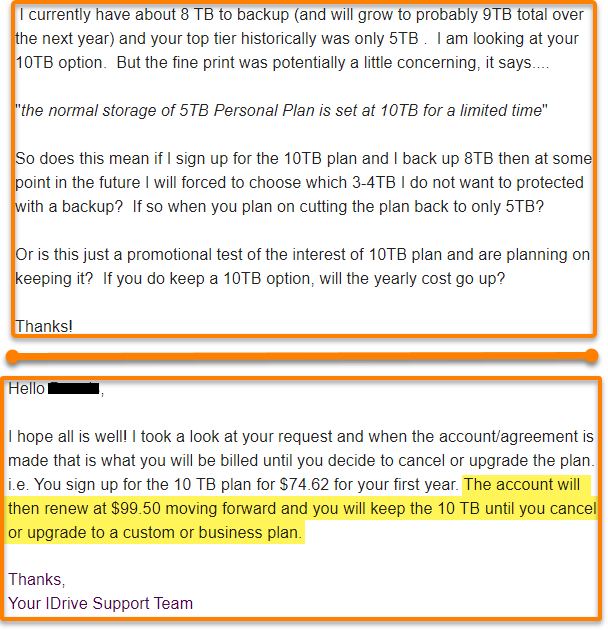
iDrive – Is a good highly rated option (and I have used them in the past). They have historically only offered a max of 5TB, so when I saw they are currently offering a 10TB option for $8.33 a month or $100 yearly after the promotional first year (link HERE) I was ready to jump on the offer…until I read the small very fine print at the bottom that said “the normal storage of 5TB Personal Plan is set at 10TB for a limited time.” I have emailed iDrive asking if I sign up and upload 8TB now will I be forced to delete 3TB from my backup in the future if it is reduced it back down to only a 5TB plan again? I will post their reply when I get it.
-
OneDrive / DropBox / Box / Sync / etc… – They may vary slightly but they are all basically the same pricing…as many of these have veered away from personal plan options and focused on business options. They say unlimited storage for only $15 a month. Sounds great until you read the fine print that says minimum of 3 users (so now it jumps to $45 a month / $450 a year). Or they say you have 10TB or 15TB which sounds great until you read the fine print and it says again minimum of 2-3 users with a storage cap of 2TB to 5TB per user.
There are several more examples of opportunities for more than 10 TB cloud storage options in the past that are no longer viable or have doubled / tripled in price making them unattractive now. This is a strange turn of events when looking at the history of technologies advances… they are usually limited and expensive when they start but become cheaper with wider options as they mature. It is just the opposite with online storage. It was cheaper with more options in the past and more expensive with less options and more restrictions as the years roll on.
So after all that…here is the question…
What options are available now in 2020 and the upcoming year of 2021 that meet the following criteria that historically has not been a problem when looking for online storage that meet these basic criteria:
- Is AFFORDABLE (like $8 to $15 a month or $80 to $100 a year)
- Have at least 10TB to Unlimited storage that
- Does NOT restrict backing up a Plex server
- Does NOT require a minimum number of users
- Does NOT restrict each user to only 1TB to 5TB storage in spite of the plan offering 15TB or more for the plan


 If you chose that iDrive holds the encryption key they can access all your data if they were ever pressed to do so by any authorized US gov agency or I guess even by some rogue employee who just wanted to snoop around, because they have the key to decrypt your data. This, believe it or not, is the standard and many times the ONLY option with many other online storage companies.
 But if you chose that YOU (client) hold the key then iDrive can never access your backup data…even if the US gov demanded that they do it or a rogue employee just wanted to explore. So since YOU create and hold the key, your data is encrypted BEFORE it is sent to iDrive and is only decrypted AFTER iDrive sends your data back to you. This is call client side or client end to end encryption (you being the client). iDrive never knows what the encryption key is.
 One last note… you have to make the decision to have iDrive control your encryption key or that YOU control the encryption key when you first set up your account. If you change your mind later about who owns the encryption key then all your data will have to deleted in order to convert to your new encryption option. So…If you decide to have iDrive control it and then realize how much more secure it would be if you owned the encryption key and change it to you controlling the encryption key they have to delete all of your backups and you have to start over backing everything up because everything has to be re-encrypted with your new key you created and now control. SO choose wisely when you first set up your iDrive account.