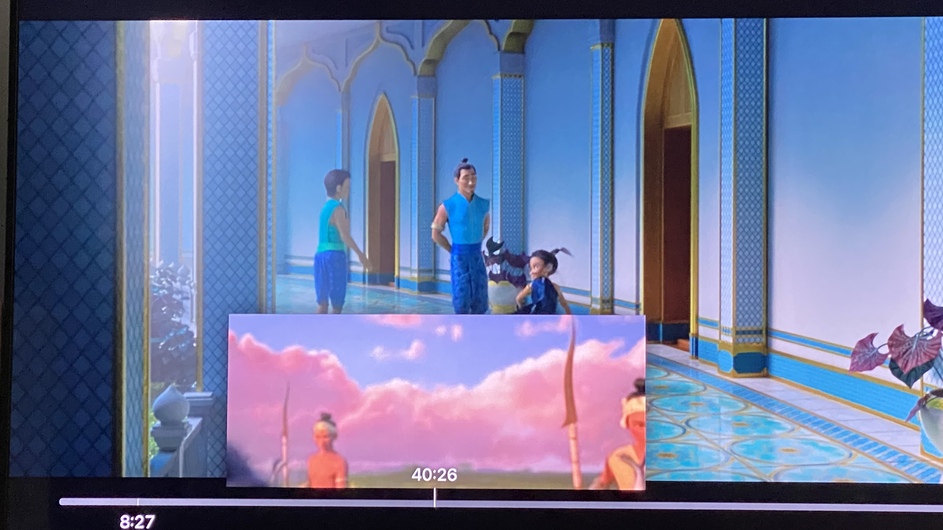
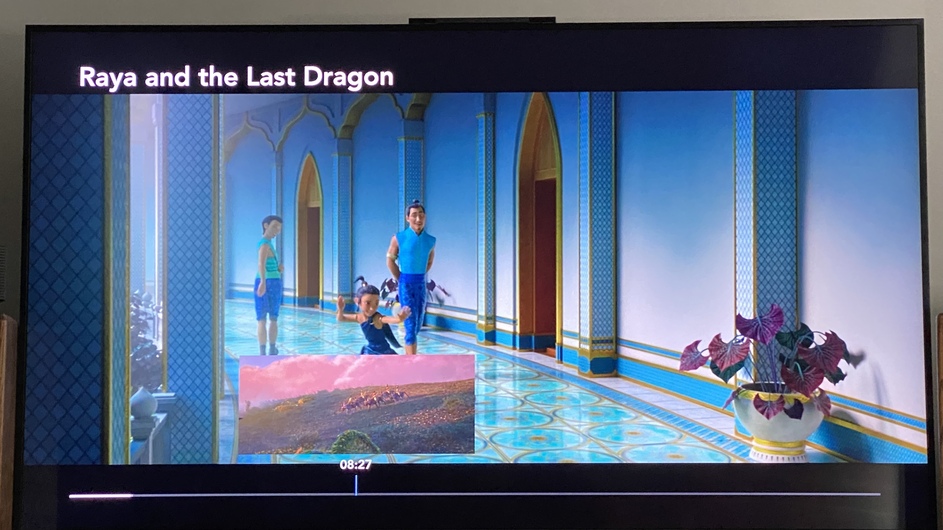
First off, the thumbnails are working.
The issue I have is that when Plex creates thumbnails for 4K movies, the thumbnails are suffering from two things.
First off, the tone mapping of the thumbnails, (or should say the lack of tone mapping) is obvious, it is washed out and dim.
The second issue is the thumbnails are huge, it needs to be reduced in size, about half of what is currently is, (which I would think would save on data storage of the Plex DB.
I turned on tone mapping as a test, (in the transcode settings) to see if that setting would affect the poor appearance of the 4K HDR thumbnails, (when Plex generates them) it didn’t, so I turned it off.
I feel that this is a cosmetic issue, as well as a possible way for Plex to reduce the Plex DB file size. Smaller thumbnails, results in less data stored.
I can’t address the tone mapping issue. I haven’t tested Video Preview Thumbnails of HDR content in a while. Did you enable Tone Mapping and add a brand new HDR show? I agree that it is a significant cosmetic issue.
Regarding the size, Video Preview Thumbnails are generated at a maximum of 320x240, regardless of source video dimensions.
Plex can be configured to make thumbnails less frequently, which reduces the space used significantly.
Sorry for not being very clear about tone mapping, to answer your question about “Did you enable Tone Mapping and add a brand new HDR show?” Yes, (turned on tone mapping and added a brand new show to Plex), it didn’t make any difference. Tone mapping for thumbnails of 4K HDR movies is not applied to the thumbnails.
Just wanted to comment again on the size of the thumbnails, they are still more than twice the size, used on any other media player. They really need to reduce the dimensions of the thumbnails to at least half The size they are currently generated at. They are way too big. They literally fill over 1/3 of the width of my 65 inch flatscreen.