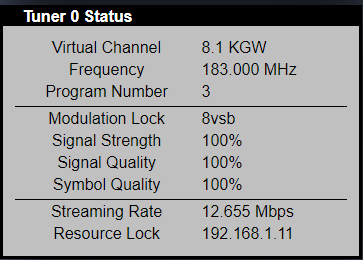
This was working properly last season (earlier in the year) but now when it tries to record a TV show it creates a .ts file of 0 length.
Linux: Ubuntu server
Here is what the logs say (Plex Media Server.log):
Oct 07, 2019 07:59:31.829 [0x7f0475ffb700] ERROR - Unable to find title for item of type 5
Oct 07, 2019 07:59:31.829 [0x7f0475ffb700] ERROR - Unable to find title for item of type 5
Oct 07, 2019 07:59:32.187 [0x7f04597fa700] ERROR - [Transcoder] [mpeg2video @ 0x22ad5c0] Invalid frame dimensions 0x0.
Oct 07, 2019 07:59:32.214 [0x7f045b7fe700] ERROR - [Transcoder] [mpeg2video @ 0x22ad5c0] Invalid frame dimensions 0x0.
Oct 07, 2019 07:59:32.348 [0x7f0409ffb700] ERROR - [Transcoder] [mpeg2video @ 0x22ad5c0] Invalid frame dimensions 0x0.
Oct 07, 2019 07:59:32.888 [0x7f0475ffb700] ERROR - Unable to find title for item of type 5
Oct 07, 2019 07:59:32.888 [0x7f0475ffb700] ERROR - Unable to find title for item of type 5
Oct 07, 2019 07:59:38.511 [0x7f04467fc700] ERROR - [Transcoder] [mpegts @ 0x7a0000] sample rate not set
Oct 07, 2019 07:59:38.512 [0x7f045b7fe700] ERROR - [Transcoder] Could not write header for output file #0 (incorrect codec parameters ?): Invalid argument
Oct 07, 2019 07:59:38.513 [0x7f040bfff700] ERROR - [Transcoder]
Oct 07, 2019 07:59:38.581 [0x7f0476ffd700] ERROR - DVR:Grabber: Failed to inspect file: Could not parse /media/hdd/plex/Reed/TV/.grab/540d87bde632993070997f657d0ce744dafe69ed/Today (1952) - S2019E218 - 10-07-2019.ts (error=-1094995529): Invalid data found when processing input
Oct 07, 2019 07:59:38.589 [0x7f04477fe700] INFO - Library section 6 (Reed’s TV) will be updated because of a change in ‘“/media/hdd/plex/Reed/TV”/Today (1952)’
Oct 07, 2019 07:59:42.149 [0x7f040b7fe700] ERROR - Couldn’t copy file “/var/lib/plexmediaserver/Library/Application Support/Plex Media Server/Metadata/TV Shows/c/e74ebf018bb0d641eca4117193d36125812f565.bundle/Uploads/posters/d30fd709058a010e16347653182def0b908fe677.jpg” to “/var/lib/plexmediaserver/Librar
y/Application Support/Plex Media Server/Metadata/TV Shows/2/b9f623f8cc321952312eec0dd6396fd1267ec52.bundle/Uploads/posters/d30fd709058a010e16347653182def0b908fe677.jpg”: File exists
Oct 07, 2019 07:59:42.238 [0x7f03edffb700] ERROR - downloadContainer: expected MediaContainer element, found html
Oct 07, 2019 07:59:42.238 [0x7f03edffb700] WARN - DVR:Subscription: No container available for /tv.plex.providers.epg.cloud:6/metadata/plex%3A%2F%2Fshow%2F5d00ded42234aa001efc6e26
Oct 07, 2019 07:59:42.238 [0x7f03eeffd700] ERROR - downloadContainer: expected MediaContainer element, found html
Oct 07, 2019 07:59:42.238 [0x7f03eeffd700] WARN - DVR:Subscription: No container available for /tv.plex.providers.epg.cloud:6/metadata/plex%3A%2F%2Fshow%2F5cffa2fbd5c642001dd54211
Oct 07, 2019 07:59:42.238 [0x7f03ee7fc700] ERROR - downloadContainer: expected MediaContainer element, found html
Oct 07, 2019 07:59:42.238 [0x7f03ee7fc700] WARN - DVR:Subscription: No container available for /tv.plex.providers.epg.cloud:6/metadata/plex%3A%2F%2Fshow%2F5d0b86d863c8ec001f46fd26
Oct 07, 2019 07:59:42.240 [0x7f03ee7fc700] ERROR - downloadContainer: expected MediaContainer element, found html
Oct 07, 2019 07:59:42.240 [0x7f03ee7fc700] WARN - DVR:Subscription: No container available for /tv.plex.providers.epg.cloud:6/metadata/plex%3A%2F%2Fshow%2F5cffa309bfcdfe001e37b0ee
Oct 07, 2019 07:59:42.240 [0x7f03eeffd700] ERROR - downloadContainer: expected MediaContainer element, found html
These are the parts that seem to be the issue. The “Invalid frame dimensions 0x0”. What could cause this?
ERROR - [Transcoder] [mpeg2video @ 0x1b525c0] Invalid frame dimensions 0x0.
ERROR - DVR:Grabber: Failed to inspect file: Could not parse /media/hdd/plex/Reed/TV/.grab/4633b6972249ea79cf1dfbcc69ac454cd71c80ed/Leave It to Beaver (1957) - S01E39 - Cat out of the Bag.ts (error=-1094995529): Invalid data found when processing input