So… is it a bug that causes only 5.1 output or an issue to detect the right name/description of the audio stream?
thats why it says that on android tv
in plexweb, if you get one of those movies doing that, right click it and click ‘Analyse’ - is it still wrong?
Still wrong after analyse
what version of PMS are you running?
Last version 1.18.2.2079
The example of @jwiechelman_gmail_com is correctly recognized as 7.1 because it does not have a 5.1 core:
Audio
ID                                       : 2
Format                                   : E-AC-3
Format/Info                              : Enhanced AC-3
Commercial name                          : Dolby Digital Plus
Format profile                           : Blu-ray Disc
Codec ID                                 : A_EAC3
Duration                                 : 15 s 104 ms
Bit rate mode                            : Constant
Bit rate                                 : 1 536 kb/s
Channel(s)                               : 8 channels
Channel layout                           : L R C LFE Ls Rs Lb Rb
Sampling rate                            : 48.0 kHz
Frame rate                               : 31.250 FPS (1536 SPF)
Compression mode                         : Lossy
Stream size                              : 2.77 MiB (3%)
Language                                 : English
Service kind                             : Complete Main
Default                                  : Yes
Forced                                   : No
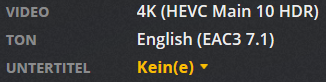
My and @TobyX his example have a 5.1 core:
Audio
ID                                       : 2
Format                                   : E-AC-3
Format/Info                              : Enhanced AC-3
Commercial name                          : Dolby Digital Plus
Format profile                           : Blu-ray Disc
Codec ID                                 : A_EAC3
Duration                                 : 30s 144 ms
Bit rate mode                            : konstant
Bit rate                                 : 1 024 kb/s
Channel(s)                               : 6 Kanäle
Channel(s)_Original                      : 8 Kanäle
ChannelLayout_Original                   : L R C LFE Ls Rs Lrs Rrs
Sampling rate                            : 48,0 kHz
Frame rate                               : 31,250 FPS (1536 SPF)
Stream size                              : 3,68 MiB (2%)
Language                                 : Deutsch
Service kind                             : Complete Main
Default                                  : Ja
Forced                                   : Nein

Audio: German / Dolby Digital Plus Audio / 7.1 / 48 kHz / 1024 kbps
(DD+ Embedded: 5.1 / 48 kHz / 576 kbps)
That’s the difference and the reason why Plex does not read and display it correctly.
So Plex has to read another place. The “Channel(s)_Original” row:
Channel(s)                               : 6 Kanäle
Channel(s)_Original                      : 8 Kanäle
@dan-the-man @Achilles
I revoked the Solution icon from this topic since I still see this issue as not fully fixed.
No stuttering but audio is not correctly detected.
Could you please reproduce this issue on your device?
I don’t have this issue but I am also running production PMS at 1.16.2.1321. 
Is this a beta? 
Btw I see that this is an older version… don’t get the clue
No it is an older stable public release that I still choose to use for my production environment.
So an old version recognizes our videos correctly as 7.1?
Then it is even easier to find the error or to solve?
All the 1.17.x / 1.18.x releases have been utter garbage. Real shame.
@KCX @Achilles @dan-the-man (it seems that you actually do not have this problem)… or someone else
Does anyone of you guys still have the problem that 7.1 is not correctly detected? In my case, Plex now plays the movie smooth.
I suspect that the remaining problem is more likely a bug relating to displaying the correct audio label (eg 7.1) rather than a fundamental problem of playing 7.1
So… in my case it seems to play 7.1 even if Plex states 5.1… this only seems to happen when you have more than one audio channel/stream. I would expect that when we only have one single stream Plex would display it correctly.
To sum up: it seems that only a small bug remained relating to the correct display in Plex even if 7.1 is currently played…?! Could someone please confirm or reject my suspects.
Yes confirm. Same here. As i discribed, Plex has to read the Original Channels. In my opinion, only a small read error can be fixed quite quickly. Then the topic EAC3 7.1 is completely done.
Same here
New Sample… M2TS File with 7.1 EAC3 - but without 5.1 core
Audio
ID                                       : 4352 (0x1100)
Menu ID                                  : 1 (0x1)
Format                                   : E-AC-3
Format/Info                              : Enhanced AC-3
Commercial name                          : Dolby Digital Plus
Format profile                           : Blu-ray Disc
Muxing mode                              : Stream extension
Codec ID                                 : 132
Duration                                 : 2 h 14 min
Bit rate mode                            : Constant
Bit rate                                 : 1 024 kb/s
Channel(s)                               : 8 channels
Channel layout                           : L R C LFE Ls Rs Lb Rb
Sampling rate                            : 48.0 kHz
Frame rate                               : 31.250 FPS (1536 SPF)
Compression mode                         : Lossy
Stream size                              : 987 MiB (2%)
Language                                 : German
Service kind                             : Complete Main
It is also read incorrectly and displayed as 5.1.

With this file it also shows it incorrectly, although there is no explicit 5.1 core. This is crazy because there is no info of 5.1 anywhere in the Media Info. MKV or M2TS makes no difference.
Sample:
Has anyone downloaded the example to their server and tested whether it is also recognized as 5.1?
I would say you open a new thread and tag it plex media server as that is where the deficiency lies.
ok I’ve already thought about that. Then I will create a new thread in the right topic shortly. I will link it here and hope for your support. I can’t really assess that, but I think the problem will be solved quickly. thx 
Have now created the extra thread in the right forum:
I would be happy if the topic EAC3 is finished. 
