Videos won’t load. Stuck loading

Hi guys.
I’ve gone through quite a few topics but still can’t seem to find an answer although it seems I’m not alone.
Hope this thread will provide a solution.

I’m a Plex Lifetime user but now, as of a few months, my Plex is almost useless.
95% of my videos won’t load. They just stay there loading and get stuck doing that.

Please let me know what logs I need to provide (and how to get them :p)

Server: DS918+
Symbology version: DSM 7.1.1-42962 Update 2

Plex server version: 1.30.0.6486-7000

Players that don’t work:

Samsung QE50Q80T (or any other Smartv)
Web Plex
Roku
iOS (iPhone and iPad)

Play that works:
AppleTV

P.s. this shouldn’t have anything to do with it but the coincidence is there. This all started happening the Plex recommended us do log out of every device due to the hack and I had a little trouble putting the server back up again on Sinology.

DEBUG server logs please which capture the start of a playback??

Followed the steps and got a zip file. Which one is it? (Sorry for the newb question)

P.s. added a he original post

Settings - Server - Trouble Shooting - Download Logs

Gives you one ZIP

Attach the ZIP please

Here it is.
Not sure if there’s a log about this because it just stays there loading. No error.

Plex Media Server Logs_2023-01-02_22-18-47.zip (4.1 MB)

@LourencoRsilva

You are experiencing the Dolby bug .

Do you still have PMS 1.29.2 for your Synology?

If you don’t , please let me know and I’ll send you the link.

The process to downgrade:

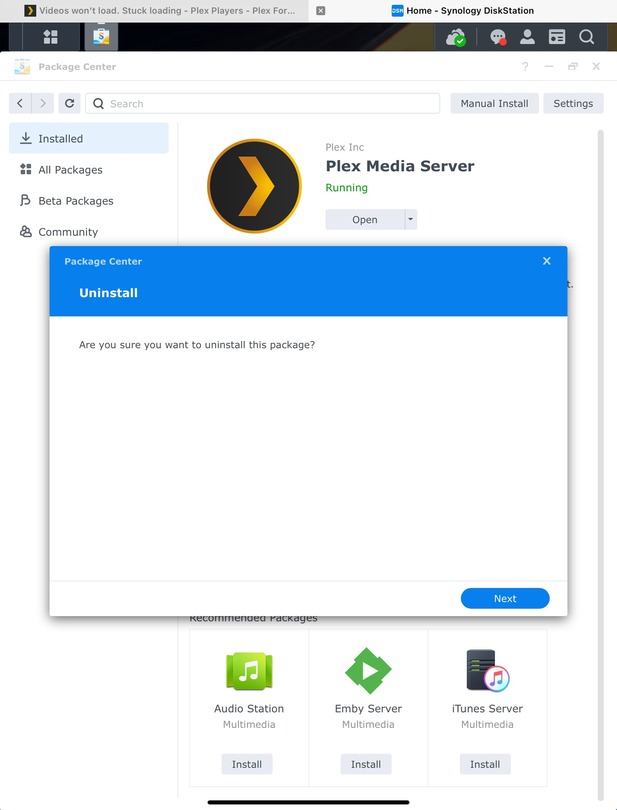
  1. Uninstall with the KEEP (first radio button) option
  2. Install 1.29.2 - Normal option
  3. Allow it a extra bit to readjust to 1.29.2 (watch the CPU activity)

Won’t that keep me from having access to all the new features from now on?

What’s that radio button you mentioned?
(I’m guessing you’re giving the process of not loosing all my data, preferences etc)

When we downgrade, Synology requires us to uninstall first.

Knowing this, I wrote the package scripts to NOT delete anything unless you tell it to.

It is 100% safe to “Uninstall w/ KEEP” option. This is by design.
All the server information & metadata is left in place – right where it belongs.

When you install the lower version, it sees the existing server data and uses it automatically.

Where’s that “keep” option? After I hit uninstall? (1st picture I sent)

And could you send me that link with the previous version please?

the first line – “Uninstall Only. Keep all data for future installation”

It is the default.

we call it the KEEP option.

Perfect. Already saw it.

Could you please send me the link for that 1.29 version you mentioned?

Plus,
What does this mean now? Will I be restricted of the new features?

Will I ever be able to upgrade to a newer version?

Yes, you’ll always be able to upgrade.

I’ve suggested backing down to 1.29.2 because it’s the last stable before the Dolby bug.

I’ve already tested the fix for the bug. Engineering and QA are working on releasing it now

PS: Check your PM

ChuckPa,
thank you so much!

(Finally) Working perfectly now.

How will I know I can update the server again?

@LourencoRsilva

Keep an eye here (and below):

watch for Engineering to announce.

Hi guys,

is it safe for me to update already?

I’d like to try to new skip feature

Hi guys,

sorry for the bump but just wanted to double check before updating,

May I see your current DEBUG logs ZIP which captures it getting stuck?

Hi.

Since your help it started working. The thing is that you said I should keep an eye for future updates for a version that had that bug you found fixed.

But I have no idea what to look for and know for sure if these new releases are already “safe” for me to update

PMS 1.31.2.6810 contains several bug fixes.

PlexPass (1.31.3.6868) contains several fixes for Credit Detection (cleaning up properly is the big one)

Choice is yours. I’d start with 131.2.6810 and see how it works for you – knowing – credit detection cleanup should be monitored and TMP probably needs clean up by hand

My issue is knowing if the “Dolby bug” you detected on my last server version has been corrected since PMS 1.29.2 (the one you said for me to install)