Server Version#: 1.19.1.2645
Player Version#:Version 1.6.5.1097-3bb9dc68
DMS Version#: 6.2.2.24922
HD HomeRun Quattro
Newly installed Plex on Synology DS 218+ has an annoying stop then start in live TV broadcasts every two seconds (two seconds playing, followed by two seconds of freeze) on all HD stations. It does not act up on any SD channels. I do not see the twirling circle that plagued me when I had Plex on my PC. Did I leave out a step in the configuration process that could fix this? (Hardware acceleration?)
When using HD HomeRun app there is absolutely no issue in live TV HD or Otherwise.
I’ve got the same issue on my qnap nas. Tried doing the thing where people were recommending deleting some video driver that was causing issues.
I’ve tried plex versions 1.17 through to 1.19 and nothing works. At one point all of this worked. I’m not sure at this point if this is a NAS software update that broke things or a Plex issue.
I am adding just a little bit more information. It just went from bad to worse. Now I can not view live TV at all. When I click on a channel I get the message “playback error, source is unavailable”. I went to the only source of live TV that I know of, and deleted the DVR. Then I created a new DVR, which includes a channel scan. It completes successfully and the DVR appears with an electronic program guide. It still will not view live TV. The same error appears. How do I troubleshoot this?
I need log files please to determine what’s happening.
- Verify DEBUG logging enabled, VERBOSE logging disabled (off)
- Start Playback - recreating the problem
- Play just long enough to recreate
- Stop Playback
- Wait 30 seconds for logs to flush to disk
- Settings - Server - Troubleshooting - Download Logs
- Attach the ZIP file
You have a few issues here.
- It’s not finding the hardware.
You have hardware assist on this NAS.
Settings - Server - Transcoder - Show Advanced - Use Hardware Acceleration when available
- attempting to transcode MPEG2 to H264
Apr 24, 2020 12:37:26.252 [0x7fbef0b21700] DEBUG - Audio Stream: -1, Subtitle Stream: -1
Apr 24, 2020 12:37:26.253 [0x7fbef0b21700] DEBUG - MDE: Selected protocol hls; container: mpegts
Apr 24, 2020 12:37:26.253 [0x7fbef0b21700] ERROR - Unable to find title for item of type 5
Apr 24, 2020 12:37:26.253 [0x7fbef0b21700] DEBUG - MDE: analyzing media item -1
Apr 24, 2020 12:37:26.253 [0x7fbef0b21700] DEBUG - MDE: : no direct play video profile exists for http/mpegts/
Apr 24, 2020 12:37:26.253 [0x7fbef0b21700] DEBUG - MDE: : no direct play video profile exists for http/mpegts//
Apr 24, 2020 12:37:26.253 [0x7fbef0b21700] DEBUG - MDE: : selected subtitle stream  has no codec
Apr 24, 2020 12:37:26.254 [0x7fbef0b21700] DEBUG - MDE: : codec is unavailable for analysis
Apr 24, 2020 12:37:26.254 [0x7fbef0b21700] DEBUG - MDE: : codec is unavailable for analysis
Apr 24, 2020 12:37:26.254 [0x7fbef0b21700] ERROR - Unable to find title for item of type 5
Apr 24, 2020 12:37:26.254 [0x7fbef0b21700] DEBUG - MDE: : selected media 0 / -1
Apr 24, 2020 12:37:26.254 [0x7fbef0b21700] DEBUG - Cleaning directory for session cad99c45-9ed5-4816-a551-c2cdef570b46 ()
Apr 24, 2020 12:37:26.254 [0x7fbef0b21700] DEBUG - Starting a transcode session cad99c45-9ed5-4816-a551-c2cdef570b46 at offset -1.0 (state=3)
Apr 24, 2020 12:37:26.254 [0x7fbef0b21700] DEBUG - Streaming Resource: Added session 0x7fbeb002fad0:cad99c45-9ed5-4816-a551-c2cdef570b46
Apr 24, 2020 12:37:26.254 [0x7fbef0b21700] DEBUG - TPU: hardware transcoding: enabled, but no hardware decode accelerator found
Apr 24, 2020 12:37:26.255 [0x7fbef0b21700] DEBUG - TPU: hardware transcoding: final decoder: , final encoder:
Apr 24, 2020 12:37:26.256 [0x7fbef0b21700] DEBUG - Job running: EAE_ROOT='/volume1/Plex/tmp_transcoding/pms-9d2aba8f-581a-4358-99e8-95387d49367a/EasyAudioEncoder' FFMPEG_EXTERNAL_LIBS='/volume1/Plex/Library/Application\ Support/Plex\ Media\ Server/Codecs/99c90e0-3095-linux-x86_64/' XDG_CACHE_HOME='/volume1/Plex/Library/Application Support/Plex Media Server/Cache' XDG_DATA_HOME='/volume1/@appstore/Plex Media Server/Resources' X_PLEX_TOKEN='xxxxxxxxxxxxxxxxxxxx' '/volume1/@appstore/Plex Media Server/Plex Transcoder' '-noaccurate_seek' '-ignore_unknown' '-scan_all_pmts' '-1' '-rw_timeout' '30000000' '-reconnect' '1' '-reconnect_streamed' '1' '-reconnect_delay_max' '30' '-fflags' '+discardcorruptts+fillwallclockdts' '-probesize' '20000000' '-i' 'http://192.168.1.126:5004/auto/v4.1' '-map' '0:V?' '-codec:V' 'copy' '-map' '0:a?' '-codec:a' 'copy' '-map' '0:s?' '-codec:s' 'copy' '-break_non_keyframes' '1' '-segment_format' 'mpegts' '-f' 'ssegment' '-individual_header_trailer' '0' '-segment_time' '1' '-segment_start_number' '0' '-segment_time_delta' '0.25' '-segment_list' 'http://127.0.0.1:32400/video/:/transcode/session/cad99c45-9ed5-4816-a551-c2cdef570b46/990a0b87-35e7-49c0-859a-39d2adde520c/seglist?X-Plex-Http-Pipeline=infinite' '-segment_list_type' 'csv' '-segment_list_size' '5' '-segment_list_separate_stream_times' '1' '-segment_list_unfinished' '1' '-max_delay' '5000000' '-map_metadata' '-1' '-map_chapters' '-1' 'media-%05d.ts' '-y' '-nostats' '-loglevel' 'quiet' '-loglevel_plex' 'error' '-xioerror' '-progressurl' 'http://127.0.0.1:32400/video/:/transcode/session/cad99c45-9ed5-4816-a551-c2cdef570b46/990a0b87-35e7-49c0-859a-39d2adde520c/progress'
Apr 24, 2020 12:37:26.257 [0x7fbef0b21700] DEBUG - Jobs: Starting child process with pid 22970
Apr 24, 2020 12:37:26.261 [0x7fbecae6b700] DEBUG - Request: [127.0.0.1:58952 (Loopback)] PUT /video/:/transcode/session/cad99c45-9ed5-4816-a551-c2cdef570b46/990a0b87-35e7-49c0-859a-39d2adde520c/progress?status=startup (11 live) Signed-in Token (Tuckerworks) (range: bytes=0-)
- It finds invalid video info in the MPEG2
Apr 24, 2020 12:37:26.986 [0x7fbef2e98700] DEBUG - Completed: [127.0.0.1:58952] 200 PUT /video/:/transcode/session/cad99c45-9ed5-4816-a551-c2cdef570b46/990a0b87-35e7-49c0-859a-39d2adde520c/progress/stream?index=2&id=53&codec=ac3&type=audio (11 live) 0ms 195 bytes (pipelined: 7) (range: bytes=0-)
Apr 24, 2020 12:37:27.044 [0x7fbef1cb5700] ERROR - [Transcoder] [mpeg2video @ 0x9f0380] Invalid frame dimensions 0x0.
Apr 24, 2020 12:37:27.064 [0x7fbecae6b700] ERROR - [Transcoder] [mpeg2video @ 0x9f0380] Invalid frame dimensions 0x0.
Apr 24, 2020 12:37:27.065 [0x7fbecab7d700] ERROR - [Transcoder] [mpeg2video @ 0x9f0380] Invalid frame dimensions 0x0.
Apr 24, 2020 12:37:27.065 [0x7fbef0545700] ERROR - [Transcoder] [mpeg2video @ 0x9f0380] Invalid frame dimensions 0x0.
Apr 24, 2020 12:37:27.124 [0x7fbef1cb5700] ERROR - [Transcoder] [mpeg2video @ 0x9f0380] Invalid frame dimensions 0x0.
Apr 24, 2020 12:37:27.125 [0x7fbecae6b700] ERROR - [Transcoder] [mpeg2video @ 0x9f0380] Invalid frame dimensions 0x0.
Apr 24, 2020 12:37:27.125 [0x7fbecab7d700] ERROR - [Transcoder] [mpeg2video @ 0x9f0380] Invalid frame dimensions 0x0.
Apr 24, 2020 12:37:27.184 [0x7fbef0545700] ERROR - [Transcoder] [mpeg2video @ 0x9f0380] Invalid frame dimensions 0x0.
Apr 24, 2020 12:37:27.184 [0x7fbef1cb5700] ERROR - [Transcoder] [mpeg2video @ 0x9f0380] Invalid frame dimensions 0x0.
Apr 24, 2020 12:37:27.185 [0x7fbecae6b700] ERROR - [Transcoder] [mpeg2video @ 0x9f0380] Invalid frame dimensions 0x0.
Apr 24, 2020 12:37:27.223 [0x7fbecab7d700] ERROR - [Transcoder] [mpeg2video @ 0x9f0380] Invalid frame dimensions 0x0.
Apr 24, 2020 12:37:27.224 [0x7fbef0545700] ERROR - [Transcoder] [mpeg2video @ 0x9f0380] Invalid frame dimensions 0x0.
Apr 24, 2020 12:37:27.224 [0x7fbef1cb5700] ERROR - [Transcoder] [mpeg2video @ 0x9f0380] Invalid frame dimensions 0x0.
Apr 24, 2020 12:37:27.283 [0x7fbecae6b700] ERROR - [Transcoder] [mpeg2video @ 0x9f0380] Invalid frame dimensions 0x0.
Apr 24, 2020 12:37:27.284 [0x7fbecab7d700] ERROR - [Transcoder] [mpeg2video @ 0x9f0380] Invalid frame dimensions 0x0.
Apr 24, 2020 12:37:27.284 [0x7fbef0545700] ERROR - [Transcoder] [mpeg2video @ 0x9f0380] Invalid frame dimensions 0x0.
Apr 24, 2020 12:37:27.421 [0x7fbef1cb5700] ERROR - [Transcoder] [mpeg2video @ 0x9f0380] Invalid frame dimensions 0x0.
Apr 24, 2020 12:37:27.462 [0x7fbecae6b700] DEBUG - Request: [127.0.0.1:58952 (Loopback)] PUT /video/:/transcode/session/cad99c45-9ed5-4816-a551-c2cdef570b46/990a0b87-35e7-49c0-859a-39d2adde520c/progress/streamDetail
I would like you to Toggle the Hardware OFF
Save it
Go back
Enable it
Save again
Now, I would like you to reinstall PMS itself.
You won’t lose your data.
It will reset the permissions on the hardware.
What I see here is common when DSM updates.
Thanks for replying. I just did what you suggested, it did not fix it. Unless DSM updated itself, I have not done so since I installed the latest one when I set up this NAS less than a month ago. Just to be clear, I DID just update the PMS. included are the logs of the recent failure.
Would you please do the following:
- Stop Plex
- Open the Plex share in File Station
a. give yourself permission in the Control Panel - Shared Folder) if you need to - Navigate Library / Application Support / Plex Media Server / Codecs
- Now, rummaging around (the name on your system will be unique to you)…
- In one of those folders, you’ll see MPEG2 decoder.
- Delete the MPEG2 codec(s) - there should be only 1
Now restart Plex and attempt to play again.
OK, I did that. The file was “libmpg2video_decoder.so”. I restarted Plex and tried again, no luck
Is it only this MPEG2 or does it impact everything?
I am not sure that I know enough about codecs to fully understand the question. If MPEG2 is only live TV, then that appears to be the case. I checked to see if it impacts everything by trying to replay music, which it does well (FLAC recordings), and TV programs that I had previously recorded on Plex from OTA TV broadcasts, which it also did well. Where it failed was in trying to playback TV recordings that I had recorded in HD HomeRun DVR. But I can not say that I had ever tried to replay one of those because I just used HD HomeRun’s app to view HD HomeRun programs. When I tried that I got the error message “this server is not powerful enough to convert video”. It is a Synology DS 218+ which I got specifically to do Plex due to its supposedly powerful Intel Celeron processor. Remember, we have deleted the MPEG2 codec and I have not replaced it as far as I know.
When I was able to play live TV even with two second pauses, I tried all the various bit rates, including original, and it did not seem to make any difference. Just so I understand, if something is played at “Original” on a Windows PC, no transcoding is required, is it?
Thank you for your help,
Steve
Update. Even though it still says that the source is unavailable, I tried recording a program. To my surprise, it turned out good. I do not know how it can do that without a source, but it did. Still can not view live TV.
Regarding your question “Is it only this MPEG2 or does it impact everything?” did I cover what you were looking for?
I have gone over all my settings with Synology engineers and we have disabled server support for IPv6, specified a preferred network interface and changed to static IP settings. They indicated that everything else looks OK. I am still having difficulties. I can still not see live TV and I can not do anything with my iPad.
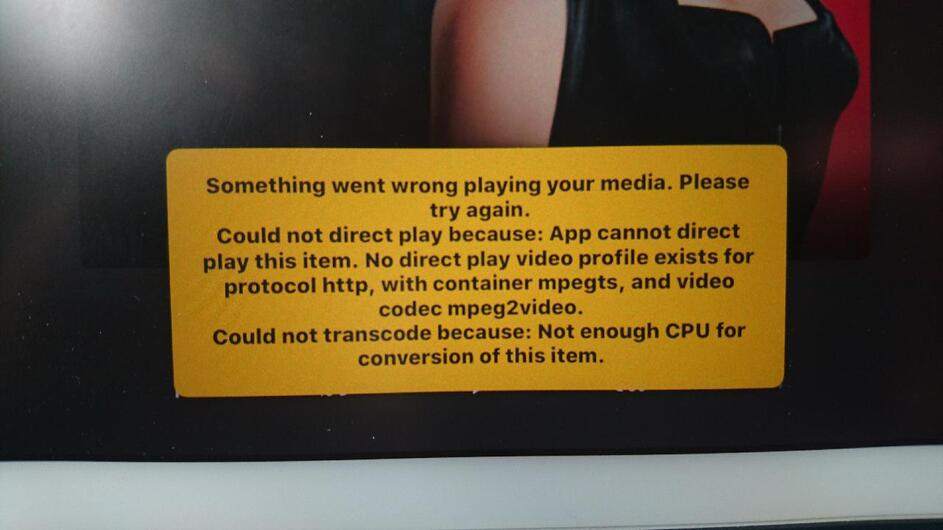
The DS 218+ is in your list of compatible NAS’s as being able to do all of this. Please help me get things configured properly
I’m sorry for the delay. Between personal life and here, I’ve been overwhelmed.
Your logs indicate subtitles being used.
Your logs state HW transcoding is enabled but it’s not found.
The screenshot you provided, with the error message, looks like it’s covering subtitle text which the logs indicate are present. Are subtitles being used?
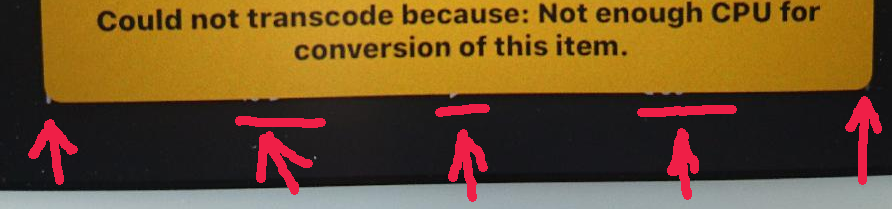
If subtitles (which logs state there are) are being used then we the root cause has been found.
Synology’s one weakness if subtitles. Subtitles must be transcoded by the CPU, not the hardware (there is no hardware boost for subtitles yet from Intel) .
As seen above, the logs indicate it doesn’t know which type of subtitles are being used. This adds extra burden on the transcoder (and CPU)
Apr 24, 2020 17:49:23.789 [0x7f6ed4f8b700] ERROR - Unable to find title for item of type 5
Apr 24, 2020 17:49:23.789 [0x7f6ed4f8b700] DEBUG - MDE: analyzing media item -1
Apr 24, 2020 17:49:23.790 [0x7f6ed4f8b700] DEBUG - MDE: : no direct play video profile exists for http/mpegts/
Apr 24, 2020 17:49:23.790 [0x7f6ed4f8b700] DEBUG - MDE: : no direct play video profile exists for http/mpegts//
Apr 24, 2020 17:49:23.790 [0x7f6ed4f8b700] DEBUG - MDE: : selected subtitle stream  has no codec
Apr 24, 2020 17:49:23.790 [0x7f6ed4f8b700] DEBUG - MDE: : codec is unavailable for analysis
Apr 24, 2020 17:49:23.790 [0x7f6ed4f8b700] DEBUG - MDE: : codec is unavailable for analysis
Apr 24, 2020 17:49:23.790 [0x7f6ed4f8b700] ERROR - Unable to find title for item of type 5
Apr 24, 2020 17:49:23.790 [0x7f6ed4f8b700] DEBUG - MDE: : selected media 0 / -1
Apr 24, 2020 17:49:23.790 [0x7f6ed4f8b700] DEBUG - Cleaning directory for session da831beb-2bcd-42da-8367-627025c7761f ()
Apr 24, 2020 17:49:23.790 [0x7f6ed4f8b700] DEBUG - Starting a transcode session da831beb-2bcd-42da-8367-627025c7761f at offset -1.0 (state=3)
Apr 24, 2020 17:49:23.790 [0x7f6ed4f8b700] DEBUG - Streaming Resource: Added session 0x7f6ec00e0b30:da831beb-2bcd-42da-8367-627025c7761f
Apr 24, 2020 17:49:23.790 [0x7f6ed4f8b700] DEBUG - TPU: hardware transcoding: enabled, but no hardware decode accelerator found
Apr 24, 2020 17:49:23.790 [0x7f6ed4f8b700] DEBUG - TPU: hardware transcoding: final decoder: , final encoder:
Apr 24, 2020 17:49:23.791 [0x7f6ed4f8b700] DEBUG - Job running: EAE_ROOT='/volume1/Plex/tmp_transcoding/pms-d4e18372-b070-401d-a3c8-6caadd3fd824/EasyAudioEncoder' FFMPEG_EXTERNAL_LIBS='/volume1/Plex/Library/Application\ Support/Plex\ Media\ Server/Codecs/99c90e0-3095-linux-x86_64/' XDG_CACHE_HOME='/volume1/Plex/Library/Application Support/Plex Media Server/Cache' XDG_DATA_HOME='/volume1/@appstore/Plex Media Server/Resources' X_PLEX_TOKEN='xxxxxxxxxxxxxxxxxxxx' '/volume1/@appstore/Plex Media Server/Plex Transcoder' '-noaccurate_seek' '-ignore_unknown' '-scan_all_pmts' '-1' '-rw_timeout' '30000000' '-reconnect' '1' '-reconnect_streamed' '1' '-reconnect_delay_max' '30' '-fflags' '+discardcorruptts+fillwallclockdts' '-probesize' '20000000' '-i' 'http://192.168.1.126:5004/auto/v4.1' '-map' '0:V?' '-codec:V' 'copy' '-map' '0:a?' '-codec:a' 'copy' '-map' '0:s?' '-codec:s' 'copy' '-break_non_keyframes' '1' '-segment_format' 'mpegts' '-f' 'ssegment' '-individual_header_trailer' '0' '-segment_time' '1' '-segment_start_number' '0' '-segment_time_delta' '0.25' '-segment_list' 'http://127.0.0.1:32400/video/:/transcode/session/da831beb-2bcd-42da-8367-627025c7761f/1e4fb0e1-6382-477c-9d92-da06762cc80e/seglist?X-Plex-Http-Pipeline=infinite' '-segment_list_type' 'csv' '-segment_list_size' '5' '-segment_list_separate_stream_times' '1' '-segment_list_unfinished' '1' '-max_delay' '5000000' '-map_metadata' '-1' '-map_chapters' '-1' 'media-%05d.ts' '-y' '-nostats' '-loglevel' 'quiet' '-loglevel_plex' 'error' '-xioerror' '-progressurl' 'http://127.0.0.1:32400/video/:/transcode/session/da831beb-2bcd-42da-8367-627025c7761f/1e4fb0e1-6382-477c-9d92-da06762cc80e/progress'
Apr 24, 2020 17:49:23.792 [0x7f6ed4f8b700] DEBUG - Jobs: Starting child process with pid 26005
To do this,
- Stop Plex
- Uninstall the package
- Install the package
- Allow it to start again
When installing, the installation script confirms DSM permissions are correct to allow user plex to use the hardware when present.
Thanks for returning. We all need the weekend off.
I stopped Plex, uninstalled it, downloaded the new version and installed it. In the web player, live TV is the same as before. However, now I can not play downloaded TV. (I could before). When I click on a program that I have recorded I get the error message “this server is not powerful enough to convert video”. Interestingly, I can play recorded programs from the Plex for Windows player. I still get the “no source” error message for live TV. however.
Subtitles have always confused me. I almost always use subtitles . In the Player setting I have burn subtitles set to “Automatic”. Whenever I begin to play a recording the subtitles will not appear. I have to open the “Settings” menu that looks like equalizer sliders at the lower right, and turn OFF the item that invariably reads "Unknown(Closed Captions). When this is turned off, there are still no closed captions. But when I open it again and turn them back on, usually they will appear. When they will not reappear, I simply play the Plex recording in another player, James River Media Center. The Closed Captions always work in that player, which leads me to believe that closed captions are always present, not needing to be “burned in”
Please download the log file ZIP (Settings - Server - Troubleshooting - Download Logs)
and attach it here for me to examine.
It looks like starting to get backlogged (Pipeline count)
The photo transcoder is running ,.
Ingesting media ?
width=180&height=180&minSize=1&upscale=1&url=https%3A%2F%2Fplex.tv%2Fusers%2Fb2a8341096b9c895%2Favatar%3Fc%3D1582942566 (11 live) TLS GZIP 2ms 1086 bytes (pipelined: 5)
Apr 28, 2020 14:18:09.722 [0x7fd33106e700] DEBUG - HTTP 200 response from GET https://plex.tv/updater/products/5/check.xml?build=linux-x86_64&channel=16&distribution=synology&version=1.19.2.2711-bab6de29f
Apr 28, 2020 14:18:09.723 [0x7fd33106e700] INFO - AutoUpdate: no updates available
Apr 28, 2020 14:18:09.724 [0x7fd36e0b7700] DEBUG - Completed: [192.168.1.63:53580] 200 PUT /updater/check?download=0 (11 live) TLS GZIP 715ms 274 bytes (pipelined: 7)
Apr 28, 2020 14:18:20.281 [0x7fd36e3a5700] DEBUG - Completed: [192.168.1.63:53440] 200 GET /player/proxy/poll?deviceClass=pc&protocolVersion=3&protocolCapabilities=timeline%2Cplayback%2Cnavigation%2Cmirror%2Cplayqueues&timeout=1 (10 live) TLS GZIP 20000ms 5 bytes (pipelined: 8)
Apr 28, 2020 14:18:20.284 [0x7fd36e0b7700] DEBUG - Auth: authenticated user 1 as Tuckerworks
Apr 28, 2020 14:18:20.284 [0x7fd33106e700] DEBUG - Request: [192.168.1.63:53440 (Subnet)] GET /player/proxy/poll?deviceClass=pc&protocolVersion=3&protocolCapabilities=timeline%2Cplayback%2Cnavigation%2Cmirror%2Cplayqueues&timeout=1 (10 live) TLS GZIP Signed-in Token (Tuckerworks)
Apr 28, 2020 14:18:20.284 [0x7fd33106e700] DEBUG - Content-Length is -1 (of total: -1).
Apr 28, 2020 14:18:22.926 [0x7fd36e3a5700] DEBUG - Completed: [192.168.1.63:53519] 200 GET /player/proxy/poll?deviceClass=pc&protocolVersion=3&protocolCapabilities=timeline%2Cplayback%2Cnavigation%2Cmirror%2Cplayqueues&timeout=1 (10 live) TLS GZIP 20000ms 5 bytes (pipelined: 6)
Apr 28, 2020 14:18:22.945 [0x7fd36e0b7700] DEBUG - Auth: authenticated user 1 as Tuckerworks
Apr 28, 2020 14:18:22.945 [0x7fd33106e700] DEBUG - Request: [192.168.1.63:53519 (Subnet)] GET /player/proxy/poll?deviceClass=pc&protocolVersion=3&protocolCapabilities=timeline%2Cplayback%2Cnavigation%2Cmirror%2Cplayqueues&timeout=1 (10 live) TLS GZIP Signed-in Token (Tuckerworks)
Apr 28, 2020 14:18:22.945 [0x7fd33106e700] DEBUG - Content-Length is -1 (of total: -1).
Apr 28, 2020 14:18:24.078 [0x7fd36e0b7700] DEBUG - Auth: authenticated user 1 as Tuckerworks
No, it is just a bunch of pictures. It does not even need to be there. If I delete the library would that help? I still have return privileges on the NAS. Is it really too underpowered to do this?
I just removed the Photo library. Retried live TV, no luck.
Plex Media Server Logs_2020-04-28_18-28-43.zip (4.5 MB)
Removing the photo library isn’t “instant” relief.
Optimize the database
Now restart Plex
let it sit for a minute
then start a test
