I have plex server on a NAS drive, works well
But
When I browse a folder against a library all i get is various numbers instead of recognisable folders
Any ideas plaes
Gordon
Where are you seeing this?
Mind sharing a screenshot?

Can you verify how that missing drive is mounted on your system?
Are you looking for data on an internal, external or network / remote drive?
Please state the brand and model of NAS.
What you see there is the /mnt folder of a Linux file system. Every Linux/Unix OS has such a folder hierarchy which does not only represent data storage, but also various parts of the running system.
The /mnt folder is the usual place where all the other data storage volumes (i.e. hard drives) are “mounted” into the folder structure. Each drive and partition is represented by one of the folders in there.
I would assume that you can find your media somewhere inside the subfolders in /mnt. You should consult the user manual of your NAS if you don’t want to go hunting.
Hi
I have two qnap nas systems
To access the drives on my pc i use as example \storage6\public\films and it works fine on my pc, if I try this on the plex folder is does not work
As I have show in the picture i sent nothing like that appears in the plex folder list
I managed to find films on the nas drive using the following:
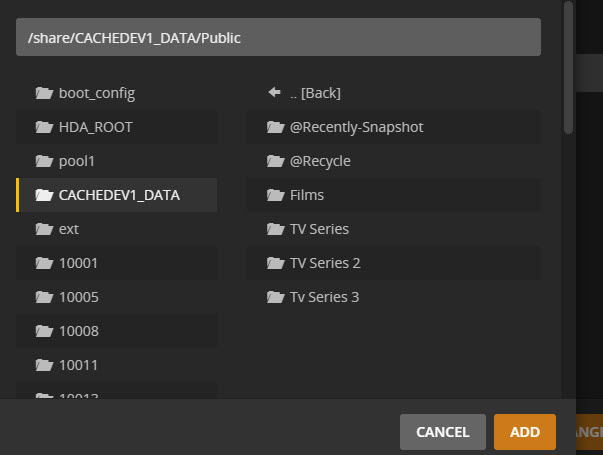
Hope this hels
Gordon
This is just how your NAS device is functioning.
The presentation of your data storage over the network (as Windows-compatible file shares) is different from what it looks like inside the NAS. And since your Plex server is running directly on the NAS, it looks at it from the inside.
Just point your Plex libraries to those subfolders in /share/CHACHEDEV1_DATA/Public and be done with it.
You might wanna bookmark this: Qnap faq.....read me first!
