Server Version#:
Player Version#:
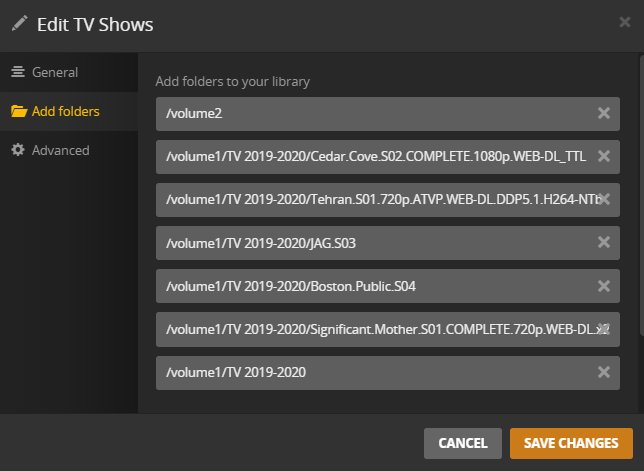 I have no idea where to find what you are asking for. Just want to know when I try to add a folder on an external usb3.0 drive I can not navigate to it. Plex only shows vol 1 vol2 which is what is in my NAS. I have 3 8TB drives attached to my desktop and can not navigate to any of them as you can clearly see. The folders I want it to see are shared on my network. Do I have to share the entire drive which I do not want to do that just to see a few folders.
What you are showing are the folders that you already have selected.
Scroll down and click on the BROWSER FOR MEDIA FOLDER button.
This looks like you’re running a version of Plex Media Server on your NAS (not on the Windows/desktop machine).
Generally speaking… when adding a folder to a library, you navigate until you can select that folder. This should show the folder’s content on the right side… don’t click anywhere else, just click Add and Save your changes.
Side note… you need to work on your file organization/naming!
- Plex wants you to add the top-level folder to the library (e.g.
/volume1/TV 2019-2020/) – not the folders of individual shows, seasons or even episode files - Plex needs your files to be properly organized
volume1
  TV 2019-2020    <- the folder linked to your Plex tv-show library!!
    JAG
      Season 03
        JAG - s03e01.ext
        JAG - s03e02.ext
        ...
    Boston Public
      Season 04
        Boston Public - s04e01.ext
        Boston Public - s04e02.ext
        ...
Where .ext is your respective file extension.
Can you clarify something?
Are you currently running Plex on your NAS, using media also stored on your NAS?
And you have USB drives attached to your PC, that you want to share with the Plex Server on your NAS?
Is that true? Which NAS are you using? Many NAS devices can export network shares, but cannot access other network shares.
It might make more sense to run another Plex Server on your PC, for the data that is connected to your PC.
The point of the screenshot is those files are not on the NAS. It says Plex only runs on W10 when trying to D/L the app for a desktop on the Plex D/L page. I’m running 7 with no intention of ever going to 10 on any PC that is connected to the internet. I tried hooking 2 of the USB3.0 Ext drives to the USB3.0 ports on the rear of the NAS, but Plex would not read either one(2 full 8TB Ext drives). They are of course NTFS and I have no intention of formatting them to the file system the NAS uses. I’m about ready to trash the NAS and go get my Kodi box back. It is ten times easier to use and navigate and add files on it. This system is ridiculous. You can’t even add a football game and have it show up. So slow to add new files. I added 5 episodes to a folder that I have been watching with the app on my TV and 12 hours later they had not shown up. It took almost a full 24 hours b4 I could access them to watch them. I-7 16GB RAM Synology NAS 400MB connection speed. It is set to re-scan whenever I add new files. It has been this slow since I loaded the first files on it. 2 8TB 7200RPM NAS HDD in the NAS. SSD in the desktop. I don’t need all the pretty pictures to watch a show, I just want to watch the show or movie. How can it take that long for files to be accessible???
When you connect the USB drives to your NAS do they show up in the NAS file system?
Thanks - that’s what I was confused by. You’re trying to do something unusual.
You also mentioned it’s a Synology NAS. I believe that it is possible to mount remote folders on a Synology NAS.
If you share them from the Windows PC, then Mount them on the Synology, it should be possible for Plex to see them.
Rube Goldberg would be proud. I want to hear if it works, and if it works well.
That’s wild. I understand not liking Windows 10, but running an unsupported OS while connected to the Internet is an interesting decision.
I believe Synology supports accessing NTFS volumes. They appear as usbshareX. I’m not a Syno expert, but that should be possible.
Sounds frustrating. None of that sounds normal. I think people would help with it. Or if you don’t care about all of the Plex features, maybe you’d be happier with the simple DLNA media server on the NAS?
I would if I could, but I can’t find a way (have searched the net to no avail) to see DLNA on my new Sony Android 4k tv. There is no app to access the NAS files thru DLNA. I did that with my RAS PI but when they started 4k I went to Plex and now Kodi will do 4k. So if I can’t find a way to use the DLNA like in Kodi without the RAS PI I will just go back to the RAS PI and get rid of the Plex. Hope someone has an idea to help.
Sony have dropped their native “Video” app?
