Hey All
Just started (merry xmas to me  ) using PLEX web version 4.12.3 connected to my computer with my media files stored on portable hard drives and my TV has a Fire Stick to connect to PLEX. Both Computer and TV(Fire stick) are connected to each other via wifi.
I understand when I’m watching content supplied from PLEX that I’m downloading but what I’m wondering is when I’m watching my own media files on the PLEX web based system am I going thru my metered wifi connection or is it simply transferred from my hard drives to TV without any metered connections?
Hope I’ve explained myself correctly? Thanks for your input and help on this matter and happy to clarify to the best of my knowledge (limited!) if the info isn’t enough.
Cheers
Hardly Handy
That really should tell you all you need to know.
If your ISP is all set up to charge you for WiFi - they’re not going to let you get any of it for free.
Get a router.
Get some wires.
Doh! yeah I get that
But it’s more about the app it self? Are they just opening a portal or conduit to transfer my media to the TV or is it as if I’m downloading it all again? I was wondering if it’s downloading and uploading the whole file or not? If we watch from our own media storage system? PLEX didn’t actually download all my media from my hard drives to their servers?
All your media is LAN only, it is not traveling across a WAN unless you are connected remotely.
To check: Below is an example found in your server settings. Nearby is LAN no charge. Remote would be WAN and you would be charged by your ISP.
(I have corrected this statement in following replies if my source is correct)
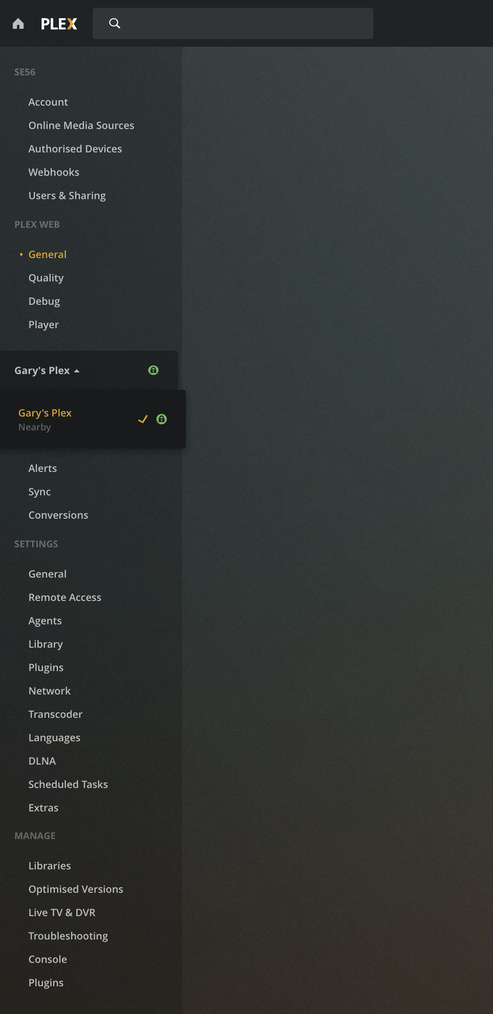
Thanks Gary Yep that helps
My set up reads the same as yours!
Only I’m not a Gary lol
Cheers for taking a screen shot
His ISP is charging him for WiFi - and delivering a pitifully small amount, before they start tacking on WiFi Bandwidth Charges - so yea… he’s paying his ISP for Plex Access.
If he had his own router, owned the WiFi radio in it, and could do whatever he wanted to with it without charge - would be the way to go. Installing Wires and using those instead of WiFi would really be the way to go, but first things first I guess. First let’s stop paying our ISP for WiFi.
Sorry Hardly, I had no knowledge of what you meant by Wifi as being Fixed Wireless. You need a Router that can be put in Bridge mode, support Wifi and a short Ethernet patch lead to keep your LAN traffic un-metered.
Simply put it inline between your Server and your ISP supplied modem, then only connect via your New modem Wifi Channels.
My excuse, I live in an opposing land down under where a Authoritarianism Government don’t charge for LAN traffic with ISP modems.

Thanks Juice for putting me straight.

Well, I’m not there reading the contract, but if I know my Criminal Underworld ISPs - that’s exactly what’s happening.
So here in the USA, not sure I understand the question from HardlyHandy, but I think what he is saying is that he pays for metered internet access? I’ve never heard of an ISP that charges for ‘WiFi data.’ An ISP that charges a monthly fee for WiFi access (as in the hardware) - you bet.
For example if you are using Verizon Cellular / LTE for your internet, then WiFi between the Plex Server and the player isn’t using the metered connection, because it isn’t using the internet.
This is the same in Australia, LAN traffic is not metered. Once its WAN traffic it is metered unless your on an Unlimited plan, irrespective of proposed modem router used.
What was explained to me that ISP provided Wifi Modem meter all traffic. Is this correct?
Proposed solution put to me was a third party/Privately owed Router modem would void any LAN Traffic metering.
So not being a US citizen I can only be guided by forum input.
Without knowing the contract details we just have to put our trust in our ISP. Anybody willing to do that? I’m not.
Every ISP I’ve EVER dealt with tells me I can’t have Cable Internet without Cable - until I ask to talk to the Supervisor - then things magically change. You know what that is? That’s them getting ready to Boar-Hog me and me saying - wait a minute.
If it were me, I’d be finding out exactly what’s going on pretty quick.
Maybe it’s time to talk to The Supervisor. In the meantime I’d also talk to a Router Salesperson. Past experiences have soured the idea of my ISP having complete control over equipment that ultimately costs me (more) money (than they’re already beating out of me at an alarming rate).
If they could charge you for the air around their router - that you thoughtlessly breathe - they would.

This topic was automatically closed 90 days after the last reply. New replies are no longer allowed.
