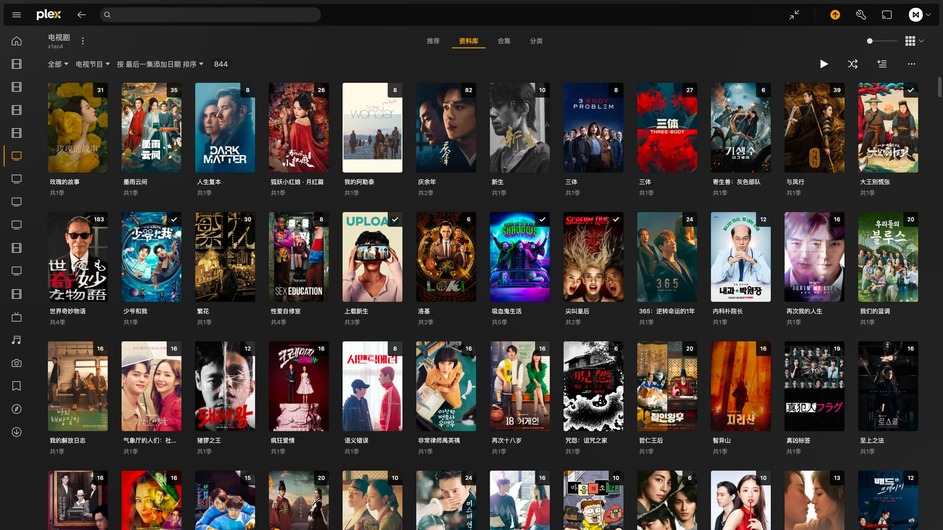
Watched Checkmark VS Unwatched Orange Corner

Apple TV user: I can no longer see a yellow dot that indicates that I watched an episode of something when browsing my personal files through the Plex App. Note that I use Folder mode.

I tried different settings with this new “Watched Indicators for Personal Media” setting, but to no avail.

It is my understand that this feature was taken away on purpose due to… feedback? Well I am providing feedback right now: please fix this.

1 Like

It sure as heck wasn’t USER feedback.

6 Likes

another long time plex user here who hates everything about this change. I want the unwatched tabs to highlight new stuff in my library. I would prefer the tab to be a color like orange, but if your new design dictates something bland like black or white that’s at least better than these gross watched checkmarks all over the place.

8 Likes

Is there any way to get the unwatched count on series? I like having that to help prioritize what shows to watch to catch-up on

2 Likes

Haven’t been here in a while because I’ve mostly been just enjoying Plex, but the change finally happened on Apple TV and, not only do I not like the change (it’s harder to see which episodes have been watched versus not watched), but my wife hates it with a passion, and so now this has become a more egregious issue that is a constant complaint from the family, so now I’m forced to make time to submit a post. Please revert to something that stands out more, or give us an option the settings.

10 Likes

I appreciate Plex responding to this very divisive topic, however I don’t appreciate changes made to functionality without providing alternative options to restore said functionality.

To me, it does not make sense to have a dot, blip, checkmark, etc on something I’ve already watched. I already know what I’ve watched, why would I need something to tell me that?
It makes more logical sense to me to have a dot or counter for series that are UNwatched, you know like when you have dots for UNread text messages. Users that have content delivered on a regular basis to libraries would probably like to know when new content is available, and how much via some sort of visual feedback such as before when a series card showed # of unwatched episodes. It also helps keep track of how far along in a series you are.

These are core visual design details that allow for quick recognition of information.
Previously, as I scrolled through a Library, I knew that if a series card had no checkmark, it’s completely watched. However, if a series card showed a number, I knew instantly how much unwatched content is available, especially if content had newly arrived.

The way things are now, if I wanted to know how much new content is available for a given series I have to click the entry with no checkmark, and look number at the Season card. Now imagine doing that for an entire library - Click the entry, check the number, press back, scroll to the next entry and click, check the number, press back, scroll to the next entry and click, check the number so on and so forth. This is incredibly clunky for what should be basic information visible at a glance.

Knowing that this appears to be a fairly split topic in terms who wants what indicators visible on cards in a Library, make Experience options that allow for more customization. The newly implemented options are a step in the right direction, but need to be fleshed out further. Please consider readding options for Unwatched Episode Counter, with settings for TV Shows, or Off.
Having the newly implemented Watched Indicator options AND re-implementing the Unwatched Episode Counter would cover BOTH sides of the argument.

Looking forward to the next update. Thank you.

14 Likes

I’m here, posting for the first time because the unwatched markers disappeared and can’t be toggled back on. I’ve just turned the watched markers off, because my eye is trying to catch what TO watch, not what I’ve watched already…

5 Likes

Just came here to bump that we need choices.
IMO the eye being drawn to unwatched is logical.
Should be a choice for a triangle, and its color as a sub choice AND the choices for the triangle and how it appears as others have described.

7 Likes

So, my wife just called me down… “Plex is broken…” She really liked knowing how many unwatched episodes she’s got on series. I appreciate all the work the Plex team is putting in, but if you’re going to make a change like this, please give users a way to still apply the old way…

10 Likes

Mama ain’t happy cuz her unwatched episode count icons are missing. Now, nobody happy! Kindly fix this or give us the option to choose.

9 Likes

In Plex for iOS versions prior to 8.35, the original orange design was used. On the season page, there were no marks on the covers of watched episodes, while unwatched episodes had an orange corner mark. Additionally, the episode number was in front of the title, and everything was very reasonable.

In the new version, the episode number is placed on the cover, which I find very confusing. Moreover, both watched and unwatched episodes now have marks on their covers, which is another poor design choice.

For English users, the episode number might just be ‘E24’, but for users of other languages, such as Chinese users, ‘E24’ would be displayed as ‘第24集’. With the check mark in front, you can see in the image below that the width of the episode number and the watched mark almost takes up half of the poster. I believe this design does not consider users of other languages and the result is not good.

7 Likes

wait, the episode count icon on tv posters was removed ON PURPOSE!??! i can’t think of a more mind bogglingly useless change that drops the usability of this software by a major factor. i don’t care about watched/unwatched checks. if a thing has been watching, i delete it, so nothing going to have a check anyway. i don’t mind the checks being there, but the episode count MUST be returned.

in the meantime, i guess i’ll try to figure out how to roll back to an earlier version of the software where usability hasn’t been needlessly crippled.

i’ve seen a lot of bad GUI decisions made over the years (20 years of software development here) but rarely have i seen something this absurd.

i guess if i can’t fix this, i’ll try to get my lifetime subscription refunded and switch to kodi.

3 Likes

The episode count icon has not been removed; instead, an option has been added. You can set it to display the episode count icon and the watched mark, or not display them. So it has not been removed.

1 Like

I’ve gone to that new option in the menu and all it does is enable or disable the “already views checkmark” thing. but either way, the episode count number is still missing.

Correct, the episode count number is not at the library level, it is only at the season level. So you have to jump into the show detail page to see the unwatched episode count for each season. There sadly is no total unwatched count on the library page… :frowning:

I’m not sure which client you’re referring to, but I tested Plex for Mac, and it can display the episode count. If it’s not showing up for you, try restarting the app.

My Plex for Mac has it.

yes, my plex.tv browser page still has them, but my plex in firecube does not. they literally just disappeared today. and from looking at the thread above, it would appear it’s missing for a lot of people besides just me.

So it seems that on some clients and platforms, the episode count is not displayed. I suggest specifying the device and client name when reporting issues.

I must concur with what others have said here. I don’t need/want something telling what I have already seen. For those of us with large libraries, when most of your library has this it seems redundant, silly, and clutters up the poster view for no reason.

Additionally, please allow us to revert or change the color of the unwatched items back to orange. It was much easier to parse visually.

7 Likes