I’ve experienced the same thing but not as common as him. Maybe 1 out of every 20 watches won’t carry over as marking the episode as watched with the server.
Don’t waste your time people, this has been going on for years over on iOS
they have no clue how to fix, they will just waste your time asking for logs, and then do nothing and disappear from the thread. Just like always with many, many other long standing bugs.
2 Likes
Had the same thing again.
In the plane watched the last 3 episodes of Brockmire while being offline (6 till 9).
Coming back on wifi and syncing Plex, this is the result.

Here is the XML of Episode 6 121879.txt (2.9 KB)
Thanks. It’s missing the watched information so definitely something not syncing up correctly between the app and client. Odd that it worked on the other episodes. Can you hit the refresh button in the app then get me a log from the app AND PMS?
I’ve manually changed the watch state so that won’t show anymore. I’ll get the logs next time.
Any updates? I was thinking that I wanted to get Plex premium for a month for the duration of my vacation. This is kind of a deal-breaker
No update, it is still broken and to be honest I have no faith it will be fixed ever. There are more topics about this and it should not be hard to replicate for the Devs.
Just setup a PMS, sync content to your mobile, put mobile in flight mode and start watching content.
If this is a deal breaker, you need to decide for yourself.
When you watch offline content and at that moment don’t have a connection to your media server it will not always sync all watched states back when you get back online. That means you need to do that manually for those episodes.
For me it is an annoying bug in the near future I’ll have a look at Emby to see if that does what I need.
This has been going on FORVER and they refuse to address it. Insane.
1 Like
Unfortunately I don’t expect it to be ever solved.
I also still have this issue. Had a 4 hour flight to Cairo and all of the episodes I watched were marked as watched when I was offline but when I got back online they reverted back to unwatched.
Like I said, they have no clue on how to fix this. It’s been YEARS on iOS.
I know but I have the idle hope that if people keep bringing it up, it might get fixed someday.
Just happened AGAIN. Fix this crap and not these other random BS issues.
Just had it happen again, watched Episode 2 in the plane.
Was marked as Watched when still in Offline Mode. When getting back online it reverted back to unwatched.
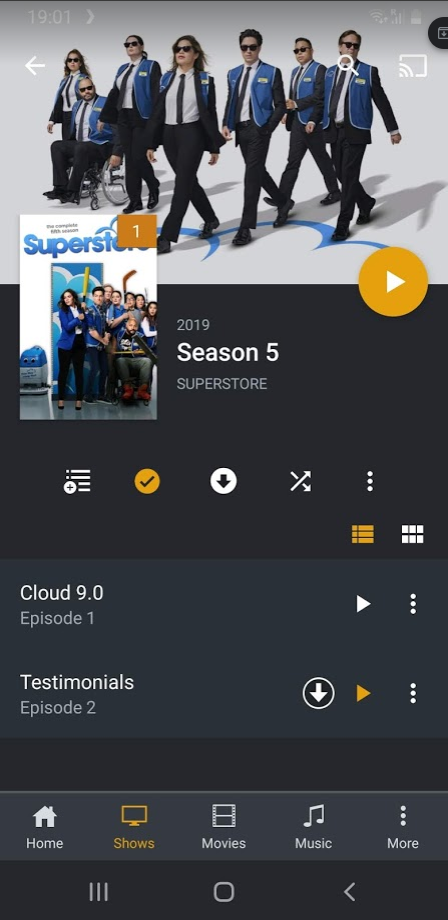
Let me know which logs (and how I get them) you would need to fix this.
Do you know if someone else might have manually marked that episode or the entire season/show as unwatched after you watched it offline? The watched status is based on the last time from all your clients.
No, I’m the only one using my Plex server.
1 Like
Next time you finish watching something that you’ve synced, can you get the XML for that video before you go back online. Then get me the Android log and the XML again after you go online.
How do I get the Android log?
Thanks I’m flying again this afternoon so I should be able to get you the logs.
@anon18523487 How do I get the XML file of the episode in the mobile app?
So I can already export the episodes that I’m going to watch in the airplane since my mobile will by on Flight mode the XML will not change between now and then.
Episode Info Before watching.rar (7.5 KB)
