I installed Fedora Workstation 41 Gnome on a laptop.
Installed Plex app and it’s not showing thumbnail glitches.
I installed Fedora Workstation 41 on a laptop.
Installed Plex Flatpak
I don’t see any issues at all. No thumbnail glitches and white boxes.
I noticed this is ok if your Display resolution is not 100% Native. Only 125% scale worked for me.

I’ve been getting these “Glitches” for a while, I’ve tried different Debian based distro’s, but sadly the issue still persists. I’m using multiple machines and get this issue. My daily driver is the HP Zbook 14 G2 with 16Gb RAM, Ubuntu 24.04.2LTS.
Here’s what I get, and I’m surprised @ChuckPa or someone else hasn’t seen this, it’s been an ongoing issue that I doubt will ever get fixed!
Here’s my screemshots…
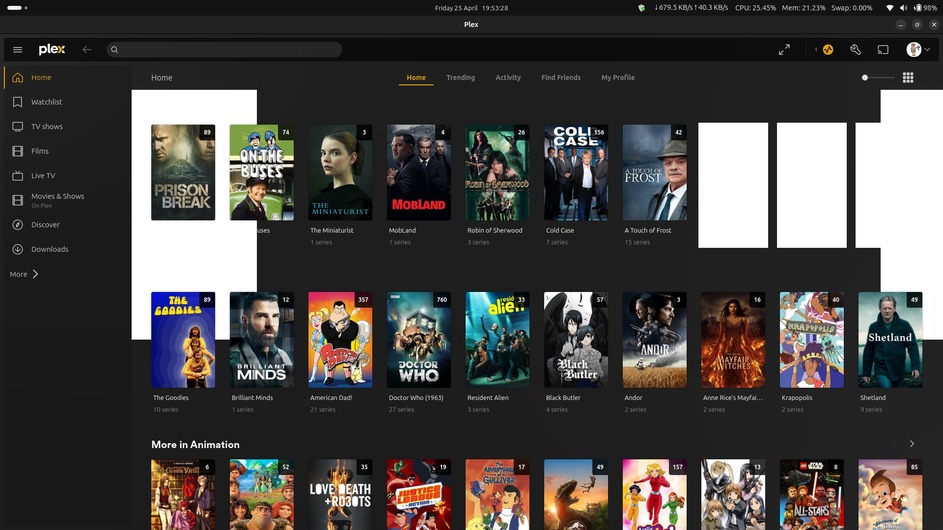
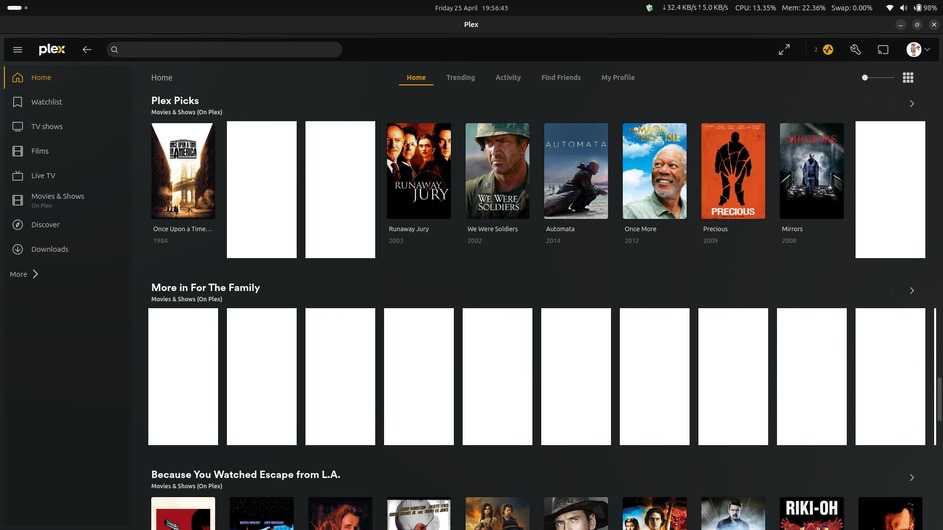
The only strange thing is the HTPC version on all my machines don’t have the issue, just the Plex-Desktop application…
Dave
Sorry I missed this. Calling me out got my attention. 
I use Ubuntu 22.04 here and have never seen this.
Looking at the white blocks,
-
Where it obliterates the poster and text is pretty clearly a browser rendering problem.
-
Why the browser is running up to the upper border and down into the second row at left and right margins is very weird.
I see a wide variety of distros, hardware, and even window managers / desktop managers.
Which browser(s) is/are doing this ?
( I use Chrome or Chromium and have no issue. I avoid FireFox these days due to it being unreliable.)
If i were to spin up a test environment, what is most recommended as the most likely to recreate with and what do I need to do?
1 Like
This issue has nothing to do with browsers, its a plex linux desktop problem most likely related to plex’s use of Qt 6 as per this comment above → Weird white squares all over the place with latest version - #32 by gbooker02
Hey @ChuckPa
Glad to be of service!! This issue as @dokuro states isn’t the browser, it’s been an issue for a while with the Plex-Desktop app in Linux, and I’ve had it since everything went from 1.47.1 got upgraded (2022!!)
The issue doesn’t happen with the Plex-HTPC app, just the Desktop one, and using Plex throught the browser has been the only solution, even though it sends certain videos played into Transcode…
Any update on this would be great, just can’t believe no one at Plex has seen this bug for 3 years!!
Dave
My two cents. I sense the reason it doesn’t happen (or at least does not happen as much) is that the HTPC client is oversized as its designed to be viewed with a TV screen. The desktop client has a smaller interface and for whatever reason this seems to impact the white squares/boxes.
To prove this, the next time you see this issue happen adjust this slider from …
 to
to 
… and you will see the squares disappear. This is only a temp workaround as the issue still happens with the larger display but its far less often.
It made my white boxes bigger… This issue should’ve been sorted 3 years ago after v1.47 was updated to the newer Qt etc, but sadly we’ve had to put up with it, thing that I’m surprised with is if this issue slowed up in Windows it would’ve caused outrage, even a mass jump ship to say Emby or Jellyfin.
Anyway, here’s hoping now that @ChuckPa is aware of the issue, it gets mitigated and fixed sooner rather than v later
Dave
I reproduced the problems several different ways.

[844699:844757:0504/122207.589824:ERROR:raster_decoder.cc(2171)] [.RenderWorker-0x56bbc196cf00]GL ERROR :GL_INVALID_VALUE : glCopySubTexture: Cannot clear non-combineable rects.
[844699:844757:0504/122207.590054:ERROR:raster_decoder.cc(2171)] [.RenderWorker-0x56bbc196cf00]GL ERROR :GL_INVALID_VALUE : glCopySubTexture: Cannot clear non-combineable rects.
[844699:844757:0504/122207.590156:ERROR:raster_decoder.cc(2171)] [.RenderWorker-0x56bbc196cf00]GL ERROR :GL_INVALID_VALUE : glCopySubTexture: Cannot clear non-combineable rects.
[844699:844757:0504/122207.590834:ERROR:raster_decoder.cc(2171)] [.RenderWorker-0x56bbc196cf00]GL ERROR :GL_INVALID_VALUE : glCopySubTexture: Cannot clear non-combineable rects.
[844699:844757:0504/122207.591164:ERROR:raster_decoder.cc(2171)] [.RenderWorker-0x56bbc196cf00]GL ERROR :GL_INVALID_VALUE : glCopySubTexture: Cannot clear non-combineable rects.
[844699:844757:0504/122207.592743:ERROR:shared_image_representation.cc(207)] Attempt to read from an uninitialized SharedImage
[844699:844757:0504/122207.592815:ERROR:shared_image_representation.cc(207)] Attempt to read from an uninitialized SharedImage
[844699:844757:0504/122207.592858:ERROR:shared_image_representation.cc(207)] Attempt to read from an uninitialized SharedImage
[844699:844757:0504/122207.592900:ERROR:shared_image_representation.cc(207)] Attempt to read from an uninitialized SharedImage
[844699:844757:0504/122207.592939:ERROR:shared_image_representation.cc(207)] Attempt to read from an uninitialized SharedImage
[844699:844757:0504/122207.792843:ERROR:raster_decoder.cc(2171)] [.RenderWorker-0x56bbc196cf00]GL ERROR :GL_INVALID_VALUE : glCopySubTexture: Cannot clear non-combineable rects.
[844699:844757:0504/122207.793958:ERROR:raster_decoder.cc(2171)] [.RenderWorker-0x56bbc196cf00]GL ERROR :GL_INVALID_VALUE : glCopySubTexture: Cannot clear non-combineable rects.
[844699:844757:0504/122208.082545:ERROR:shared_image_representation.cc(207)] Attempt to read from an uninitialized SharedImage
[844699:844757:0504/122208.082649:ERROR:shared_image_representation.cc(207)] Attempt to read from an uninitialized SharedImage
[844699:844757:0504/122209.657847:ERROR:shared_image_representation.cc(207)] Attempt to read from an uninitialized SharedImage
[844699:844757:0504/122209.657924:ERROR:shared_image_representation.cc(207)] Attempt to read from an uninitialized SharedImage
[844699:844757:0504/122209.690927:ERROR:shared_image_representation.cc(207)] Attempt to read from an uninitialized SharedImage
[844699:844757:0504/122209.690999:ERROR:shared_image_representation.cc(207)] Attempt to read from an uninitialized SharedImage
[844699:844757:0504/122209.793746:ERROR:shared_image_representation.cc(207)] Attempt to read from an uninitialized SharedImage
[844699:844757:0504/122209.793825:ERROR:shared_image_representation.cc(207)] Attempt to read from an uninitialized SharedImage
[844699:844757:0504/122209.908987:ERROR:raster_decoder.cc(2171)] [.RenderWorker-0x56bbc196cf00]GL ERROR :GL_INVALID_VALUE : glCopySubTexture: Cannot clear non-combineable rects.
[844699:844757:0504/122209.909104:ERROR:raster_decoder.cc(2171)] [.RenderWorker-0x56bbc196cf00]GL ERROR :GL_INVALID_VALUE : glCopySubTexture: Cannot clear non-combineable rects.
[844699:844757:0504/122209.924745:ERROR:raster_decoder.cc(2171)] [.RenderWorker-0x56bbc196cf00]GL ERROR :GL_INVALID_VALUE : glCopySubTexture: Cannot clear non-combineable rects.
[844699:844757:0504/122209.924856:ERROR:raster_decoder.cc(2171)] [.RenderWorker-0x56bbc196cf00]GL ERROR :GL_INVALID_VALUE : glCopySubTexture: Cannot clear non-combineable rects.
[chuck@lizum ~.2002]$ plex-desktop
qt.scenegraph.general: Using QRhi with backend OpenGL
  Graphics API debug/validation layers: 0
  QRhi profiling and debug markers: 0
  Shader/pipeline cache collection: 0
qt.scenegraph.general: Using QRhi with backend OpenGL
  Graphics API debug/validation layers: 0
  QRhi profiling and debug markers: 0
  Shader/pipeline cache collection: 0
[847114:847164:0504/122250.615139:ERROR:shared_image_representation.cc(207)] Attempt to read from an uninitialized SharedImage
[847114:847164:0504/122250.652590:ERROR:raster_decoder.cc(2171)] [.RenderWorker-0x57998150e110]GL ERROR :GL_INVALID_VALUE : glCopySubTexture: Cannot clear non-combineable rects.
[847114:847164:0504/122250.665854:ERROR:shared_image_representation.cc(207)] Attempt to read from an uninitialized SharedImage
[847114:847164:0504/122250.765753:ERROR:shared_image_representation.cc(207)] Attempt to read from an uninitialized SharedImage
[847114:847164:0504/122250.792327:ERROR:raster_decoder.cc(2171)] [.RenderWorker-0x57998150e110]GL ERROR :GL_INVALID_VALUE : glCopySubTexture: Cannot clear non-combineable rects.
[847114:847164:0504/122250.798626:ERROR:shared_image_representation.cc(207)] Attempt to read from an uninitialized SharedImage
[847114:847164:0504/122251.119160:ERROR:shared_image_representation.cc(207)] Attempt to read from an uninitialized SharedImage
[847114:847164:0504/122255.515281:ERROR:raster_decoder.cc(2171)] [.RenderWorker-0x57998150e110]GL ERROR :GL_INVALID_VALUE : glCopySubTexture: Cannot clear non-combineable rects.
[847114:847164:0504/122255.851151:ERROR:shared_image_representation.cc(207)] Attempt to read from an uninitialized SharedImage
[847114:847164:0504/122259.066638:ERROR:raster_decoder.cc(2171)] [.RenderWorker-0x57998150e110]GL ERROR :GL_INVALID_VALUE : glCopySubTexture: Cannot clear non-combineable rects.
[847114:847164:0504/122259.067201:ERROR:shared_image_representation.cc(207)] Attempt to read from an uninitialized SharedImage
[847114:847164:0504/122259.111009:ERROR:raster_decoder.cc(2171)] [.RenderWorker-0x57998150e110]GL ERROR :GL_INVALID_VALUE : glCopySubTexture: Cannot clear non-combineable rects.
[847114:847164:0504/122259.111649:ERROR:shared_image_representation.cc(207)] Attempt to read from an uninitialized SharedImage
[847114:847164:0504/122300.366297:ERROR:raster_decoder.cc(2171)] [.RenderWorker-0x57998150e110]GL ERROR :GL_INVALID_VALUE : glCopySubTexture: Cannot clear non-combineable rects.
[847114:847164:0504/122300.366656:ERROR:shared_image_representation.cc(207)] Attempt to read from an uninitialized SharedImage
[847114:847164:0504/122300.466870:ERROR:raster_decoder.cc(2171)] [.RenderWorker-0x57998150e110]GL ERROR :GL_INVALID_VALUE : glCopySubTexture: Cannot clear non-combineable rects.
[847114:847164:0504/122300.467264:ERROR:shared_image_representation.cc(207)] Attempt to read from an uninitialized SharedImage
[847114:847164:0504/122301.149008:ERROR:raster_decoder.cc(2171)] [.RenderWorker-0x57998150e110]GL ERROR :GL_INVALID_VALUE : glCopySubTexture: Cannot clear non-combineable rects.
[847114:847164:0504/122301.149577:ERROR:shared_image_representation.cc(207)] Attempt to read from an uninitialized SharedImage
[847114:847164:0504/122326.983065:ERROR:raster_decoder.cc(2171)] [.RenderWorker-0x57998150e110]GL ERROR :GL_INVALID_VALUE : glCopySubTexture: Cannot clear non-combineable rects.
[847114:847164:0504/122326.983634:ERROR:shared_image_representation.cc(207)] Attempt to read from an uninitialized SharedImage
[847114:847164:0504/122330.133974:ERROR:raster_decoder.cc(2171)] [.RenderWorker-0x57998150e110]GL ERROR :GL_INVALID_VALUE : glCopySubTexture: Cannot clear non-combineable rects.
[847114:847164:0504/122330.134410:ERROR:shared_image_representation.cc(207)] Attempt to read from an uninitialized SharedImage
[847114:847164:0504/122334.788066:ERROR:raster_decoder.cc(2171)] [.RenderWorker-0x57998150e110]GL ERROR :GL_INVALID_VALUE : glCopySubTexture: Cannot clear non-combineable rects.
[847114:847164:0504/122336.249872:ERROR:shared_image_representation.cc(207)] Attempt to read from an uninitialized SharedImage
[847114:847164:0504/122336.998529:ERROR:raster_decoder.cc(2171)] [.RenderWorker-0x57998150e110]GL ERROR :GL_INVALID_VALUE : glCopySubTexture: Cannot clear non-combineable rects.
[847114:847164:0504/122336.998867:ERROR:shared_image_representation.cc(207)] Attempt to read from an uninitialized SharedImage

This is a problem with the code and the host’s OpenGL.
Looks a lot like coding issue but, without it in the debugger, I cannot confirm.
I will write this up for them to look at when they get back next week.
4 Likes
@ChuckPa Cheers kind sir! I knew we would get to the bottom of the issue.
I noticed it happens on both my Laptops, one with just Intel iGPU and the other is a iGPU+dGPU.
As I mentioned, the issue has been there since the version after 1.47.1, which take us back to 2022… Any idea who the coders were back then? We can make them dance around with a Borat Mankini on… no second thoughts, just the thought of the mankini has put me off my breakfast
Dave
when is this going to be fix
i did find a work around install girens for plex it use the remote for plex to watch your stuff
@ChuckPa Latest update still causes white boxes, on both Wayland and X11, surely there’s a solution incoming?
@ChuckPa Hey Chuck,
Here’s my complete system rundown if it helps? I doubt it, but would be nice to think it’s helped towards the fix after the devs have finished killing the Roku app, not happy at all with the new layout. but you guys call it progress, I call it regressing… anyway that’s for another thread…
dave@dave-HP-ZBook-14-G2
OS: Ubuntu 24.04.2 LTS x86_64
Host: HP ZBook 14 G2 A3009D510303
Kernel: 6.11.0-25-generic
Uptime: 1 day, 6 hours, 5 mins
Packages: 2024 (dpkg), 13 (snap)
Shell: bash 5.2.21
Resolution: 1920x1080
DE: GNOME 46.0
WM: Mutter
WM Theme: Adwaita
Theme: Yaru-dark [GTK2/3]
Icons: Yaru-dark [GTK2/3]
Terminal: gnome-terminal
CPU: Intel i5-5200U (4) @ 2.700GHz
GPU: Intel HD Graphics 5500
GPU: AMD ATI Radeon R7 M260X
Memory: 3367MiB / 15396MiB
Thank you for tracking this down. I’m likely going to be changing from Windows to Linux for my primary desktop PC soon, so I knew this was going to start being an issue for me in the near future.
1 Like
I do wonder if this specific issue will go away when they roll out their new experience to the webux and desktop clients. Time will tell …
when is this going to get fix
I’m using this workaround and it seems to work for me at the moment, launch plex desktop with these 2 switches --disable-gpu-driver-bug-workarounds and --enable-gpu-rasterization. For example, on ubuntu,
snap run plex-desktop -- --enable-gpu-rasterization --disable-gpu-driver-bug-workarounds
Source: Qt 6: Blank rectangles (mainly with AMD graphics?) · Issue #7398 · qutebrowser/qutebrowser · GitHub
For those running flatpacks it is
/usr/bin/flatpak run --branch=stable --arch=x86_64 --command=Plex tv.plex.PlexDesktop -- --enable-gpu-rasterization --disable-gpu-driver-bug-workarounds
qt.scenegraph.general: Using QRhi with backend OpenGL
Graphics API debug/validation layers: 0
QRhi profiling and debug markeqt.scenegraph.general: Using QRhi with backend OpenGL
Graphics API debug/validation layers: 0
QRhi profiling and debug markers: 0
Shader/pipeline cache collection: 0
rs: 0
Shader/pipeline cache collection: 0
I’ll report back after a week.
