Many people don’t know this:
In Windows with it’s File Manager - for MP4/M4V files (the files it can do something about) - enable the Details Pane and whack that title and description in seconds (then save, of course) - then it’s done. I do that seconds before it passes though Xmedia Recode for the Audio Adjustment and remux to MKV.
Yea - it’s a belt AND suspenders kind of thing…
Ok ! So there it is, the little culprit checkbox hiding in the far unexplored submenu ! Thanks, works for me.
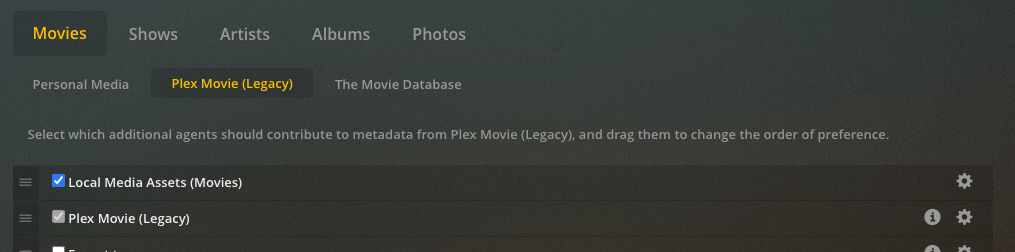
If Local Media Assets was enabled in legacy agent, but not above the primary Plex Movie (legacy) or The MovieDB agents then Use local metadata won’t be enabled in migration to new movie agent.
It would only be enabled if Local Media Assets was above Plex Movie (legacy) or The MovieDB in legacy agent. So it can maintain the same behavior after migration
so if old python agents were like this. it won’t be enabled
if old python agents were like this then it would be enabled.
Thanks for the clarification.
Now I got my titles back… but the subtitles still won’t download  How does it work with the new agent now, since we cannot extend the scanning process with dedicated agents like we did before (in the screens you attached) ?
Don’t think the automated agents or plug-ins for subtitles work if you want to keep using the new agent. You can download subtitles thru the web interface (not sure if apps have that capability) or upload subtitles you have found. I find Subscene a pretty good place to find subtitles (in English, anyway) I think the search finds subtitles from OpenSubtitles.
I don’t know if either of those options actually work, I always make sure subtitles are in place before I add to the server.
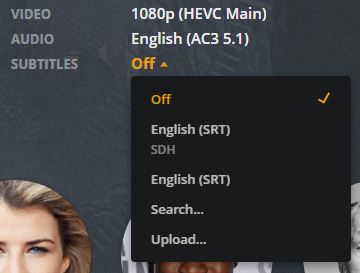
@leelynds : Oh… that is a serious step back for me ! I do not add manually my content, I got scripts running on my server that do the job. I rely then on Plex to do his part : to search for metadata and subtitles. So when I get home, sit on my sofa and grab the remote, I just have one last thing to do : press Play !
Guess I will stick to the legacy then…
That would be you best option for now. I don’t believe the legacy agents are being updated, and at some point I imagine your only choice will be to use the new ones. You may have to modify your scripts when/if that happens.
I use bazarr to automatically download the subtitles for me.