Can you quantify that?
I could but I’m not going to sift through the channel notes from a few months ago to find it, when it was being discussed (worked on)
Can you quantify that?
I could but I’m not going to sift through the channel notes from a few months ago to find it, when it was being discussed (worked on)
Just to circle back to this, does this onlyspeed up library rescans or does it also speed up loading the library in your client app? The doc you pointed to only talks about needing a seperate folder if a movie has additional associated media. But if you just have single file movies, it says you can put them in one folder.
It does say that. Forget you read it.
If Plex knows where those files are and knows they haven’t changed it doesn’t need to go looking for them, by spinning up your drive and looking through hundreds (thousands) of files to find one - then play it.
The important bit is:
With 1000 movies, on the loose, like Wild Mustangs, Plex will grind through your storage life-span a LOT quicker - than if it didn’t even need to look for them.
If you enter a movie’s preplay page, the folder of the video file is scanned for new external subtitles (even if there are none – it has to look anyway). A folder with only one file in it is scanned faster than with 500 or more files in it.
That was partly the reason for my question as well … still haven’t really heard what Plex considers large vs small for libraries. Most response from Plex folks detail only the “right way” and won’t discuss much around common use ways. To be fair, it is probably not uncommon for users to pull “Plex Employee said that was okay” when Plex Employee really said “we advise against that but it won’t explode” so … seems to depend on the rep.
I had all my movies in one folder - but it was only 300-400 titles with no supporting files. I recently created a few generic subfolders to break up the large folder of files into smaller batches of files as a half measure for now as I’m increasing my library catalog; a very old Plex\MMC suggestion which I don’t know if it’s relevant anymore but it does work. I did not notice any significant change in responsiveness and my CPU never worked that hard either way but that’s only a few hundred files; some folks have 10s of thousands so I definitely believe that circumstance would see a bigger impact for efficiency and hardware lifespan (and evidently some client responsiveness).
As my library is growing I’ll eventually switch to the “right way” when I do a broader migration in the next year or so with the expectation that my library is likely to expand further than I originally expected. It should also make changes in Plex software easier to incorporate if I fit their expected config.
Still, I don’t know that it’s hugely significant outside of “right way” vs “good enough way” since my single folder of movies had been working for me and I have no complaints. That’s entirely anecdotal of course. 
I’m sure Plex has numbers they could pull from the data metrics and get specifics but dunno that they’d necessarily share them.
I had a few thousand movies on the loose, segregated into multiple libraries and storage locations - all seemed fine.
I consolidated 28 Libraries into 1 - and the trouble started.
Major Congestion on the freeway - scans take what seems like forever.
FileBot and I put every move in a Folder - Warp Speed.
I was sold.
That’s where I expect this setup to come into play … a few hundred? No problem. Getting towards 1000+? Time to include those efficiencies of scale.
You still have your storage working through it’s life-span with unnecessary scans.
Movies in Folders that don’t change - aren’t scanned.
Looking up filebot right now
So, im looking at filebot, it only renames files…what about moving files NOT in folders into folders with appropriate names?
It’s all in the details…:
If you Edit Format you’ll see the basic string changes as you go through some of the options. That string isn’t one of the basic strings, but exploring the FileBot site will reveal there are a lot of user options:
{n} ({y}) [{vf} {vc}]/{n} ({y}) [{vf} {vc}]{subt}
That, will name a Movie and stick it in a folder off the root and also name a subtitle file if present and includes some details about the file and it’s format:
Nothing really mysterious about it. Look at the string and it’s just commands (found at the website) placed in the order you want, packed in Brackets where you choose, with a slash between so it names the folder and the files within the same.
If you use the {Plex} global command everything will automatically go into a Movies or TV Show Folder off the root - but I have hundreds of media folders and didn’t want to fiddle with each path…
So I shut down Plex, dragged a hundred wild mustangs onto FileBot - it named and packed them all in folders off the root (of whatever drive it was working in) - then I put them back where they belonged and started the PMS when I was done. I did it in manageable chunks as I had time and it was over - when it was over.
Everything arrives at the Juicetown station in a folder on the D:\drive.
Filebot names Movies and puts them in a folder off the root of D:\ - then I distribute them where they need to go across 6HDDs… by hand if you can imagine…lol
@rubernck21 This is my plan for the future as well … leveraging FileBot to do this job for me. Why @JuiceWSA doesn’t use affiliate links to reap some financial reward for being such a good advocate for the software I’ll never know… 
I got an always free, always updated FileBot - for the rest of my life.
But that’s not why I recommend FileBot.
FileBot recommends itself.
I’m just riding the saddle between it’s wings…lol
Regarding moving thousands of movies from one folder to individual folders with the same name as the file…
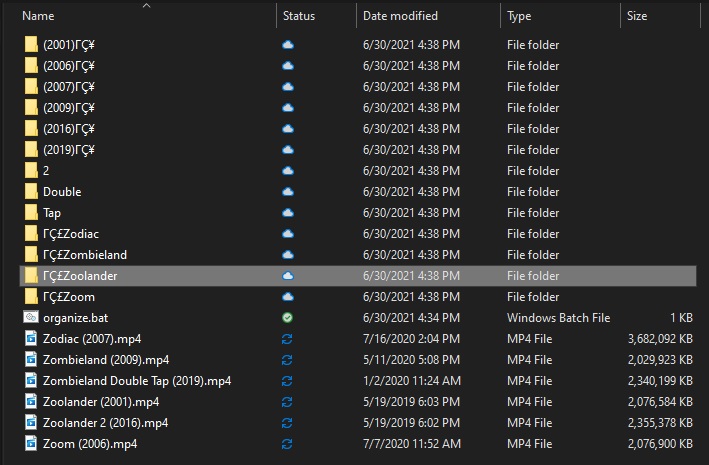
If you don’t want to deal with Filebot because, like me, you have never been able to get it to do what you want, here is another option. (windows only)
Open a text file and copy the following into it.
@echo off
for %%i in (*) do (
 if not "%%~ni" == "organize" (
  md "%%~ni" && move "%%~i" "%%~ni"
 )
)
Save the file and call it Organize.bat
Go and drop that file into a folder with all your movies and double click on it. It will take every file in that directory (including itself) and put them in individual folders as described above. Easy peasy.
Where’s the part where it matches against the appropriate database to get THE EXACT name required for matching and deals with subtitles in many flavors?
There are other methods, but there is only one FileBot.

That’s a great batch file.
Just a small typo in the name, Should be Organize.BAT
good catch. fixed
The forum software likes to use “fancy” quotation marks, which you don’t want.
If you edit the .bat file again, are the quotation marks straight and boring, or fancy and curly?
@echo off
for %%i in (*) do (
 if not "%%~ni" == "organize" (
  md "%%~ni" && move "%%~i" "%%~ni"
 )
)
BAM, works like a dream now. TY. So, I also have some subtitle files, this made 2 folders, one with .en at the end, lol. any way to tweak the code to look for the file, if its there and to put both into the same folder?