Server Version#: 1.24.5.5173
Player Version#: 4.63.0
About 5 or 6 updates ago is when it all started. I had just surpassed 25k movies at the same time. I do not have the ability to watch it daily but at first it seemed to crash in the morning during maintenance/scheduled task. So I disabled many things within this and then reenabled them one at a time but couldn’t find what was doing it. I tried reading the logs but I am lost. I had also noticed that it was taking a good 30 seconds and more in most cases to load the movie details when I would select it from the library to view contents. Now it will not load anything beyond the movie poster and synopsis. 9 out of 10 times it will not load actors or anything that would normally be below this. I don’t know what to do or even what information is relevant to get help with this. I am adding the logs as that seems to be what most people are doing. Please do let me know if this is incorrect. I hope this doesn’t contain any private information…Plex Media Server Logs_2021-10-28_23-48-18.zip (7.0 MB)
Maybe someone can tell me the best way to get eyes on this? Should I clear the logs and start fresh maybe? (just the logs and not the whole server) If so maybe someone can tell me how to do this? Thanks
H:\MOVIES-OTHER\1408.2007.mkv"
If all your file names are looking like this, and you are putting all movies into the same folder I am not wondering anymore.
- each movie into its own subfolder
- movie files named after the guidelines
Definity not on one drive

I am not talking about drives, but folders.
You should definitely start thinking about drive pooling, btw.
I mean this has worked fine since 2015 when I started. Here’s an example of drive E:

Also I haven’t used drive pooling because I use Carbonite and they have an 8tb recovery limit at the time.
Try StableBit - The home of StableBit CloudDrive, StableBit DrivePool and the StableBit Scanner you won’t regret it. At least try the 30-day trial period. It shouldn’t affect any of your backups, just don’t have it backup the drivepool. Have it backup each individual drive just like you currently are.
Also, each of those movies should be in it’s own separate folder. Plex will run a lot better that way (scans will by many times faster).
Man…that is an impressive setup. Use the program “Files2Folder” that will instantly move those files to folders named after the files. Then do a scan.
The above is definitely improved by subfolders for every movie.
I take it you prefer StableBit over Drive Bender? I’ve looked at them both in the past but was undecided. And it was no rush as I had plenty of space.
No one sees the crashing that’s going on in the logs?
I remember having stability issues a long time ago when I was on not so good hardware with just 600 movies or so. I beefed up my hardware and that made it stable for a while, after hitting 1500 movies about 100 shows, 30k music I had issues again this time I separated Plex from media.
Now I have just over 3k moves, 400+ shows and 50k music, with one server as my storage with all of the files on it, and one as my “processing” or media server with just Plex and a few other things. No issues since, makes it easier to upgrade too, if I wish.
My file structure is even worse lol, I have all my movies in one folder no sub folders at all. If you have Plex and storage on the same box that might have an effect, maybe do a two box setup?
My build is (and is only used for Plex) Z270 Taichi with a i7-6700, 32gb ddr4, Quadro P2000 5GB. Win10 is on a 1TB gen3 NVMe with plex data on a 1TB SSD (as seen in the photo) Again, this changed over night. I have had no issues until I upgraded from 1.24.1.4931 to 1.24.2.4973 and I coincidentally also surpassed 25k movies. Everything was as it was when I started in 2015. Fast and didnt crash.
I also started having issues of Plex crashing after this update. The only difference that I have been able to find in the application is the new sonic feature for audio tracks (or at least I think new, I’ve never seen it before). I just had to restart PMS after another crash and disabled that setting. PMS had only been running for about 3 hours since I had to restart it this morning.
I have about 5k movies, 1400 shows (100k episode files), 452k audio files…
On a side note… I switched over to using DrivePool after Microsoft dropped their option from the old Windows Home Server, can’t remember their name for it right now. I really like the customizable duplication option of Drivepool - my personal files, photos, home movies, etc I keep across 4 drives to make sure I never loose anything…

These are my settings… I had not seen the sonic features option before - if you already had it disabled and were still experiencing the crashing, I guess that torpedoes my idea that it was the cause…
“ROLLBACK” is definitely a feature I wish they would add for instances like this…
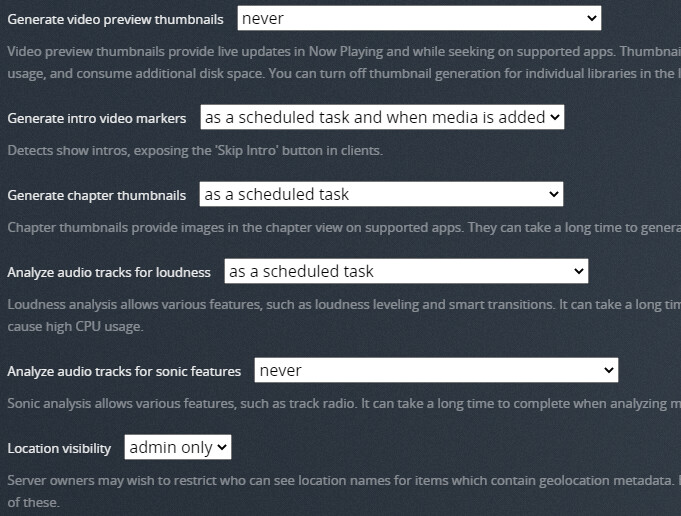
Ya, these were/are my settings. I had to reinstall as a rollback is not an option as you stated. However the issue was still present. I have been updating since hoping that one of the new versions would resolve this issue. But I am really thinking there is a limit to Plex and I have surpassed it. I am currently at 26840 movies, 3303 Documentaries, 521 Concerts/Rockumentaries, 214 TV Shows, 27 Mini Series, 407 Music Artist, and so on. Each of these are in their own Library. THE one issue I did come across during this reinstall is that now you don’t have the choice to dictate where your metadata is placed. Not sure why this ability was removed.
About 8 months ago they did an update that was causing similar crashing issues - I just threw out a powershell script to check the status of the exe and if it had stopped running, start it again. Not really a fix, but it kept me limping along until the following release that seemed to have corrected the issue.
I guess it’s possible that there might be some database limit that could be reached - there were several references to DB changes with this latest update. Most of the times when I’ve ran into a DB issue with plex, it has just caused client issues not crashing the server application itself…
As far as I understand it, there are no limits to how many files plex can use.
I know that a few of you say “I’ve been using it this way for years and never had a problem until now”… but if you have literally thousands of movies in the same folder, then at some point you simply will end up having problems.
I started having problems at around 400 movies in the same folder, and eventually I bit the bullet and started separating them all into their own unique folders, which, lets be honest, is what @Plex will always suggest is the “correct” way to do it.
So my advise… Don’t double down with being stubborn… Just get to work and start splitting them out correctly.
