Server Version#: 1.25.6.5577
Player Version#: Web 4.76.1
I’m re-creating my movie library thanks to this issue, as my current one is completely un-matched after choosing to "upgrade library. (I had a directory tree for movies that Plex was fine with for years until new scanner/agent).
So I figure as long as I’m going through the pain, I’d like to figure out how to get cast photos to be complete. After starting a new library using the new “Plex Movie” scanner and agent, the movies are matched fine but the photos for cast are like 99% missing. I’d say maybe 1 out of 100 show up.
All the posts I’ve been reading online seem to reference settings that don’t exist any more, or using The Movie Database as agent – which forces my scanner to change from “Plex Movie” to “Plex Movie Scanner” which doesn’t seem to help and the “upgrade library” option comes back.
So what is the magic? The movies are matched properly, I see the cast list, yet almost no photos with the Plex Movie agent? Are they supposed to just fill (incredibly) slowly over time in the background?
Any clues would be welcome at this point… Thanks!
Not sure if it’s the exact same issue as yours, but a few weeks ago I noticed that a bunch of my movies also seemed to have incomplete cast info (headshots). It also seemed to be maintaining multiple entries for some actors - I had added Paycheck, which stars Aaron Eckhart, who also plays TwoFace in The Dark Knight, but when I clicked on that actor from within either movie, to display other movies they are in, it wouldn’t show him as being in the other.
I found that Refresh Metadata on a particular movie seemed to populate the cast list / images appropriately, as well as unifying the orphan actor objects.
Since I wasn’t sure how many movies had this issue, I just did a Refresh Metadata on my entire movies library, and that looks to have resolved it all. Note that with Refresh Metadata, Plex will overwrite any fields that hadn’t explicitly been locked (either via explicit locking or manual edit).
Thanks… I’m afraid I’m probably in a worse state, as I can’t seem to get the cast images to show reliably regardless of multiple Meta refreshes on a movie.
Starting to think a Plex upgrade may not have completed properly, as under Settings > Server > Agents for movies I don’t have the new “Plex Movie” only “Personal Media”, “Plex Movie (Legacy)”, and “The Movie Database”.
I assume you’re using “Plex Movie” for both scanner and agent on your library ?
Thanks!
Sooo.. I found the issue, and it’s almost as annoying as the recent change in how library subfolders are processed.
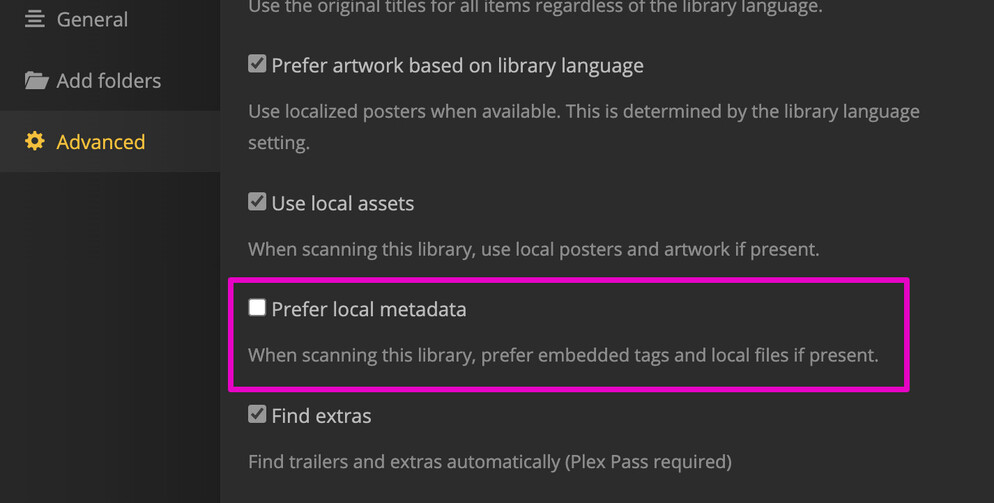
For any future-me who can’t seem to get cast images, apparently the “Prefer local metadata” option which states “When scanning this library, prefer embedded tags and local files if present” should really be titled “Use local metadata exclusively” as that is the only way for my collection to load cast images. I would like Plex to use my tags (as it used to), but apparently that’s not going to be an option if I want cast photos.
Something feels wrong here.
sorry for the late reply! yes, for both:

With your Refresh Metadata not doing any magic, sounds like we have different problems though :\ I also haven’t upgraded my library yet, mostly because I’ve been fearful of ending up in such a state