the1dv
December 2, 2019, 6:14am
1
Server Version: 1.18.2
Since about version 1.16 Plex on QNAP is constantly crashing, I can watch maybe 2 episodes before it becomes unavailable and I have to stop and restart the app. I’ve seen several other threads on here about this and none of them have any kind of indication that it is being looked at.
At this rate there is no point in me renewing my Plex pass as it is unwatchable and completely unfit for service for watching my library remotely?
Are there any suggested fixes?
May I see the log files? I might be able to glean the cause if it didn’t roll out the end of the buffer.
the1dv
December 2, 2019, 6:45am
3
Sure I can PM them to you?
It’s not going well with Plex on QNAP for me.
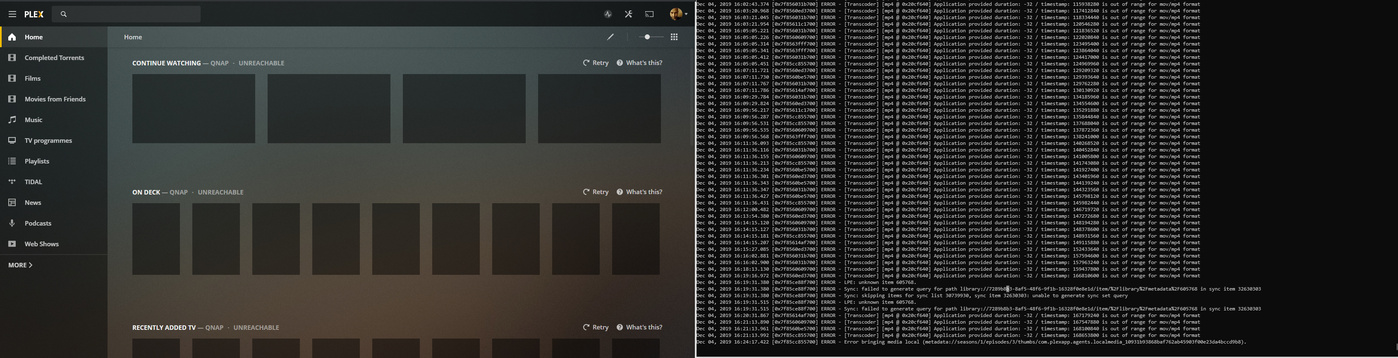
I’m now hitting issues with the web client (Unreachable) - see image
An iPhone (on 12.4.3 running the latest Plex app) which can’t see the server as online
The iPhones on 13.2.3 can’t back up the photos to PMS as JPG files.
For which of the 3 issues, and where? Thanks
ChuckPa
December 2, 2019, 11:02pm
7
Start at the bottom and work backwards.
Clearing the customizations is something discovered to address multiple issues in the Android app. I’m hoping it works here too
the1dv
December 3, 2019, 12:28am
8
This is exactly what i get as well -seems to coincide with library scans too!
vram
December 3, 2019, 1:19am
9
Same issue - shows server as unreachable. It finds a new server nearby…which is the same old server. Problem is I lose all watched history, etc.
Any suggestions for re-establishing connection or restoring history from original server?
ChuckPa
December 3, 2019, 2:16am
10
Owning qnap, we’re all familiar with SSH
Sign out the web browser
close the brower
Open a Putty or SSH session to the QNAP with attached tunnel forwarding:
ssh -L 8888:127.0.0.1:32400 ip.addr.of.qnap
windows-putty users use this reference: Forward source port 8888 to destination port 32400
With this ssh tunnel established, let it sit there.
Should this not allow to regain the connectivty / ownership:
Stop Plex.
Rename “Preferences.xml” to “Preferences.xml.old”
start plex
Open 127.0.0.1:8888/web again
It will want to setup a new server
SKIP creating new library sections. your sessions still exist.
Setup everything else as you want.
When you arrive at the dashboard, you should be signed in and your existing libraries present.
the1dv
December 3, 2019, 3:32am
11
I’m connecting to it directly via local IP, even on the same machine it has problems!
the1dv
December 4, 2019, 3:24am
12
Also is Plex aware that the crash uploader isnt working?
I have tried the above btw - same thing happens - its definitely the Plex backend that is causing problems, im trying to monitor logs now
Dec 03, 2019 19:04:18.271 [0x7f9e8fcab700] INFO - Crash Uploader - Platform: Linux ServerUUID: f6c13af512e165b2e8ba724560da7878e2f3153e UserId: Version: 1.18.2.2058-e67a4e892
Dec 03, 2019 19:04:18.304 [0x7f9e94df7740] DEBUG - HTTP requesting POST https://sentry.io/api/1233455/minidump?sentry_key=xxxxxxxxxxxxxxxxxxxxxxxxxxxxxxxx
Dec 03, 2019 19:04:20.276 [0x7f9e94df7740] DEBUG - HTTP 429 response from POST https://sentry.io/api/1233455/minidump?sentry_key=xxxxxxxxxxxxxxxxxxxxxxxxxxxxxxxx
Dec 03, 2019 19:04:20.276 [0x7f9e94df7740] ERROR - Failed to upload crashdump 6752afc9-2efd-35c9-3faf324c-21c41795: 429
Dec 03, 2019 19:04:20.276 [0x7f9e94df7740] DEBUG - HTTP requesting POST https://sentry.io/api/1233455/minidump?sentry_key=xxxxxxxxxxxxxxxxxxxxxxxxxxxxxxxx
Dec 03, 2019 19:04:22.077 [0x7f9e94df7740] DEBUG - HTTP 429 response from POST https://sentry.io/api/1233455/minidump?sentry_key=xxxxxxxxxxxxxxxxxxxxxxxxxxxxxxxx
Dec 03, 2019 19:04:22.077 [0x7f9e94df7740] ERROR - Failed to upload crashdump 61e32f8c-8545-6633-21b1de55-0cade87a: 429
Dec 03, 2019 19:04:22.077 [0x7f9e94df7740] DEBUG - HTTP requesting POST https://sentry.io/api/1233455/minidump?sentry_key=xxxxxxxxxxxxxxxxxxxxxxxxxxxxxxxx
Dec 03, 2019 19:04:24.079 [0x7f9e94df7740] DEBUG - HTTP 429 response from POST https://sentry.io/api/1233455/minidump?sentry_key=xxxxxxxxxxxxxxxxxxxxxxxxxxxxxxxx
Dec 03, 2019 19:04:24.079 [0x7f9e94df7740] ERROR - Failed to upload crashdump 03ea5f90-86b8-1508-5d4dce9a-3ea1cfe8: 429
ChuckPa
December 4, 2019, 4:22am
13
the1dv:
Dec 03, 2019 19:04:18.271 [0x7f9e8fcab700] INFO - Crash Uploader - Platform: Linux ServerUUID: f6c13af512e165b2e8ba724560da7878e2f3153e UserId: voycey@gmail.com Version: 1.18.2.2058-e67a4e892 Dec 03, 2019 19:04:18.304 [0x7f9e94df7740] DEBUG - HTTP requesting POST https://sentry.io/api/1233455/minidump?sentry_key=xxxxxxxxxxxxxxxxxxxxxxxxxxxxxxxx Dec 03, 2019 19:04:20.276 [0x7f9e94df7740] DEBUG - HTTP 429 response from POST https://sentry.io/api/1233455/minidump?sentry_key=xxxxxxxxxxxxxxxxxxxxxxxxxxxxxxxx Dec 03, 2019 19:04:20.276 [0x7f9e94df7740] ERROR - Failed to upload crashdump 6752afc9-2efd-35c9-3faf324c-21c41795: 429 Dec 03, 2019 19:04:20.276 [0x7f9e94df7740] DEBUG - HTTP requesting POST https://sentry.io/api/1233455/minidump?sentry_key=xxxxxxxxxxxxxxxxxxxxxxxxxxxxxxxx Dec 03, 2019 19:04:22.077 [0x7f9e94df7740] DEBUG - HTTP 429 response from POST https://sentry.io/api/1233455/minidump?sentry_key=xxxxxxxxxxxxxxxxxxxxxxxxxxxxxxxx Dec 03, 2019 19:04:22.077 [0x7f9e94df7740] ERROR - Failed to upload crashdump 61e32f8c-8545-6633-21b1de55-0cade87a: 429 Dec 03, 2019 19:04:22.077 [0x7f9e94df7740] DEBUG - HTTP requesting POST https://sentry.io/api/1233455/minidump?sentry_key=xxxxxxxxxxxxxxxxxxxxxxxxxxxxxxxx Dec 03, 2019 19:04:24.079 [0x7f9e94df7740] DEBUG - HTTP 429 response from POST https://sentry.io/api/1233455/minidump?sentry_key=xxxxxxxxxxxxxxxxxxxxxxxxxxxxxxxx Dec 03, 2019 19:04:24.079 [0x7f9e94df7740] ERROR - Failed to upload crashdump 03ea5f90-86b8-1508-5d4dce9a-3ea1cfe8: 429
That’s a Throttled message.
The host is crashing so much, trying to upload so many reports, it’s making your uploads slow down and wait.
the1dv
December 4, 2019, 5:17am
14
I’m running plex now and I’m following the logs for ERROR, just waiting for it to crash
the1dv
December 4, 2019, 5:26am
15
Ok so exactly the same problem again - there is NOTHING in the logs about this (that makes sense anyway), Videos play fine while this is happening. It is just as if the front-end cant speak to the back-end.
Really need a solution on this as it is unusable
ChuckPa
December 4, 2019, 5:49am
16
For one thing, the transcoder does not like the media file. It may play fine but the time indices are all messed up.
Does it do this for every file?
the1dv
December 4, 2019, 5:54am
17
Looks like it yes - that seems to be a very normal error message when anything is playing through Plex - old or new.
ChuckPa
December 4, 2019, 5:54am
18
I need to see the log files at your earliest convenience.
Please make sure DEBUG logging is enabled but VERBOSE is off.
Please start a playback, let it play for 30 seconds then stop.
Grab (download) the Log ZIP file and attach it here so I can look
the1dv
December 4, 2019, 5:56am
19
Ive sent them in our private message.
Verbose is off and Debug is on.
The PMS version 1.18.3.2111 that I applied tonight appears to have resolved the web client issue for me (with the server flagged as unreachable).issue ).