Server Version#:1.32.7.7621
Player Version#:1.82.2.4024
I have connected via HDMI to my receiver and 50" Plasma TV. The receiver handles AC3 Dolby Digital of multiple flavors and the same with DTS multiple flavors. I have tried both the Plex for Windows and Plex HTPC (which sucks BTW). The settings show Passthrough for all (Dolby, DTS, etc). The Plex for Windows shows the screen as I would expect, but no surround. The HTPC product blows up my screen with everything overly large and NO WAY TO CHANGE IT that I have found. I tried playing a movie that says is 5.1 EAC and it sits there and transcodes I am assuming with the hourglass forever. My downloads ALSO seem to transcode down and lose surround! WHAT DID I DO WRONG and HOW DO I FIX IT PLEASE!!!
BTW - This is running on a Windows 10 Pro machine running Processor AMD Ryzen 7 3700X 8-Core Processor, 3600 Mhz, 8 Core(s), 16 Logical Processor(s)
with 32gb RAM.
What products do I need to watch movies in surround sound and original resolution without transcodin
it is likely the overscan settings on your TV. The brand might not call it overscan. but if you mean the posters are just big with nothing cut off then that is just the interface which is the same as our other smart tv apps.
You have to set the output device correct in settings so it offers the surround options so it knows it is connected to a surround capable device. You also have to set your computers audio correctly
I’m on a mac so the options in `audio device" dropdown will be different but this is where it is. when set to a surround capable device it will show al the other options like in my screenshot.

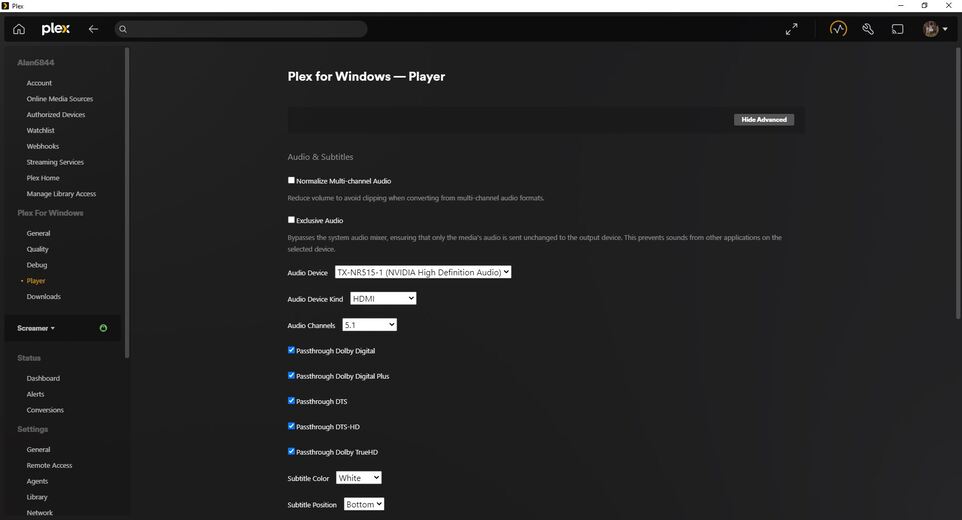
Is pretty much the same with the PC - - and as I said in the original post the same settings that you show are the same in PC. Only difference with yours and mine, is mine has Audio Channels set to 5.1 and ALL THE PASSTHROUGHs are CHECKED. My receiver in an Onkyo that will recognize automatically if the stream is AC3 or DTS and whatever flavor of it. It shows PCM and not the Dolby Digital icon when played through Plex. If I play one of my movies that I converted that I know has surround with VLC player - it plays fine with surround. If played with Plex for Windows Desktop there is NO SURROUND. So is NOT my receiver or Windows settings at all. Is either a codec thing like on one I watched today from a friend that had HEVC codec used that I don’t have. The Windows 10 built in player will not play it at all and errors telling you codec. VLC player will play the video fine, but the audio comes through as PCM 2 channel. Every movie I have downloaded also gets “converted apparently to 2 channel”. I can’t find any setting to stop this. And YES - - Normalize multichannel audio is UNCHECKED. But thanks…I also tried the Exclusive Audio checkbox to see if it made any difference.
How is the audio output set up on the computer itself?

These are the settings - so should be a no brainer! I REALLY WANT THIS TO WORK AS INTENDED!!
Microsoft unfortunately removed Mediacenter from the later versions of Windows after 7. A former Microsoft employee friend of mine started a company and created a product called My Movies for metadata collection and playback across platforms. When MS stopped support, he slowly started to as well and now long standing “features” of his product no longer work. My last stronghold Win 7 “Mediacenter” machine that is connected to 50" Plasma just had the boot drive go out and cannot upgrade for free to Windows 10 for plex anymore. So I moved my Plex server into its place.
BTW - The TX-NR515 is my Onkyo Receiver. Also (interestingly), in the HTPC app I cannot scroll up and down with the wheel like I can in the Desktop Plex app. I have to use the arrow keys to go up or down or left or right as no way apparently to do it with a mouse. And since the resolution doesn’t seem set right or anywhere near the same in HTPC as the Plex app, it is REALLY HARD to get around. I can’t get down to the More section to see my friends machines for example which totally sucks. I also see no way to close the app (I can sign out but not close), so I have to alt tab to go back to windows and then right click and Close Window. This is NOT a problem with the desktop app at all.
Here is the Plex Player audio settings from Desktop app - -
Also what the screen looks like on HTPC - -
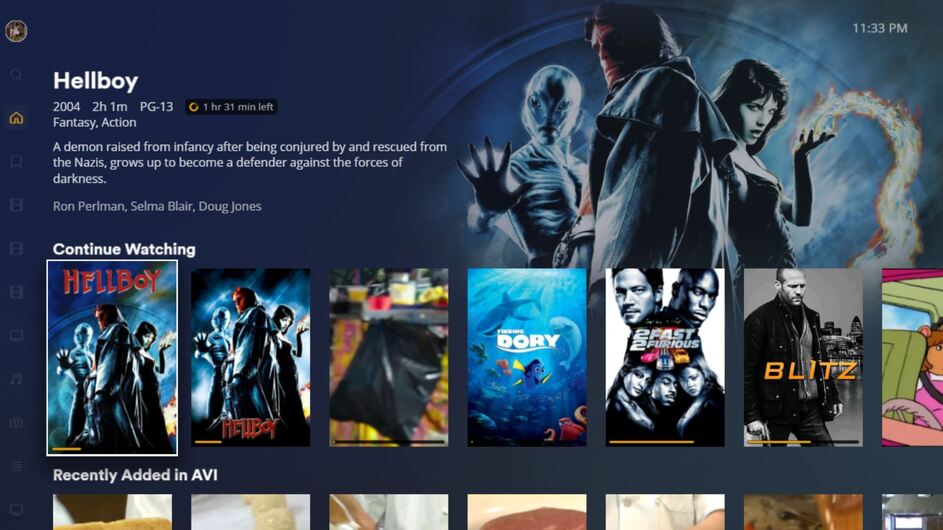
That is the normal looks of the HTPC app. It is meant to run on a computer connected directly to a TV controlled with a remote from the couch like our other TV apps on devices like a Roku etc.
Is it possible to get the desktop app logs after you reproduce the issue?
Even when it IS CONNECTED TO A SURROUND SOUND RECEIVER AND 50" PLASMA???
How am I supposed to move around? The mouse only selects but cannot scroll like in the desktop app. I have to use my arrow keys to get around.
It is meant to be used with a remote you configure with your computer. There are devices like a https://flirc.tv/ that allows you to control with a regular remote which you map keyboard keys to remote buttons with input map file. https://support.plex.tv/articles/plex-htpc-input-maps/
If you want to get a connect device the Nvidia Shield Pro that runs our Android TV app is probably the most capable as far as codec support. I have also heard good things about the new Amazon Fire Cube which also runs our Android TV app but I have not ever used one personally
Will this work with an old mediacenter remote? I just purchased a firestick 4k and roku express 4k but have not arrived yet
Also, can we get back to the MAIN TOPIC please? That of no surround sound?
Sure. I was waiting on you to get logs so i could show it to the team that makes that app.
Here is the logs. Let me know if anything else you need.
Plex.5.zip (900.2 KB)
Or if need to configure a more advanced debug logging if possible.

Those are default settings and I had NOT changed them (they were BOTH CHECKED). Just for kicks, I unchecked both and saved and then checked both and saved to put it back. I did some further investigation on the web, and saw MANY POSTS from even back in 2012 and 2014 that talk about Plex working on Windows 7 but NOT on Windows 10 with surround sound. And I NEVER SEE A RESOLUTION ON ANY POST! So apparently this has been going on for years! As you are a PLEX employee and considering that Windows 10 is REQUIRED for both the Plex Server and the Desktop App, I would like a DEFINITIVE answer - - DOES PLEX PLAY IN SURROUND SOUND (DTS or Dolby Digital for example) on WINDOWS 10??? I also saw mention of a specific OLD driver for Realtek (which has the chipset for most PCs) I think 2.71 that was the last one that worked. Interestingly Microsoft tried that without me saying anything when they took over my machine. Case is still open as I had to go. And WHY do the settings for the player keep RESETTING to Auto when I select my receiver from drop down and HDMI and ALL THE PASSTHROUGHs as CHECKED??? And yes, I do hit save afterward. I think that is why this never works. A BUG!
Plex Media Server.5.zip (1.6 MB)
Any updates from the logs sent?
You mentioned a friends server so wanted to check if this is only happening when playing from your friends server. It looks like the client is connecting that server via plex relay which has a limit of 2mbit/s and would cause transcoding.
I have 3 friends I am connected to. Two of them say their servers are setup for direct access and have been for years. The third person I am not so sure. Can you tell from the logs who is forcing the relay?
it appears to be the one whose server name starts with e
Interesting!! He is the LAST one I would have thought. Server is currently down due to drive maintenance and now new motherboard while at it. He has things automated and stuff so I am surprised. He also specifically said to me the other day before server went down that his router is setup for direct access!
