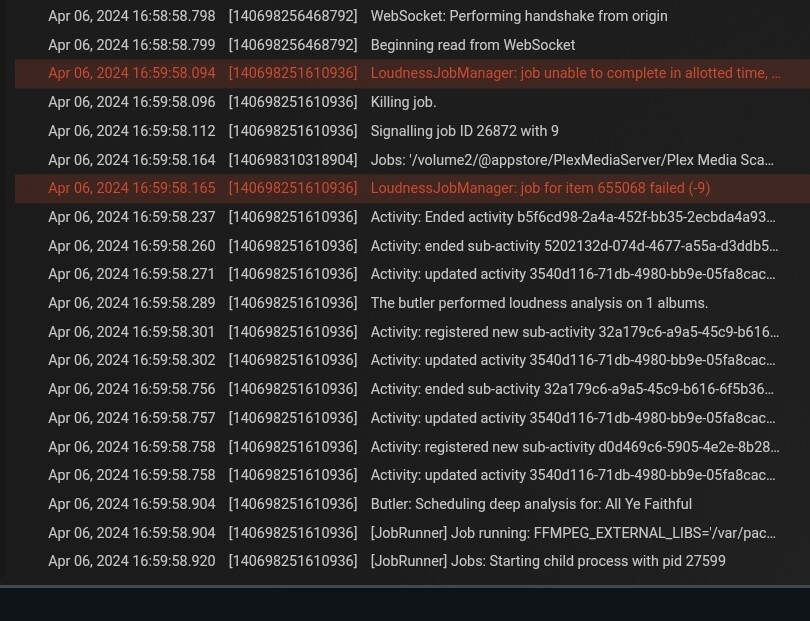
What is this due to? Are they too large audio files in terms of MBs, or too long audio files in terms of playback time?
Is it to do with Bitrates of audio files?
The biggest drawback now is that when analysing again in the Scheduled Tasks cycle, the Butler keeps checking these Albums and only then proceeds with all other tasks. Unnecessary, and this prevents other analyses from continuing.
More likely there are some albums with too many tracks within a single album. Look for albums with a very large number of tracks and remove them. (box sets or custom Frankenstein-albums)
And/or the machine’s CPU is particularly slow, which wouldn’t be a surprise with a Syno. They typically have very low-powered CPU’s which may be fine for powering a data storage device like a NAS, but not for data analysis.
Thank you for your helpful reaction.
I’m gonna check this out.
I followed the butler, but the albums he rechecks don’t actually have that many songs. Most in an album there are 39 in one folder (MP3) but some with a playback time of 59 minutes. Other folders with more songs did get analyzed. Could it be because of File size? Or numbering which is not right? OR, SampleRate/Bit maybe?
Since it is so odd why these are not successfully analyzed, it must be in there somewhere.
Still for now Analyzing is really smooth, not really fast but acceptable.
For analysis, all tracks of an album are decompressed to WAV (although with a lower resolution). Your system’s general /tmp folder must have enough free storage to hold them all.
And yes, the longer a track is, the longer it takes to analyze its loudness.