I’m at a total loss for why my Synology server is incapable of being reached outside my network. I have tried troubleshooting in the past, but nothing seemed to resolve the issues. Recently, we upgraded from our Optimum ISP modem/router to an ASUS AX68U. The Synology server is plugged into the ASUS router. Pretty much everything in our home networking situation has improved, but this issue has stayed the same.
In order to use our own router, Optimum put our modem/router into Bridge Mode, and we’ve been fine with internet access ever since. I bring this up because in researching similar issues to the Unknown error, I came across this post, but I do not know if that applies to our situation.
Our ASUS router has IP addresses from 192.168.50.xx and the Optimum modem in Bridge Mode has the WAN set up in 192.168.1.xx. I cannot make Port Forwarding rules for the ASUS or Synology because the Synology is not connected to it (only our cable box is). Let me know if that’s conflicting things.
Not bridge mode. If it were in bridge mode, you would have a public IP address. 192.168.1.x is private address space, just like 192.168.50.x.
You’re still in a double NAT situation.
Login to the Asus router. On the home page it should display the public WAN IP address when everything is correctly configured.
Try this:
Power off the Optimum router.
Power off the Asus.
Restore power to the Optimum
Wait for it to fully boot.
Restore power to the Asus.
Login to the Asus and check the WAN address. It should be public, not private.
If the Optimum router still boots up in router mode (supplying 192.168.x.x addresses), call them and have them check the configuration.
If they cannot change to Bridge Mode, you still have options.
You can place the Asus in AP mode. This disables routing in the Asus, removing the double NAT situation.
You can do a double port forward, placing forwarding statements in both routers. The Optimum points to the Asus and the Asus points to the Plex Media Server.
The ASUS router page shows WAN IP: 192.168.1.18, but not sure if that’s indicative of anything. Can I proceed from here or do I need to follow up with Optimum?
A few weeks ago when we had this set up in Bridge Mode, they also took off the broadcasting WiFi network which killed the connection to the cable boxes. The tech that came out reset the Gateway device, so that also reset the Bridge Mode.
Just called and had them put it back in Bridge Mode, and now I see a public IP address in the ASUS dashboard.
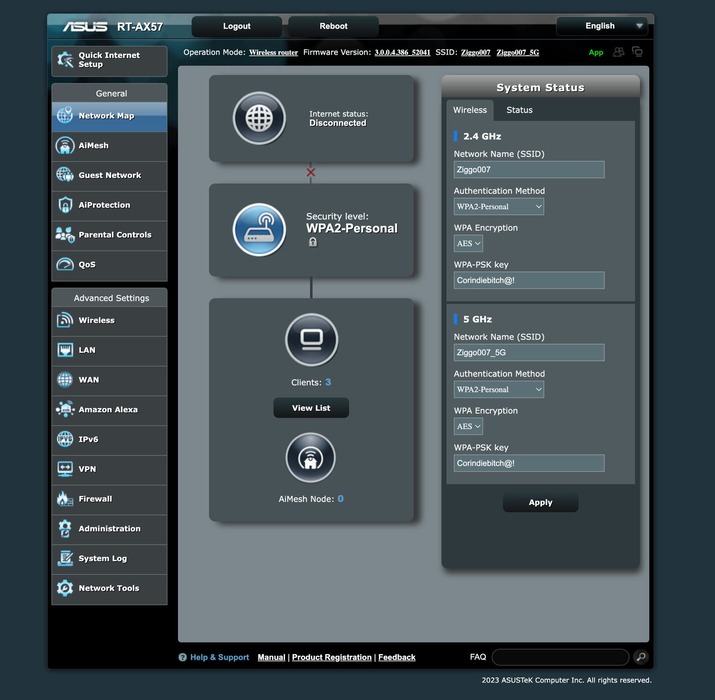
Option #1 is not a possibility in my case. I am using an IPS modem wired to Asus RT-AX57 with VPN. If I turn on AP mode, VPN is no longer a possibility.
Option #2 Could you explain this a little more in detail? What port forward should be where?
VPN: No idea if this works when running a VPN on the Asus router. In general, Plex and VPNs do not play nice with each other. Suggest you keep the VPN disabled until you get port forwarding working.
Use port 32400 for simplicity. You can change it later if desired.
The segment between the ISP router and the Asus must be a different subnet than the subnet between the Asus and the Plex Media Server.
The Asus must have static WAN IP addresses. You can assign it in the Asus settings.
The Plex Media Server must have a static IP address.
In the ISP router, forward port 32400 to the IP address of the Asus router.
In the Asus router, forward port 32400 to the IP address of the Plex Media Server.
Example:
ISP router <---- Ethernet ----> Asus RT-AX57<---- Ethernet ----> Plex Media Server
192.168.0.1              192.168.0.2    192.168.1.1              192.168.1.2
ISP router:
Port forward TCP/32400 to 192.168.0.2
Asus:
WAN port connected to ISP router via wired Ethernet.
Static WAN IP address of 192.168.0.2
Static LAN IP address of 192.168.1.1
Port forward TCP/32400 to 192.168.1.2
Plex Media Server:
Connected to Asus LAN port via wired Ethernet (directly, via LAN switch, etc).
Static IP address of 192.168.1.2
Manually specify port 32400 in Settings → Remote Access
I looked over the screenshots several times, to make sure I have things correct. Let me know if something looks wrong.
Given:
ISP router <---- Ethernet ----> Asus RT-AX57<---- Ethernet ----> Plex Media Server
192.168.178.1          192.168.178.2    192.168.179.1              192.168.179.x
Then:
The WAN/LAN addresses in the Asus look correct.
The port forward statement in the ISP router looks correct, as it points to the Asus WAN address.
You may need to configure a default route in the Asus router, pointing to 192.168.178.1. I do not know where that is configured in the Asus router. Maybe in LAN → Route (that is a guess based on screenshots).
The Synology NAS will have a 192.168.179.x address.
The default gateway for the Synology is 192.168.179.1, since that is the route off of the subnet.
The Asus router needs a port forward statement.
Forward TCP/32400 to the IP address of the Synology.
Example: Port forward statement from an Asus RT-AC68U.
Yours will have External Port = 32400, and Internal IP Address = IP address of Synology NAS.
The Asus WAN port connects to a LAN port on the ISP router.
Because you are using port forwarding, the ASUS needs a fixed WAN IP address.
There are two ways to do this:
Manual Address Assignment
You configure the Asus with a fixed IP address such as 192.168.178.2.
DHCP Router Reservation
If the ISP router supports it, you can use DHCP Router Reservation (it may be called something else).
You configure the ISP router to always assign the same IP address to the Asus router.
You will have to look through the ISP router menus (or maybe talk to your ISP) to see if the router supports the capability.
If using this method, the Asus router is set for Automatic IP.
FYI, Asus calls it “Manually Assigned IP around the DHCP List.” You can see it in the screenshot you posted. You do not need to configure this on the Asus, but it will give you an idea of what to look for in the ISP router menus.
Either method will work.
These are OK.
Connect the Asus WAN port to one of the ISP LAN ports.
Assign a fixed IP address to the Asus WAN port using either method mentioned above.
You should then see the Asus say “connected” like in the screen shot above.
Ik heb zowel het portforwarden geprobeerd als de DHCP optie.
Maar bij beide situaties mocht het niet baten. Wat frustrerend, ik hoop dat je kunt vinden waar het fout gaat!