What's up with PLEX's bandwidth usage (local and remote), it tends to use 2x more than it should?

Firefox on Linux (on the same machine PMS is on), comparison to Emby:


Plex (left) vs Emby (right).

Emby is consistently faster at initial video startup as well as overall streaming. This isn’t just me, on Discord I have been asking friends to test Emby vs Plex (both using my PC’s server) and every one of them stated Emby has been smoother in playback startup speed and overall playback.

On my Sony Android TV, using ethernet, PLEX is unusable for a 4K Blu-ray, where-as Emby does it without a hitch.

I genuinely believe something funky is going on because every time I monitor stats for Plex, its very unstable. It almost always state the playback bitrate at 2x the average bitrate of the source file too. For example when playing Twilight 4K UHD HDR Blu-ray, it stated 200 Mbps, yet the file is 80 Mbps average. Even for something lightweight like a 1080p SDR AVC file that is 50 Mbps, it stated it was 120 Mbps.

If I look at stat graphs while playing videos (either me or other people) it is incredibly unstable, alternating from 0, to something, to 0, to something, on repeat sometimes 0 being 1 or 2 Mbps.
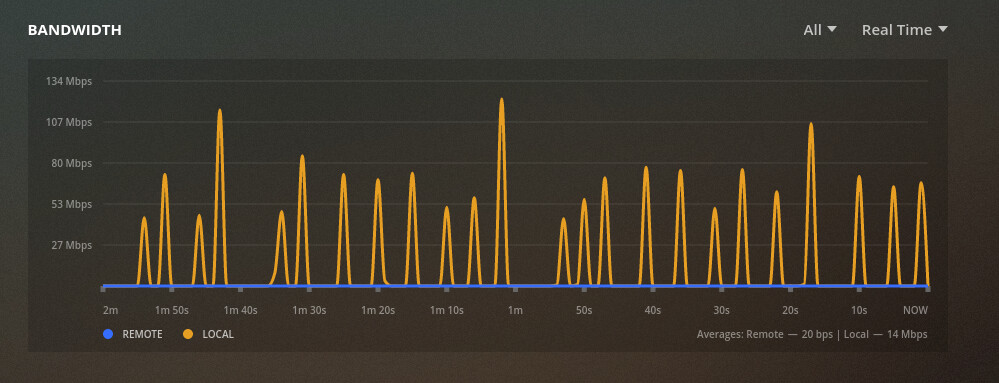
Something is clearly wrong here. Both Emby and Plex for these tests were never used simultaneously other than the comparison video, even then you cannot say Emby was given special treatment because Plex had it’s play button clicked noticably first.
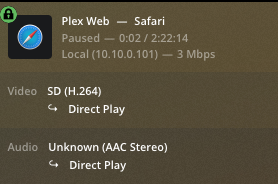

The bandwidth chart looks pretty normal.

  • The client downloads a portion of the video to the cache. This happens as fast as the network and device can support.

  • Then the client decodes and plays from the cache.

  • Eventually the cache gets a bit low, so the client downloads another chunk into the cache, as fast as possible.

  • This is further exaggerated on devices with large caches, fast networks, and low-bitrate video. My TV can download a big portion of a low-bitrate cartoon, and only grabs a new chunk every minute or two.


But that’s not to discount your complaint about slow startup or failure to play. Those deserve investigation.

For your Firefox Plex vs. Emby example, is it possible that Plex was transcoding, while Emby was playing directly? I don’t know what the in-browser capabilities of Emby are.

They were both using the exact same source file, so it wouldnt really matter what PLEX did differently regarding the content the browser gets.

Either way, they were both transcoding.

Something else to bear in mind is how Plex calculates the bandwidth requirements for streaming media. For newly added files, which have not yet had deep analysis performed, it calculates the bandwidth required for the video stream to be two times the average bitrate of the file. So, if you are playing a 4 Mb/s file, Plex will use 8 Mb/s when deciding the requirements.

Deep analysis provides a more comprehensive assessment of the bandwidth requirements. Instead of using the average bitrate of the file, it is analyzed to find the peaks; it then calculates the bandwidth required for various client buffer sizes and writes that information to the database. So, when a client requests playback of the media, it determines which buffer size to use and then uses the value calculated for the buffer size.

Deep analysis isn’t performed on media immediately, when it is added. It occurs during the scheduled tasks period for the server. And then, it is only performed if the option to enable it is selected:
Settings -> Scheduled Tasks -> Perform extensive media analysis during maintenance
You can manually run the scanner and force it to perform deep analysis (using the --analyze-deeply command line argument).

I mention all this because it may explain why you’re seeing the bandwidth being reported as it is (if not the cause of delays in playback/buffering), if the media is newly-added and hasn’t gone through deep analysis yet. The value reported by Plex in the dashboard is the calculated bandwidth requirements plus requirements for all other streams in the file (audio and subtitles).

There’s some information here which might be interesting. What I described above is documented in the “So, How Does Plex Handle it?” section. I haven’t used Emby extensively, so I’m not familiar with how it handles bandwidth requirement calculations. Perhaps it performs something akin to deep media analysis immediately, at the point media is added to the server.

[Edit to add]
You can see whether a particular item has gone through deep analysis by selecting the vertical ellipsis in the bottom-right of its poster, selecting Get Info, and then selecting View XML at the bottom-left of the resulting dialog. Look for a line similar to this in the video stream attributes:

requiredBandwidths="28025,27607,27156,26791,26774,26774,26774,26774"
1 Like

This all sounds likely to be the reason. But, why is there no option to just force it to be immediate on import? Why can’t I just tell it to run the scheduled task in the web admin ui? How can I run that cli arg with docker?

From your container’s command line:
"/usr/lib/plexmediaserver/Plex Media Scanner" --item 317 --analyze-deeply --force

Replace the item number with that of your particular media item. You can find the item ID by listing the items in a section:
"/usr/lib/plexmediaserver/Plex Media Scanner" -l # To list your sections for movies, TV, etc…
"/usr/lib/plexmediaserver/Plex Media Scanner" -c section_id -l # To list the items in that section.

Is it possible to deep scan the entire thing forcefully?

Deep analysis will influence which stream is selected for playback, and the decision to transcode or not, but it doesn’t affect the bandwidth chart on the dashboard, or the download/buffer/playback cycle once things are playing.

My point is that the video isn’t streamed smoothly at the video’s bitrate, chunks are downloaded into the client buffer as fast as possible. Bursts in the bandwidth graph are normal, will occur whether deep analysis has been performed or not, and don’t indicate a playback problem.


Analysis should automatically happen nightly, if you haven’t disabled it.

I think the first (or maybe both) of these might launch the job manually.

curl -v -X POST http://ip.ad.dr.es:32400/butler/deepMediaAnalysis

curl -v -X POST http://ip.ad.dr.es:32400/butler/upgradeMediaAnalysis

If you test that, I’d love to get confirmation. I’m not sure if it works from 127.0.0.1 without also giving a key, but I think it works from another ...allowed without auth IP address.

1 Like

I probably should have been clearer as to what I was referring to. Specifically, I was referring to the bitrate shown in the playback information on the dashboard; which is what I, in turn, assumed the OP was referring to regarding what PMS stated the bandwidth was.
image

At any rate, deep analysis does impact that. The movie from the screenshot above reported 5 Mb/s before I forced it to be deep-analyzed.

Also, I completely agree with your earlier statement that the bandwidth chart looked normal; that was my first thought looking at it as well. My post was mostly intended to explain why the reported stream bitrate was normal as well.

Hopefully I didn’t introduce any confusion as to what deep analysis is actually going to accomplish and how it will (or won’t) impact streaming.

1 Like

I’m seeing these “requiredBandwidth” entries even though I have the “extensive media analysis” option disabled in the Scheduled Maintenance settings. Does the mere presence of these lines (I see them in audio and video sections of the XML) mean that the deep analysis has occurred, or do they need to be specific values? If the former, is there another way that deep analysis is performed other than during scheduled maintenance?

Update: I’m only seeing them in my Movies library, not in any TV episodes.

I should note, I have Deep Analyzed the content and its still very rough playback compared to emby. I’ve been discussing it on Discord and people keep telling me to try this or that to do with stuff outside of PLEX, like my OS, how I’m loading PLEX media server, my connection itself.

However, everyone seems to be forgetting that Emby is handling it like a boss without me having to do anything different, force any scans, or any annoying crap like that.

The whole point of this thread is to spotlight that PLEX might be doing something wrong, or at least inefficient. Now I can’t see the code so I cant check, but I would love to see what they are doing internally compared to Emby, as whatever Emby is doing is working much much better.

As I stated previously, tons of people I had test Emby has reported much smoother playback and in all cases it either matched PLEX in terms of what needed to be transcoded or not, or Emby surpassed PLEX in those regards (due to bandwidth availability).

EDIT:
One thing I have noticed time and time again in all the discussions is that PLEX seems to absolutely pile drive the content from the server to the client. Perhaps that is what emby is doing differently. Perhaps instead of doing a buffer-fill asap style, they instead perhaps smooth-stream the content i.e. send small chunks as the user plays the content, instead of trying to fill a x amount of seconds worth of content into a buffer, and instead tries to fill x amount of bytes as it streams. Perhaps the client requests the amount of chunks it wants instead of the server pile driving it down it’s throat.

It’s possible the PMS shoving it down its throat is stifiling the bandwidth available to the server while its doing that, causing it to seize up for a bit, which then dominoes into buffering issues as it tries to resolve itself, but then the client tries robbing lots of the recovering bandwidth?

In Plex (and Emby and Netflix and every other common player and service) the model is that the client requests chunks of video, and the server delivers them in response. The client starts decoding and begins playback as soon as a minimum threshold is reached, and keeps requesting more video until a buffer-fill threshold is reached. The client then plays from the buffer, and requests additional chunks when a low-water-mark threshold is reached.

Different devices obviously have different maximum buffer sizes, and different software sets the “start playing” and “get more data” thresholds differently.

Not saying Plex is working for you. Or that it’s better. Just there’s no “pushing”.

It appears the example video is 4K HEVC HDR. Plex Web doesn’t support HEVC in Firefox, so the server must be transcoding. And if it’s HDR, the server might also be tonemapping - another server-intensive task.

But you said this happens on a TV, too. What do you see in the server status dashboard when it’s playing?

This topic was automatically closed 90 days after the last reply. New replies are no longer allowed.