I find PLEX confusing and hard to navigate, being a non-techie as I am. I recently noticed several of my Libraries had been “pinned” on the side panel. Not knowing what that meant or how these selections got there, I “unpinned” all of them that were Libraries I knew I had created. Now I cannot find these missing Libraries. Where did they go? And can I undo what I have done?
Thanks to [tom80H] and [Ismelda] for the comments. I, too, was directed to the HELP page describing that Libraries that are “unpinned” from the “pinned” section revert to the “More” side panel. I unpinned many Libraries and none of them have reappeared anywhere. They’re not in the More section and I can’t find them. I’m using Win 10 on my home PC.
Well… More shows all your libraries – those on your own server(s) as well as those shared with you by friends.
If they’re not showing under the More section, you might have actually deleted them for good or if those were libraries of friends they might no longer be sharing them with you. Plex has no other hiding place for unpinned / removed libraries.
I have no shared libraries and I am accessing PLEX via your specified URL. And I have no other PLEX accounts. I just tested “unpin” on another library and it did revert to the MORE section. I don’t know how I actually deleted my missing libraries as I only clicked on the “unpin” button, and nothing else. Are these PLEX library files stored anywhere else on my PC?
Those are stored in the Plex Media Server’s database, not as individual files.
You can check if your server has some backups of that database and attempt to restore one of those
This referred article looks promising, tom80H, but please help me understand step 3 in the restore instructions. It says “Duplicate the database backup file into the correct directory…? What exactly is the correct directory?” I have attached screen shots…and I have no idea what PLEX Media Server_OLD is. Should I, or could I delete this?
For tom80H…Some clarification. The above article shows me where the backups are, but if I copy them to replace the current corresponding files, where are these located? And do I move the current files, renaming them with the current date and replace them with the selected backup ones I’ve copied? And then do I then replace the backup files I just used + the renamed current files back into their original folder? I need a little more hand holding, please.
This is very odd…several days ago I unpinned all of my created libraries and they went away, not to MORE but just disappeared. Now today they are back, but they also appear in MORE, In addition there are many more of my created Libraries that are gone. Could there be a PLEX backup somewhere and could I restore from that? I’ve read the articles privided by tom80H (thanks again, tom) but I can’t follow them exactly.
Also I’m not sure why you want to call your Libraries a drive name, when Comedy for example can be all in same library, TV in one Library. Then collections in different Libraries, Plex arrange collections.
Are you sure you they are not there if you scroll the side bar? There should be things under the Babylon 5 TV library in the second screenshot.
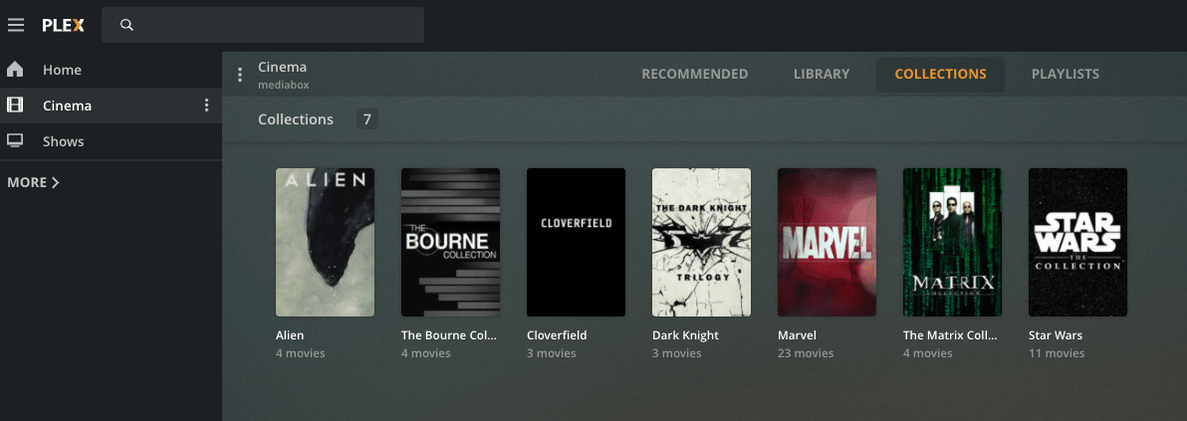
To be clear the pinned libraries on main home screen sidebar are like “Favorites”, when you click MORE> that is where all your libraries should show whether they are pinned or not. Like my screenshots I only have “Cinema” and “Shows” libraries pinned because that is what I use the most. When you click More you are seeing each Plex Media Server you have access to (Mine is called Mediabox) and all the libraries it has. Like my Gopro library which I rarely view things from.
Also why make separate libraries for every franchise of movie? You can create collections within a single movie library to group things like that.
Like in my single movie library called “Cinema”, I have the various franchises in Collections.
Thanks, SE56, for commenting on my post. FYI, I am a senior, non-techie, and have a single home PC. I have read several of the support articles but will re-read for more clarity.
My Library is scattered across multiple drives and each one has a certain arrangement and content I like. I will, however, rethink this arrangement since until just recently I was not aware of “collections” available in PLEX.
But, my main concern is a problem of my own doing, I’m afraid. I unpinned multple Libraries as I didn’t understand about “pinning.” When a Library is pinned, does it move out of MORE and into PINNED, or is it listed in both areas? At any rate, when I unpinned multiple Libraries they just disappeared, they did not go into MORE, they just disappeared! Now I find that many of my Libraries no longer show up anywhere! That is why I’m hoping there is some kind of auto-backup out there I don’t know about.
Hello again, BigWheel. You were so helpfull in setting up my “V” Library when I got stuck, that I was hoping you might be available again. I tried to message you, but I probably didn’t do that correctly, either.
I think I may have lost most of my PLEX Libraries…I’ll try to block quote the explanation I made above to SE56…
Well, that didn’t work, but at least I got the copy pasted in for you. Thanks for looking this over.
Mod-Edit: put a block-quote around the section where you’re quoting yourself
To restore an old database like the article @tom80H linked you only need to restore one of the backups of the com.plexapp.plugins.library.db file not the entire Plex Media Server folder. Depending on when that backup was made you might have to redo the fix for V you did the other day.
Thanks for your reply, BigWheel. Sorry for the delay, I never got notice of your new posting. At any rate, I am attaching screenshots for your review. I don’t see the file you cite, is that because I’m dealing with a PC an not a phone? In the article tom80H mentioned, I don’t see the files mentioned there either. I must have made a real mess of PLEX somehow. Maybe you can decipher where we are and how to get to where we need to be to get things back in order.
Hi, OttoKerner, I’m glad to have your help. I am attaching what I think you have asked for, but I have no “server” under settings. I have settings - transcoder …
OK, this is looking ordinary.
Now, take a look into the Windows registry.
in the branch HKEY_CURRENT_USER\Software\Plex, Inc.\Plex Media Server
is there a key named LocalAppDataPath?
And if so, what is in it?


 !
!



