I don’t see the “LocalAppDataPath” key:
[Moderator edit: removed screenshot]
I don’t see the “LocalAppDataPath” key:
[Moderator edit: removed screenshot]
Pleae never post screenshots of your registry, unless you have blocked/blurred the content of the ‘Token’ keys.
The fact that there is only one backup inside of
C:\Users\<username>\AppData\Local\Plex Media Server\Plug-in Support\Databases
leads me to the conclusion that previously your Plex data folder may have been elsewhere.
Did you clear out the Plex registry branch recently?
If you look closely, you can see there is a folder
C:\Users\<username>\AppData\Local\Plex Media Server\Plex Media Server
i.e. the whole folder structure appears to be replicated one folder level deeper.
I assume that is where the backup file from your earlier server installation can be found.
Please dive down into that folder and see if it has indeed the whole folder structure repeated.

As a non-techie, I don’t understand your comment about ‘Token’ keys. I don’t know what they are, why they shouldn’t show them, or how to block/blur that particular content. Sorry if I posted incorrectly…just trying to be as helpful as I could be.
Again, as a non-techie I don’t understand what a ‘Plex registry branch’ is, therefore I don’t know how to clear it out…at least, not intentionally.
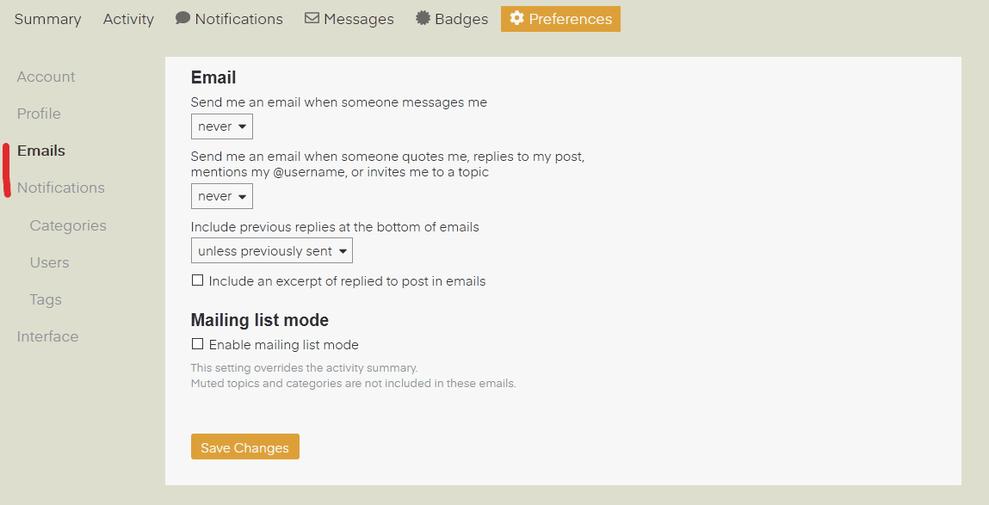
By the way, I’m not getting any email notification when you reply. How can I set this topic to do that for me?
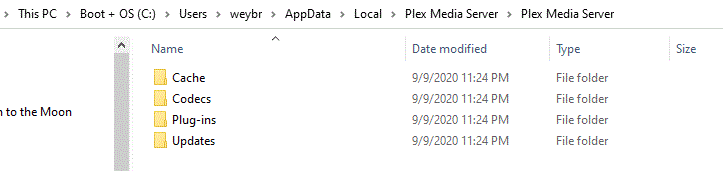
Your requested folder content query follows"
Hello, Otto. I haven’t heard from you recently and I was afraid I had missed any posting you might have made to this topic. Could you please review and give me some direction?
Something like this: https://support.plex.tv/articles/204059436-finding-an-authentication-token-x-plex-token/
They are as good as your plex account password. So never post them in a public forum like this one here.
That is what you made the screenshot from. HKEY_CURRENT_USER\Software\Plex, Inc.\Plex Media Server is the Plex Server branch of the Windows registry
.You can activate this in your forum profile
OK, thanks. Judging by the date stamp on these folders, this appears to be a remnant of your earlier experimentations. You could probably delete this particular subfolder.
Hi…I checked my email preference and found it incorrectly set…now reset I got this reply. Thanks. And thanks for answering my questions. After this long journey, it appears that I managed to delete all my stored library backups…yeah, me! I can’t thank you enough for your patience and most excellent explanations/illustrations for me to follow.
Just one more thing, please. I want to print to PDF several of the support articles for my files but the print preview I get only shows the strange preview below. Is there some special procedure I need to follow to print one of the support articles?
IMO, just don’t. Those articles are changed and updated occasionally, so printing them out is just a waste of resources.
If you want to do it nonetheless, there are special converter services available online. (google “web to pdf”)
The paid version of Adobe Acrobat also has a specialized feature to save websites as pdf (retaining the links to sub-pages etc.).
You could also just employ the open source tool wget to download a local “mirror” of the support website https://support.plex.tv/articles/
Thanks, that on-line converter will work just fine. Working with you has been great! Many thanks.