Server Version#:7.2.2-72806
Player Version#:1.41.7.9823
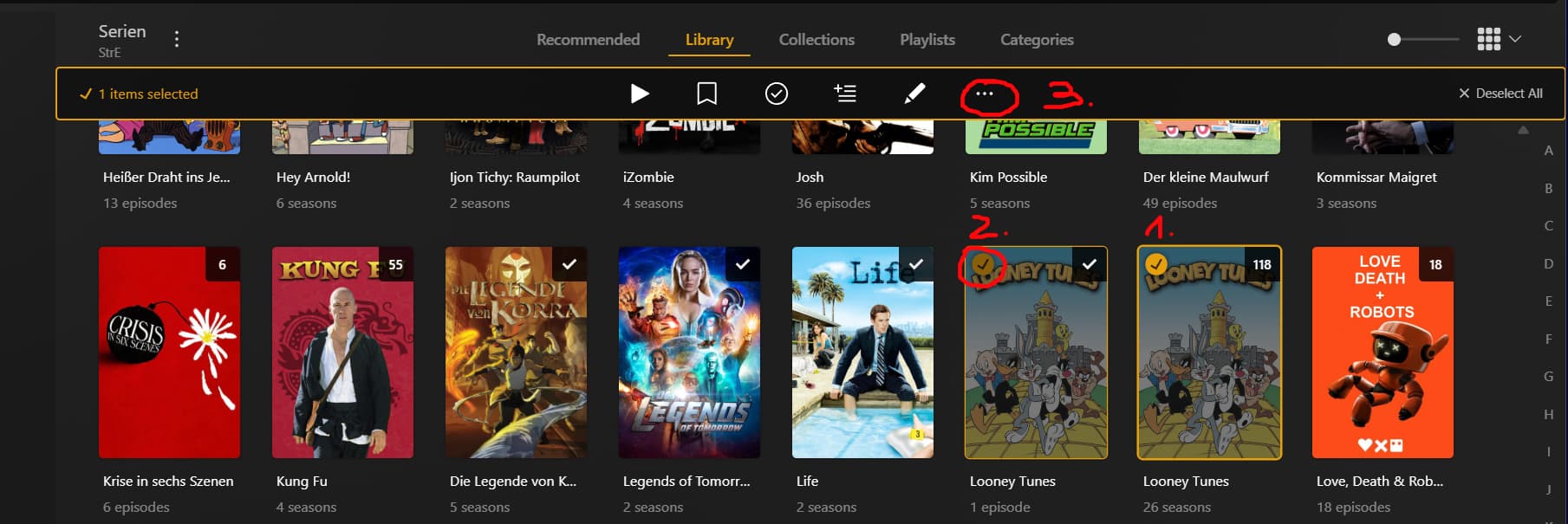
In previous versions you could select a number of items with a radio button at the upper left-hand corner of a tile, then use the resulting visible menu at the top of the window to select a “Merge” function. Looks like that is gone. Is there somewhere else to merge items?
Last I checked (days ago) it was still there, I use it regularly.
This may be a PEBKAC issue. I was attempting to merge two seasons of a show that while the same show, perhaps for whatever reason Plex sees another way. Thanks for confirming, although it was something I could have fleshed out with a bit more testing. 
You can’t merge seasons — just shows.
Interestingly, Plex broke out one episode into a separate season and while my credibility may be shot bringing this question to the forum to start with, I don’t see a normally included option to Fix Match for this one episode. So, I was hoping to merge this with the other seasons just because it feels like an outlier. Interestingly, although all named with the same naming convention, Plex also skipped some episodes altogether. I went back to my library to make sure I have an appropriate agent, even tried a different one without success. I guess I’m just going to let it lie.
Thanks to all.
That seems odd… though it’s most likely a file naming / organization problem.
Would you mind share an example of how those episodes are named and organized in your library folder?
You cannot Fix Match for a single episode either. This is only available for the show as a whole.
First, verify that the episode in question appears with the correct season and episode number. If it does, switch your library into Shows view mode/browse to the Shows. Make it so (i.e. filter if you must) that both the correct show and the deviate show are together on screen.
Now toggle the “Select” radio button of the correct show poster first, then select the poster of the deviant show. You should now be able to Merge.
Side note: Plex should not rip apart shows, if all their episodes and seasons are stored together, in the recommended folder structure. Only if you have a show that is distrubuted across several media paths (perhaps for space reasons) this may be a thing.
Issues like the above should always first be attempted to be solved at the file and folder level. Try to edit inside of Plex as sparsely as possible.
I use Filebot for the naming. So it’s TV Show Title - 1x01 - Episode Title.
For the library, I use Plex TV Series Scanner, Plex Series Agent and Episode ordering The TVDB. Everything is default after that.
In general, is there better setting(s)?
“Episode Ordering” would only appear in the properties dialog if you select
Scanner: “Plex TV Series”
Agent: “Plex Series”
Don’t change away from that. It won’t do you any good for regular series content.
So do I. But you need to tell Filebot to use the supported naming scheme for Plex instead of sticking with its default, which is oriented on Kodi (I think).
Personally, I use this format string in Filebot for tv shows:
{ny}/{episode.special ? 'Specials' : 'Season '+s.pad(2)}/{ny} - {episode.special ? 's00e'+special.pad(2) : s00e00} - {t.replaceAll(/[`´‘’ʻ]/, /'/).replaceAll(/[!?.]+$/).replacePart(', Part $1')}{'.'+lang}
It creates not only the correct file name, but also the correct folder structure.
Typically, I uploaded my items from a central repository off the server, all with the same naming conventions TV Show Title - 1x01 - Episode Title. I really don’t like editing in Plex and make sure I do it as little as possible. Interesting, the case I’m referring to that was segregated out is way outside the original running of the series. The series aired in the 60’s, but the Plex segregated episode was identified as in the 90’s, but was part of the series from the 60’s. I may go back and do a deeper dive on this and not trust in the identification that Filebot does.
Particularly with remakes, it is crucial to include the release year of S01E01 into the series folder name.
Hence why this is part of the naming guide. https://support.plex.tv/articles/naming-and-organizing-your-tv-show-files/
Thanks for the solid tips.
In the interim, just testing and messing around, I deleted that series from my server, then did a Plex>Troubleshooting>Clean Bundles>Optimize Database function, then reuploaded from my central repository. Once uploaded, Plex identified all the episodes and nothing was segregated. I’ll use your suggestion moving forward. Thank you.