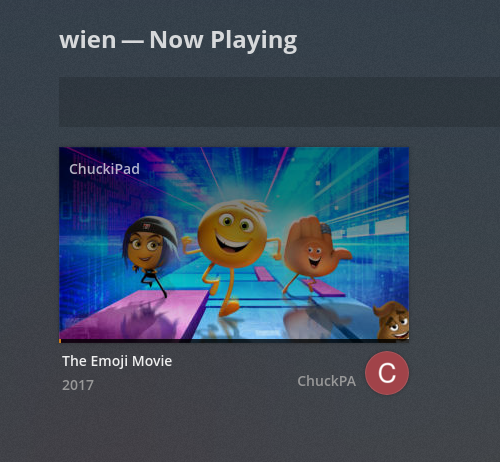
Recently I saw that devices are just sitting buffering, so i wanted to kick them off. But I can’t. its gone!
I usually read through release notes, but coule have overlooked. Has this feature been removed for some reason? Whats the deal?
How can I stop people from playing on the server?
Now Playing -> Hover over the video playing -> Click the X and stop it.
Aren’t you seeing this?
No, that’s not showing up either in google chrome browser. I’ll submit screenshots when I get back home
This is what I see in Plex/Web on Chrome
Move the mouse over the window
OS distribution and version, Chrome version, please?
Windows 10
I am a Linux guy. I don’t know about Windows or how to proceed further. Somehow your thread was created in Linux. I’ll move it to Windows and ask one of the Ninjas to step in.
Thanks, probably my fault since the Server is a linux server
Oh wait, that was your original question, the PMS system?
g@g~$ uname -a
Linux g 4.4.0-62-generic #83-Ubuntu SMP Wed Jan 18 14:10:15 UTC 2017 x86_64 x86_64 x86_64 GNU/Linux
Is the server on Linux or Windows?
Does accessing PMS’ Now Playing and not seeing the “Stop Playback” appear the same on both Plex/Web Windows Chrome and Plex/Web Linux Chrome ?
If I may jump back in here?
Where’s the Linux kernel reference coming from? Is this where PMS is running?
I have an additional request:
Being a Plex Pass user, you can ‘Launch’ Plex/web (which is a different version) than that which is bundled with the PMS you installed.
Please let me know if Now Playing works correctly there .
system
October 10, 2018, 10:11pm
16
This topic was automatically closed 90 days after the last reply. New replies are no longer allowed.