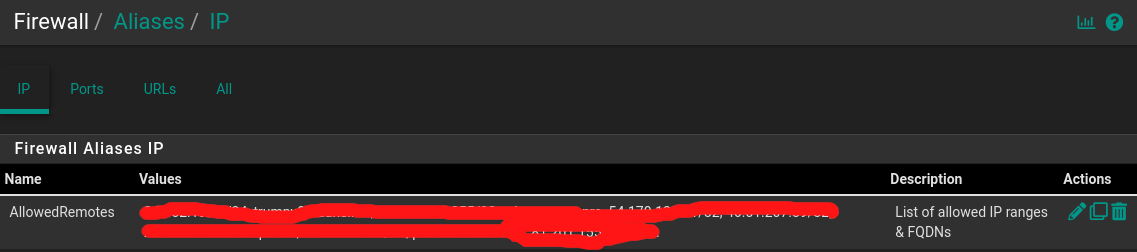
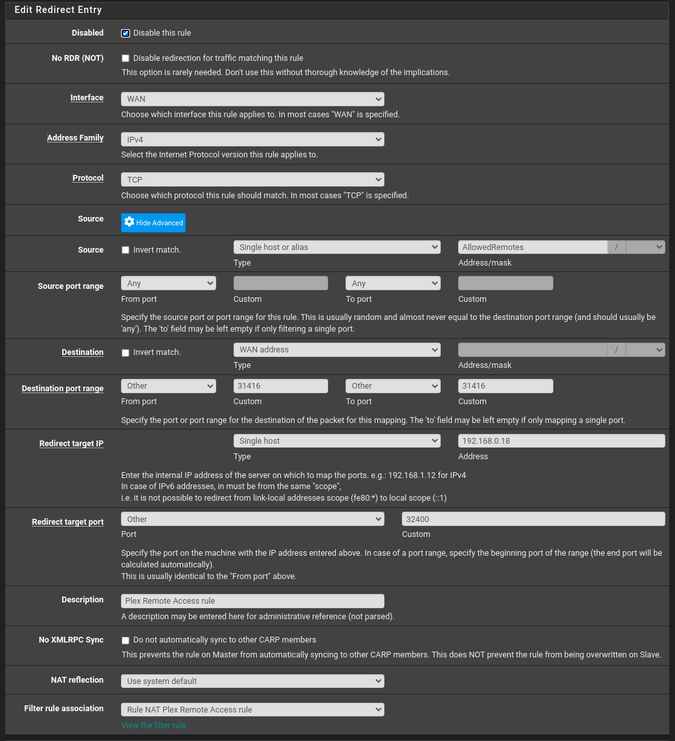
Using that Alias list, Create a NAT PASS rule to port foreward from the WAN address (inbound attempt) to the LAN outbound to the IP of the server (old server LAN IP here)
Oh… there’s 2FA in there? That’s probably tight/fine (unless you’re worried about State Grade hackers breaking NIST encryption keys). The bigger issue I have leaving any ports open/forwarding are all the world bums focusing on me and deluging me with endless pen scanning. Who needs that ?!?
The only people here who can access Pfsense are those of us rolling our own linux vms and hot servers. I do that… but that’s more “work” than “home”… plus at home you need to bridge your ISP’s router, but then you lose your free home wifi… needing to spend another few hundred $ to provide this hardware down the line. Few people will incur this additional wifi-router expense… plus more $ expense for a 2 homed server box to run Pfsense… But its a luring prospect…
So… you’re running Pfsense at home? You’re bridging your ISP’s router? How serioys is the box running Pfsense? You have 2 eth’s? What’s your OS on that box?
If you’re in PA we probably have the same ISP - Comcast/xFinity? I also have no ISP equipment, but I’m referring to my front device as “ISP equipment”… a Arris modem with 4 ports and 2/4/5.0 wifi. Lately Arris is now offering modems with 2.5gbs WAN speeds (which I think my local Comcast is supporting… at a higher price tier?). When I’m measuring such, I’m not typically seeing speeds greater than 350mbs, and I’m rarely running more than 2 such simultaneous streams… so if they’re charging me for 2.5gbs, it doesn’t pay to upgrade to this service. Maybe if I had 6 people in the house all streaming different HD TV shows at the same time… then 2.5gbs service MIGHT make sense…
I’m nowhere near as well versed with networking as @ChuckPa (or probably you based on this discussion) but I have this model system from Protecli, https://protectli.com/product/fw6b-core/, and I run pfSense on that.
I have Verizon Fios and from the ONT I come into the WAN port completely bypassing the router from Verizon. With internet only it’s much easier (the router for Fios does some port forwarding for TV guide data and caller ID on TV stuff if you have phone as well, which we still do, but I was able to get that working).
Honestly, other than that phone/TV stuff I mentioned, it was pretty simple to get up and running and not super expensive. It could’ve been cheaper if I had other systems around that I could use but I’m able to get my full “gig” speed from Fios with this setup (really 940 Mbps/880 Mbps).