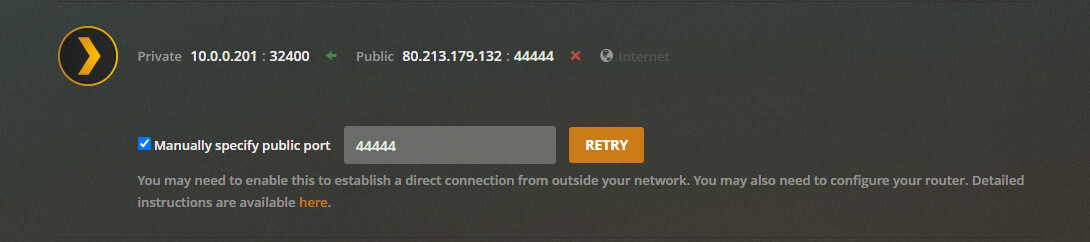
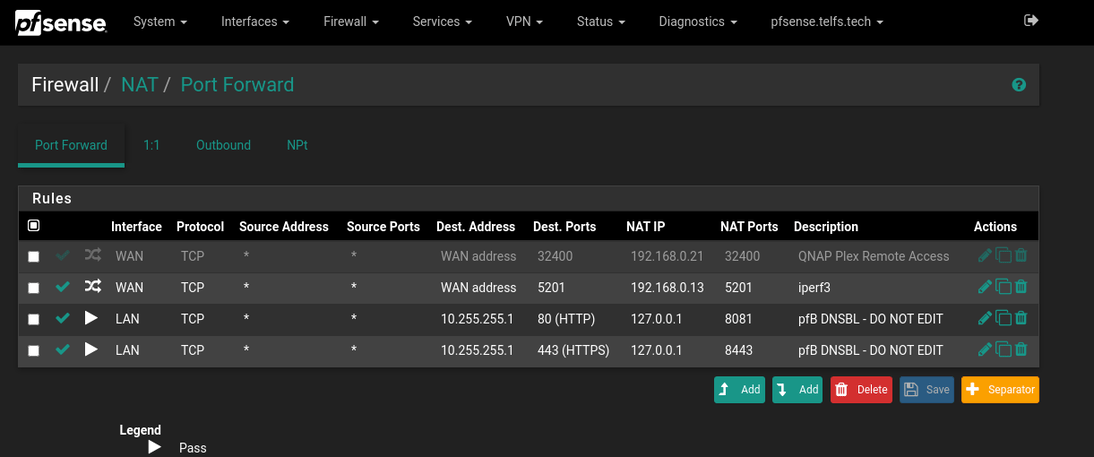
So I recently swapped my ISP router with a pfSense box. In doing so i set up static DHCP leases for my plex server (10.0.0.201), forwarded my old port 44444 to it by translating traffic to 32400 and then finally enabled UPnP which by default is off on pfSense. Even so I can’t get remote access working. Can anyone see an issue with my port forwarding or UPnP rules:
In the screenshot, it says “Destination Address = WAN net”. I am not familiar with pfsense, but shouldn’t this refer to your internal LAN. After all, you are forwarding packets which are arriving at port 44444 on your WAN interface, to port 32400 at your plex server’s LAN interface.
It’s working fine locally. I needed to alter the way pfSense did the port forwarding to allow Plex to access the server through my WAN address when using plex.tv
As far as the nomenclature is concerned I believe destination address is tied to the interface. So the WAN address just means that the traffic is arriving at my WAN address whatever that may be at any given moment. I based this setup on the examples used in the sparse pfSense documentation I could find. Sadly their only example where the destination and target ports differ is a rather particular one involving a HTTP proxy which really doesn’t help me much
I have sort of a dumb question for both @ChuckPA as well as everybody else here… are you looking at the firewall rules directly, or are you looking at the firewall/NAT/port forwarding configuration? The NAT stuff will generate the rules automatically (sort of a wizard,) and once I realized that Destination referred to inbound traffic to the firewall and Redirect referred to my internal hosts, that became much simpler to use.
I was unaware of the difference in pfSense between WAN net and WAN address. After i read up on it the difference makes perfect sense. I have now tried re-creating the NAT rule by replacing WAN net with WAN address. It has made no difference whatsoever. Internally and in the logs I can see that PLEX is making other connections externally just fine through UPnP, but I would prefer to handle the port forwarding myself. I just don’t understand why this is not working on my end. From what I’m seeing in the logs it’s almost like pfSense is seeing no traffic on the port assigned to PLEX directed at my external IP whatsoever.
Could you post the firewall rules your NAT setup generated in addition to the NAT setup itself. The connection between NAT fordwarding and the actual firewall rules are a bit unclear for me.
PS: Having now tried to do everything manually (using aliases for simplicity) I am still not seeing any sign of traffic on my external PLEX port:
So apperantly the issue was not pfSense. My initial configuration worked just fine once I altered the NAT destination from WAN net to WAN address. What was causing the issue was the local firewall on the PLEX server. Apperantly packets are fordwarded with different meta-data through pfSense compared to my ISP provided router. Most likely the original sender is maintained as the source of the packets by pfSense, but not by the router provided by my ISP. As a result packets was blocked by the local firewall on the server which were set up to only allow traffic originating on the LAN subnet access on port 32400. Giving public addresses access solved the problem. If anybody more knowledgable than me can say exactly why this is the case that would be awesome as I would like to implement a stricter local rule if possible.
Is there an easy to follow tutorial to set this up? I have plex pass and would really like this to work when I’m away from home. I have plex on a Nvidia Sheild with PFSense as my router. The Sheild is on a regular Vlan subnet. I have 2 subnets, subnet 1 is VPN, the other is regular that goes to my isp. being I’m using the regular for plex, this should work. everything is hardwired.
sheez, you got plex everywhere,lol. I’ll try one of those. I only have a “pms” on the sheild. it worked then it stopped after hardwiring it. You tech guys love throwing around acronyms,lol. oh and somtimes my old lady gets pms.
Why are your external ports different? Also is source the internal portand destination the external? See a guy needs clarity here.
Are you talking about the NAT port fowarding rules? Case that what I’m talking about. but I dont even know haw to get to that screen you showed ealier.