Server Version#: 1.18.2.2029
Player Version#: 3.104.2
Windows 10
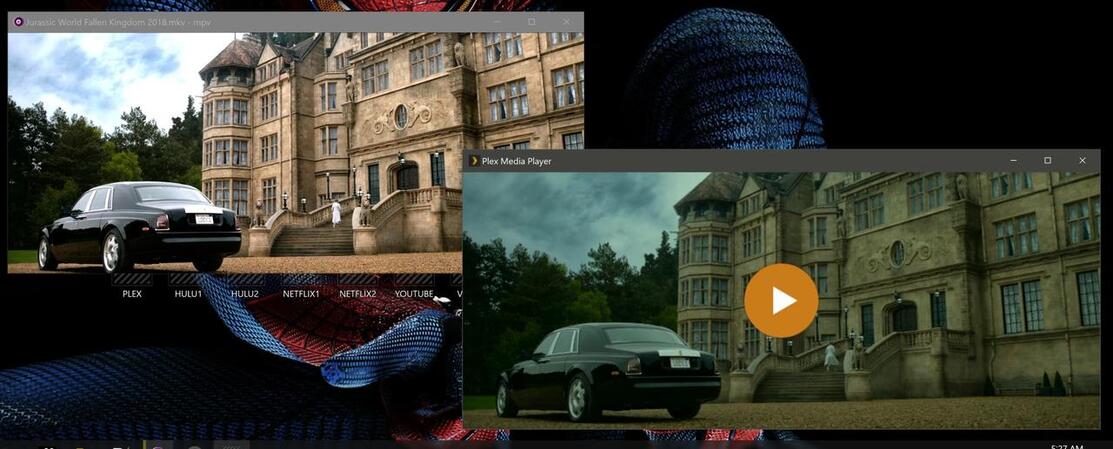
why does “native opengl” need to be enabled in settings in order for hdr files to be rendered halfway correctly? if i disable it any hdr movie file i play is not only dark and dreary but also has a severe green tint to it.
moreover, why doesn’t plex recognize mpv.conf settings in terms of gpu api’s? if i disable opengl in plex settings, shouldn’t i be able to enable it in the mpv.conf settings using opengl, vulkan, etc. by using gpu-api=opengl, gpu-api=vulkan, etc? these mpv.conf settings don’t seem to have any effect on plex even tho the pmp.log shows that plex loads/processes them, i.e. no errors are thrown when plex sees the settings?
left photo shows what an hdr fille looks like when playing it directly with mpv.exe (mpv player) compared to what it looks like when playing it with plex and opengl disabled in plex settings (right photo):