When I play Flac music files from my QNAP NAS Plex shows the playback as Unknown (flac stereo) instead of Direct Play. It shows Direct Play in the past, but I do not know how long ago right now. Both the Nvidia Shield and my receiver can play Flac music directly. Is is transcoding or something? I cannot understand why such an odd message shows when playing Flac files.
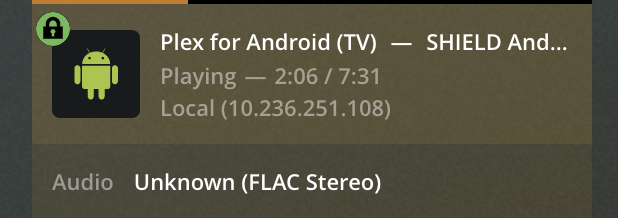
Same thing happening here. Server: latest version. Client: Shield Pro 2019, app updated to latest version, connected to a receiver that’s compatible with higher sample rates and bit depths.
Receiver reports stereo LPCM 48 kHz, even if input FLAC is 96 or 192 kHz.
I see exactly the same thing. I am not sure why Plex is sending 48 kHx when both the Nvidia Shield and my Dennon receiver support up to 192 kHz. It is very frustrating and it worked find in the past. Just not now.
Yes I have the same issue!
Using a Denon X1600H receiver which supports Flac and High Res Audio
Any news on this? I’m using the latest beta for the Shield but still getting this issue.
It seems that no one from Plex reads this forum based on this 6 week old post. It is a real issue and I wish someone would at least dignify the post with the fact that they know about it or plan to do something about it.
the unknown is the ‘language’, for which there really isn’t any need for ‘music’, so basically its just superfluous info.
ideally they would just remove it and say direct play: flac stereo 44/16
or something like that
Well, it would be nice if it were just the label that is misleading. It is actually broken (a defect of a BUG if that gets anyones attention). A 92/24 flac file should be passed through. Instead it is being downsized to 48/24 even though the NVIDIA Shield player and Denon receiver can play the original file with no intervention. It use to work correctly. Somewhere in recent months it has been broken.
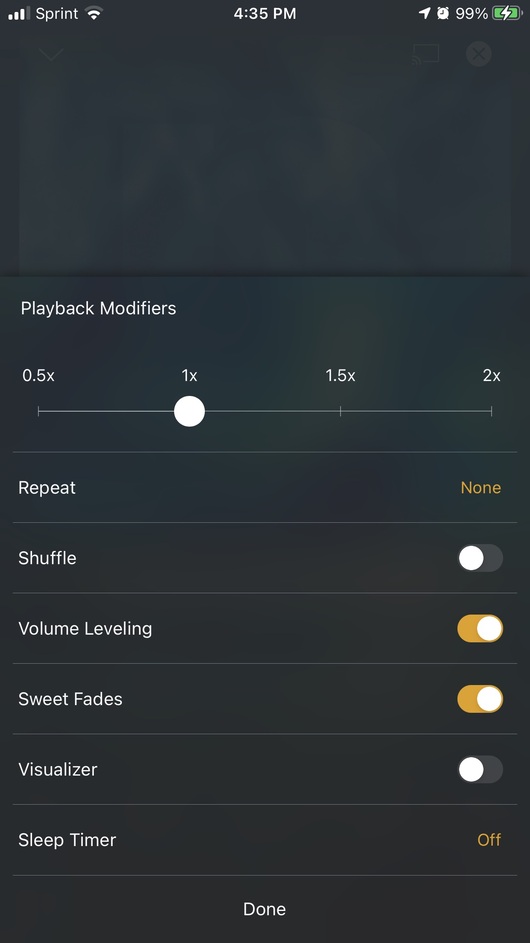
I think if you disable sweet fades/volume leveling, it may direct play 96/24 as expected.
Could you please explain how would you do that? Is it a setting on the server or on the client? I don’t think we have that option on the Shield. Thanks.
its the player, usually on the 3 dot menu or some other context menu of the player.
Not in front of my shield to check on it currently.
in any case, what you are asking for, direct pass through (like how video player can pass through dolby digital/truehd/dts directly to receiver) of audio, and has been a long standing request.
there is probably one or more threads in the feature request section you can add your vote to for it.
On iOS it looks like this, tap at the bottom center of player
Ah I see. Yes, it’s a setting available on mobile devices I think, but not on the Shield. But like the OP said, this used to work. I remember listening to hires FLAC files before using Plex. This stopped working a couple of months ago.
Plexamp on the Android platform doesn’t allow you to play anything above 48kHz/24 bit. Anything above that is downsampled (in the Plexamp client, so the server cannot know about it).
It is just a current limitation of how things are done.
I have never used plexamp. This issue is about the Plex player on the nvidia shield. It passed through in the past. Now it is broken. It is easy to test.
The general Plex Android app and Plexamp are using the same principal software libraries. So this applies to both of them.
Too bad, you are missing the boat on this one. I just loaded Kodi and the Plex addon and I get the full passed through files for Flac and DSD. Finally, the sound on my system is matching my expectations for it. The plex movie player is terrific, but the music player just seems to try too hard and limits the source music even when it should just get out of the way and pass the file through. But, then again I only use Plex internally. I have no way to access it from outside because my ISP will not allow it. So, the Kodi method works for me. Perhaps one day Plex will fix its music player to at least have the ability to recognize that is can pass Flac and DSD files straight through instead of downsizing them.
Just updating this to keep the topic relevant. Plex 8.8.0 on the Shield, but still getting this issue.
Are you looking for an answer on why the label is “Unknown (FLAC Stereo),” or why files with sample rates higher than 48kHz are being resampled to 48kHz?
To the second.
Serving a FLAC file with a sample rate higher than 48 kHz used to work on Plex. You’d get the same sample rate as the input file. Since the latest updates (can’t track which one, exactly), it doesn’t matter what’s the sample rate of the input file: either Plex or the client (in my case, a Shield Pro 2019) will always trigger transcoding to 48 kHz, even if the next devices on the chain report they support higher sample rates. My bet is on Plex.
What’s weird, though, is that by running, let’s say, a remux of a blu-ray audio - for example “A Night at the Opera”, which has a DTS96/24 track - will play the 96 kHz track without resampling it. So I know it has the capability to serve and read higher sample rates, and I know my receiver supports it, but for some reason this is not happening with FLAC anymore.
Edit: I wrote 44.1 but I meant 48 kHz.