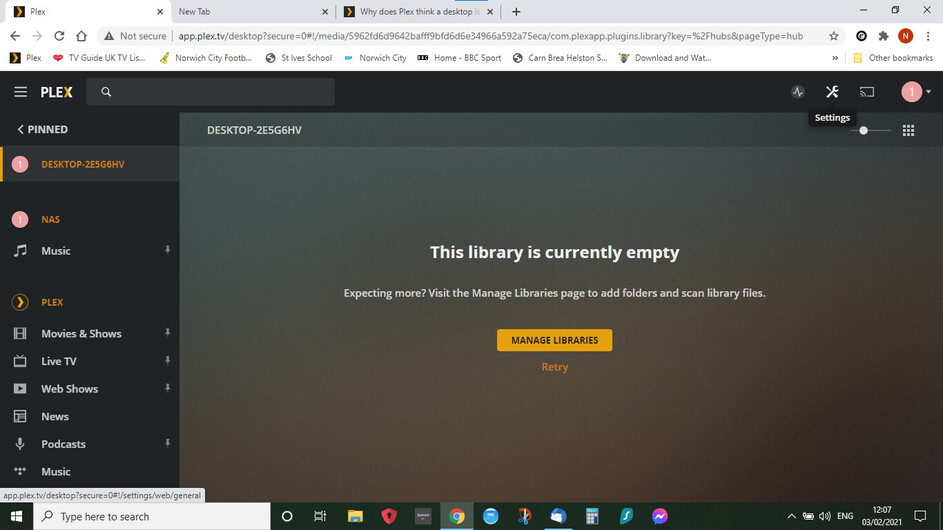
having got Plex back working with my NAS it is now picking up a windows desktop in addition to the NAS, Plex is not on that machine but is on the same network it does not pick up a laptop though - not that i want it to
any ideas how i can remove it ? its just annoying at the moment but am unsure if will cause issues in the future
The other user was my wife she has never used - it was saying the desktop (which is not hers) was the server - have deleted her as a user but still get the desktop on my “page”.
it is not clear how I remove it I do not want to go through the whole deletion thing again if I can help it
It is not on that computer - so how can i uninstall it? Apologies if I have misunderstood.
Plex is not on that machine in any sense unless that desktop is this laptop.
I deleted that user as I set it up when I originally got Plex but is has never been used although it only connected to the desktop which was bought only a month a go so was not there when user created
At some point you have installed Plex Media Server onto a Windows computer and connected it to your plex.tv account.
Whether that is a desktop or a laptop-type computer doesn’t matter.
I cannot tell you which machine it is, only you can know which Windows machines you have used.
I can only tell you that the plex server software has been on that machine since about 2 years now.
It was the fact it said a desktop didnt help it was a residual on this laptop maybe trying to link to a desktop , Plex wanted me to install it on here yesterday I then uninstalled but obviously not all
Plex doesn’t want you to install it anywhere, you choose where to install it.
Microsoft automatically names your Windows device DESKTOP-##### regardless of whether you’re installing on a Desktop, Laptop or Tablet. You can change the name.
You said you didn’t name them.
Anyway, I guess it doesn’t matter at this point. I was just trying to tell you why Windows named your Laptop DESKTOP-2E5G6HV.