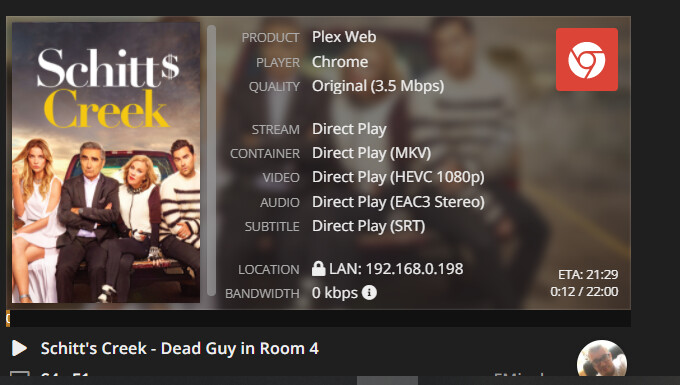
Tautulli reports the file is playing… (see screenshot 1) but in Chrome & Edge Chromium i’m stuck on this screen (screenshot 2)

Your browser apparently thinks it’s playing some video/media (play icon in the tab). Do you have some content / ad filters that might interfere with Plex playing your media? I’m not familiar with all the browser add-ons showing in your menu bar.
Do you get the same result when attempting to stream from a different browser or with browser add-ons disabled?
Tried Chrome & Edge (chromium) without add-ons.
Tautulli also says the file is playing, but it’s actually not…
It looks to me that Tautulli says your browser it’s trying to direct play an HEVC video with EAC3 audio in Chrome.
I could be wrong, but I don’t think most web browsers support either of those formats, so a transcode is required, as in this image:
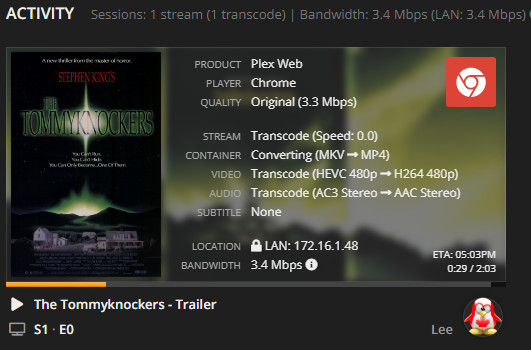
Perhaps you have disabled transcoding on your server, or set some other configuration in either the browser or the server to make Chrome think it can play those files.
1 Like
Got the solution on reddit…
-Stop PMS
-Delete, or rename, your ‘Codecs’ folder
-Start PMS
-Try again
This topic was automatically closed 90 days after the last reply. New replies are no longer allowed.
