Why I must keep logging in on the server

Server Version#:2012
Player Version#:latest, or up to date, but player is not the problem

I am asking myself this for a couple of months now. I remote log into my Windows 2012 server, with a administrator account, and with that account I had PLEX installed years ago, and not registered. I could get into my Plex without logging in, I said **without logging in, on my plex-server(the actual plex-server software) ** After I registered, it always asks me to log in, this should be an option, and not pushed like Microsoft pushes updates…

After this went on a while I thought, well, maybe because of security I add some users with partial access to my library, this login process I really understand, but on my server??? where NO-ONE else can get access to? logged in as the top domain user? and a program like plex-server asks me to verify my login and two-way authentication???
What is that good for ???

This should be removeable at once…
Maybe someone can elaborate why that is, because I do not see the value of it, when I log into my server, I really don’t need to log in on seperate installed programs… Think again…
I’m confused. You’re asked to sign into your server? We don’t specifically ask that. Do you mean the Plex Web client? If so, then yes, you do need to be signed into the client to access your server, if your server is already logged in. This sign in information gets saved into your browser’s cache. As long as you are not clearing your browser cache all the time, your sign in information should persist and you don’t need to sign in again.

I do not think you fully understand… You have an idea what a server is? A piece of hardware, similar to your computer, but stronger and able to serve many users of all kind of data?? Ok, now, I have one, and the OS on it is Windows Server 2012… On that machine I installed years ago the software PLEX SERVER and did not see the need for a life-long pass. So next to a bunch of other programs, this PLEX SERVER software did its job quite fine. Everytime I went over to maintain my library, I never had to log into the PLEX SERVER software.
Now, times changed and my use for Plex has changed too, more clients, and ways to watch my library, movies, series, music, docu’s etc… so I decided to buy a life-long pass for plex, actually afterwards I really still have not found any advantage against a plex-pass free use… Maybe on Ipad, thats all.

I did as I told buy the PASS and hoped it would work out, but after buying it, the PLEX SERVER software asks me everytime to log in with either google, or two other ways… EVERYTIME!!!
While I am on my server as the top-domain user, You know what that is? It is actually the highest ranked user that has access to all servers in the domain it is in.
As an example companies as Google has a lot of servers hanging in their domain, and only the top level domain user/administrator has full access to ALL SERVERS!!!

So, I explained it now to you, and do you know the answer?

ps. after a server restart it always asks for this to log in, even e-mail, but what I don’t get is that I marked the two way option NOT TO ASK THIS AGAIN ON THIS COMPUTER, but it still asks me to verify my login through my mobilephone, and that is SO ANNOYING!!!
(Why should I empty my cache everytime if I am not browsing on my server?, so, no, I do not!)
Sorry, but I am really pissed that this has emerged after I bought the LIFE-LONG ANNOYANCE-PASS…

Ok, I get in. By ā€œserverā€ I was referring to Plex Media Server. Plex Media Server doesn’t support active directories so you can’t include/exclude users from accessing it.

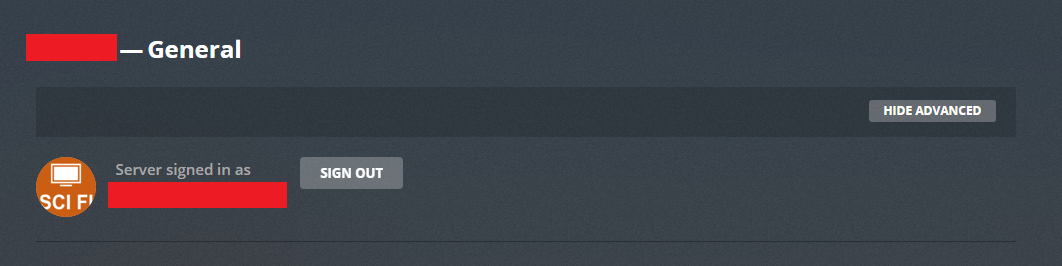
By signing into your server, I was also referring to this screen.

With the Plex Pass, we need to verify your account so your server can get it’s Plex Pass benefits. Once you sign in, this activates additional security features. One of those security features is requiring you to sign into Plex clients. If you don’t want to have to sign in, you can exempt certain machines from your network from having to sign in. Here is the setting. However, you cannot exclude the machine Plex Media Server is actually running on.

I believe the logging screen you are referring to is not the server but for the Plex Web client. This.

So, because your server is signed in as mentioned above, you do need to sign into this page. But as mentioned in m prior post, this sign in information should be saved by your web browser. If not, there is something going on and your browser may be automatically clearing it’s cache. In addition to the cache, also check the cookie settings. Make sure it is allowed. If you block these, then add Plex to the allowed list manually. Here is the setting page for Chrome.

Also check that second option. If you enable that option, it clears the data everytime you exit the browser. Other browsers also have a similar setting.

Plex don’t offer a way to ā€œnot ask againā€. I think you are referring to the browser option to remember your password, that has nothing to do with requiring you to sign in. But again, something is causing your browser to not remember the previous sign in information.

That part about verifying through your phone, that sounds like 2-factor authentication which Plex does not have so I’m confused. Can you provide a screenshot of this?

1 Like

I know right!, but this occurred only after I purchased the plex pass, and is doing eagerly so everytime I have to click on the little icon of PlexServer in the bar, down right next to the clock… (Show hidden icons)… There is this icon, and when right-click on it I get also the option Open Plex… and choosing that opens a window in chrome yes, but then it asks me to login

I have laid down my head to rest over this, I can’t solve it, for some reason I can’t find on my server in chrome the cookies at all, I can clear the browserdata including cookies, and after I did that, I know there will be more questions because I deleted about 400 or so links and settings with that, but I know it now…

Sorry, if I knew when to trigger this, I could, but after a restart I do the option above, through the taskbar to the Plex media server, or open up a chrome window and adress my server’s adres, that always seems to go to -https://app.plex.tv/auth/#!?blahblahblahblah......blahblahblah......clientID=5cmyw7oblahblah etc… and there are these three login options, and after that you think you are authenticated, but only on my path to the plex server I got the two-way authentication…

Thanks for answering, but this is a moldy situation that is here to stay i’m afraid…

But, the idea is that when I log on into my Windows server, i really do not want to log in a service that has been certified and authenticated in the past, multiple times… its like going to a hotel and every door you go through you need to verify you are you… but this is a network and no hotel (-:

Side question: Why are you trying to open the web app at all, in a remote desktop?
There is no need to do this. Just open a web browser on any computer in your local network and point it to
http://ip-of-plex-server:32400/web

Are you using remote desktop to get to your computer then opening Plex Web from there? I didn’t catch that part. If so, that’s the cause. When using a browser through remote desktop, the browser does not remember login information. I don’t know why, that’s just what happens when using remote desktop.

You are all aware that there are tools to access any Windows server, and yes, this is with the rdp protocol, and it acts like you are physically on the server…
@OttoKerner, ehm, question for you, how do you add media to your plexserver???

I do that by going to my Windows server, and move content from one folder to the other where the rest of the media is situated. When I’m there, I might as well either open up the Plex window through taskbar icon, or update library. In both cases I stay on my Windows server, no need to go to my pc and do this while plex is already running on my Windows server… Hmmmm, isn’t that weird?

I don’t know how you do this, but I have to get physically in touch with the datastorage attached to my PMS. Because this all is in a domain and it is structured by this domain.
This structure does not inflict any influence in the way that I, the Administrator of the server, can access the media, neither does Plex Client.

If you guys have access to a real Windows server, and have Plex Media Server running there, it starts up when the server (Windows) starts… After that I should not have to log in to the PMS because it is already running on my domain. This is where my original question comes from.

Why do I need to authenticate myself everytime I open Plex through the hidden icon on my Windows server’s PMS, that is running, and where can I make the PMS understand that I am already authenticated…
(If PMS had a independant way of opening the library without the use of browsers… then that would be better in this case, but not if that one also asks for authentication everytime I access it.(this is fictional ))

It is a fact that the PMS can open Plex at this location, but it is not logical if men should identify himself everytime…

I hope I made myself clearer than before.

My server is foremost a file server. And runs headless (so PMS is running as a system service).
Only if I have to update the server software, I use RDP.

I access the media storage with the default Windows file sharing method CIFS/SMB from my workstation.
I rip and prepare and pre-transcode my files on my workstation, then I copy them over to the media share on my server.
Then I open the web app on my local workstation, which is signed into my plex account.
I can immediately trigger the ā€˜Scan Library Files’ process.
Done.

I see, a little bit different the way I am doing it… Why do you pre-transcode? what is the purpose or benefit of it?
Anyway, thanks for your insight, I see that it is something not in plex, that far I guessed so too, but unsure at the time, now I know I have to do it this way, its my destiny ((-:

  • Saving drive space (~50%)
  • Making the files more compatible with more client devices for higher chance of Direct Play
  • Adding subtitles in SRT format instead of PGS → higher chance of Direct Play

hmmm, I always worry about the loss of quality… so, I try to keep them around 1 to 2 gb. Doesn’t work always, but harddiskspace is not that expensive now and building another raid system, I feel redundant enough…
Thanks man…

I think we are talking about different things here :slight_smile:
I use Bluray rips (18 to 35 GB per movie) and shave off 50% from these. Which means my files still have 10 to 15 GB per movie.
This loss of quality is insignificant to my eyes.

We most definately talk about different things… my goodness… Sometimes I find files the size of about 10 GB, and they won’t play on my Raspberry Pi, but that has nothing to do with the mediafile… Good to know there are people who are just as dumb as me, or is it smarter?, I spend over 60 % of my total harddiskspace on (ok) quality, just about slightly better than dvd !!! but you top me! Man, then you must also have as an enthousiast a prefect tv screen and audio, to fully enjoy your movies?
Thanks man, again… (can’t seem to find the smileys here…)

No, I just watch my movies on my computer screen, where I am sitting quite close. So I can see all details. And I can’t stand compression artefacts or unsharpness.

And it looks quite formidable on my family’s big tv screen as well.

1 Like

I hesitate to add Plex Media Player for Windows would also give him a Plex interface that he would only have to log into one time.

https://downloads.plex.tv/plexmediaplayer/2.29.1.961-bb236059/PlexMediaPlayer-2.29.1.961-bb236059-windows-x64.exe

Running PMP in a remote desktop session will achieve nothing good, IMHO.

I agree with Otto, a server is … to serve. To watch my media I use either tablet, RaspberryPi on my tv screen… So, on the server it is just to maintain the library and to see if the subs get there, if not, I can trigger it to start searching… (Sometimes it needs a kick in the but ):wink:

Thanks for thinking along…

This topic was automatically closed 90 days after the last reply. New replies are no longer allowed.
