Why is my Movie section identified as HomeVideo in 0.4?

I have been using version 0.3 without any problems, when I try version 0.4 my library containing movies is identified as Home Videos, why is that?


I noticed this in 0.4 when I tried to edit the file MovieSection.xml in order to remove "Recently Released". Nothing changed... but if I edit HomeVideoSection.xml instead I get what I want.


If I switch back to 0.3 everything is fine again.


Thank you in advance

BTILAF

I think I have to answer my own question or at least point out what I had to do.

I compared the file XMLConverter.py from 0.3 with the one from 0.4.

I moved these lines (420-421)

 
elif PMSroot.get('viewGroup','')=="secondary" and (PMSroot.get('art','').find('video') != -1 or PMSroot.get('thumb','').find('video') != -1):
XMLtemplate = 'HomeVideoSectionTopLevel.xml'
 
below these lines (423-424)
 
elif PMSroot.get('viewGroup','')=="secondary" and (PMSroot.get('art','').find('movie') != -1 or PMSroot.get('thumb','').find('movie') != -1):
XMLtemplate = 'MovieSectionTopLevel.xml'
 

"MovieSectionTopLevel.xml" is now on top of "HomeVideoSectionTopLevel.xml"

When I restarted PlexConnect and choose library Movies I get the correct section.
 
This is my new order in XMLConverter.py
 
    # XMLtemplate defined by PMS XML content
    if path=='':
        pass  # nothing to load
    
    elif not XMLtemplate=='':
        pass  # template already selected
 
    elif PMSroot.get('viewGroup','')=="secondary" and (PMSroot.get('art','').find('movie') != -1 or PMSroot.get('thumb','').find('movie') != -1):
        XMLtemplate = 'MovieSectionTopLevel.xml'
    
    elif PMSroot.get('viewGroup','')=="secondary" and (PMSroot.get('art','').find('video') != -1 or PMSroot.get('thumb','').find('video') != -1):
        XMLtemplate = 'HomeVideoSectionTopLevel.xml'
 
    elif PMSroot.get('viewGroup','')=="secondary" and (PMSroot.get('art','').find('show') != -1 or PMSroot.get('thumb','').find('show') != -1):
        XMLtemplate = 'TVSectionTopLevel.xml'
        
    elif PMSroot.get('viewGroup','')=="secondary" and (PMSroot.get('art','').find('photo') != -1 or PMSroot.get('thumb','').find('photo') != -1):
        XMLtemplate = 'PhotoSectionTopLevel.xml'
 

I have a ATV3 running 6.2 and Windows PMS with two different libraries, Movies and Home Videos.

PlexConnect 0.4 uses the same XML-template for the different libraries.

I posted a question on the forum, that never got answered by the way.

Then I tried to find it on my own and managed to find something in XMLconverter.py where I

changed the order of some lines to get my Movies to use the Movie template instead of the Home Video template.

Sorry to say, but now its the other way around, now my Home Videos also uses the Movie template.

How do I get the two libraries to use different templates?

Regards

BTILAF

When you create the library section in PMS are you choosing the correct type for the library you’re adding?

Yes, I have choosen different types for my libraries, this worked in PlexConnect 0.3 but is now a issue for me in PlexConnect 0.4.

I tried to create a PlexConnect.log with higher log level but I have too many recently added movies, PlexConnect takes forever to present anything on the screen when higher log level is used. Should I just let it take its time?

Thanks.

You could, or just create a new smaller library section with only a few movies in it for testing.

So I gave it a try to test it the other way around.

I created a Home Video library with just one movie in it. Changed to log level = high and restarted PlexConnect.

My limited knowledge tells me that this new library content should be identified as "video" and therefore be presented by a template like HomeVideo*.xml

as stated in XMLconverter.py on line 420-421

    elif PMSroot.get('viewGroup','')=="secondary" and (PMSroot.get('art','').find('video') != -1 or PMSroot.get('thumb','').find('video') != -1):
        XMLtemplate = 'HomeVideoSectionTopLevel.xml'
 
I look for my movie file named "Testfile.mkv" in the file "PlexConnect.log", but it seems that it gets identified as viewGroup "movie" and therefore is presented by a template like Movie*.xml
 
22:29:27 PlexAPI: <MediaContainer allowSync="1" art="/:/resources/movie-fanart.jpg" identifier="com.plexapp.plugins.library" librarySectionID="3" librarySectionTitle="Home Videos" librarySectionUUID="c8034373-0bf1-42be-9d9b-4cc7f9202ff4" mediaTagPrefix="/system/bundle/media/flags/" mediaTagVersion="1378383342" offset="0" size="1" thumb="/:/resources/video.png" title1="Home Videos" title2="Recently Added" totalSize="1" viewGroup="movie" viewMode="65592">


22:29:27 PlexAPI: ====== PMS-XML finished ======
22:29:27 XMLConverter: viewGroup: movie
 
 
The log file is to big to be pasted here and I dont know how to attach it.
 
Any ideas?

Post it to:- http://pastebin.com/
Or upload it to a site like http://www.zippyshare.com/

Also are you using the latest version of PMS.

I'm using PMS version 0.9.916.555

Log file uploaded to http://www54.zippyshare.com/v/29738259/file.html

Umm… looking at your log, I’m not sure why it’s using the Movie templates for your home videos. Line 1552 of your log clearly show the PMS xml has the secondary viewGroup and the video thumb, so PlexConnect should interpret that as HomeVideo using this line in XMLConverter.py:-

elif PMSroot.get(‘viewGroup’,’’)==“secondary” and (PMSroot.get(‘art’,’’).find(‘video’) != -1 or PMSroot.get(‘thumb’,’’).find(‘video’) != -1):
XMLtemplate = 'HomeVideoSectionTopLevel.xml’

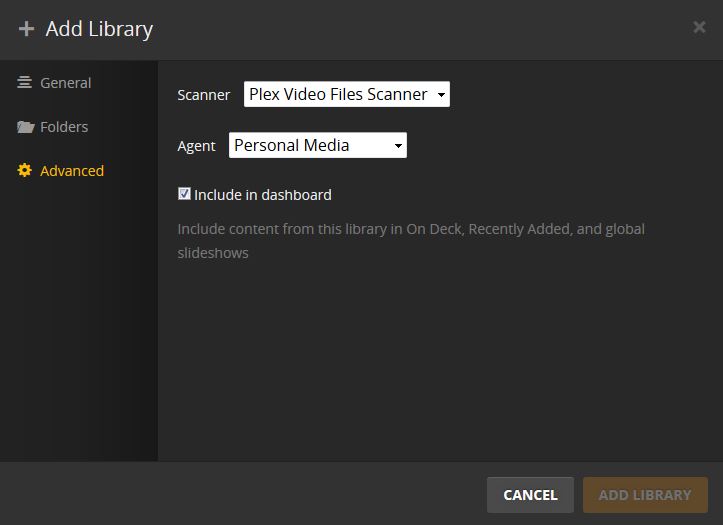
When you create the Home Video sections in PMS make sure you aren’t choosing a Movie scanner. In the advanced options scanner should be set to “Plex Video Files Scanner” and agent should be set to “Personal Media”.


You said you’ve made changes to the code in XMLConverter.py, please grab a fresh install of PlexConnect so I can be sure you’re working with the default code. Then recreate a library section making sure to use the scanner option I wrote above and see if that works, failing that please post a new log file.

For my movie collection I use "Plex Movie Scanner" and "Personal Media" agent. For my home video collection I use "Plex Video Files Scanner" and "Personal Media" agent.

I always use the "Personal Media" agent because I don't want any information collected from the internet.

I have made some changes in the "PersonalMedia.bundle" regarding how PMS is naming the movies if that can have anything to do with it?

With a fresh XMLconverter.py and high log level both of my libraries is showing the home video layout on the TV screen.

If I use my edited XMLconverter.py where home video is omitted both of my libraries use the movie layout.

http://www5.zippyshare.com/v/93929363/file.html

File uploaded contains

- Log file when choosing Home Video library

- Log file when choosing Move library

- Personalmedia.bundle (my edited version from PMS)

- XMLconverter.py (my edited version)

So what happens if you use the default Personalmedia.bundle instead of your edited one?

Ok, forget that, I can see the problem. I'm working on a fix now, stay tuned :)

---------------------------------------------------------------------------------------

Ok, so the problem is the fact you're using the "Personal Media" agent on a movie section. Because no metadata is pull for the section PMS treats the section as if it were home videos. So in effect nothing is actually wrong, what you think is a movie section PMS sees as a home video section because no metadata is being collected for it.

I don't see an easy way to fix this.... well actually there is nothing to fix PMS is doing what it's meant to do, seeing a section that's "Personal Media" and creating it as home video.

Can I ask why you don't want metadata collected from the internet?

Ok, this should now be fixed to handle section types based on the scanner used and not the thumbnail, which was bad to start with :slight_smile:

Please grab the latest commit and please don’t make any changes to the code :smiley: Let me know if it works for you, thanks.

When I first started using PMS a lot of my movies were identified wrong. I got tired of editing and changing metadata manually.

Then I kind of liked less information, I ended up just wanting production year and title.

I will give the latest commit a try and report back to you asap.

Thank you very much for your kind efforts, its very nice to receive such good help from a true professional.

Perfect!

Everything is working exactly as I want it to.

Thank you roidy for your help and excellent fix!  :)

Great, glad it now works for you.

I should have done more extensive testing... :(

When I tried my different libraries yesterday I was so glad to see the right template on the screen, I didn't watch a movie...

This morning I noticed that when I stop watching a movie, PlexConnect doesn't return to my "top level/movesection" template, it shows a new template with

a right adjusted menu with a single column containing:

-all movies

-unwatched

-recently released

-recently added

..

..

..

If I then press "menu" on the remote I end up where I can choose libraries and search.

I have never seen this behaviour before...

I have attached pictures of what my TV is showing.

Ok, I see the problem, I'm just not quite sure how to fix it. I've reverted the commit so grabbing a new version of PlexConnect will undo the changes I've made until I can have a better look at it. Sorry :(

No problems, I'm sure you will figure it out. :)

OK.... try this again :) Grab the latest commit and test it please.