Plex now seems to be throwing ads at me on my own content – not ads in their streamed shows, not ads in news, but ads before playing files streamed from my own server. So now I have to sit through an ad for some crap I’m not interested in just to get to my own files.
FWIW, I paid for a lifetime plex pass, but if I can’t turn this off I’m going to go somewhere else like Emby maybe.
How do I disable these stupid ads?
Every other time I’ve seen someone say this it’s because they accidently clicked a movie or tv show that both they own and Plex offers for free.
Check your dashboard and look at the played items to see if you actually played your personally owned content
Yes, it’s files on my own server, not in the plex B-list shows.
It’s been acting like amazon prime, when you launch a show it plays an ad for some other show in the plex streaming selection. Very annoying.
Do you have pre rolls enabled ?
As for ads, have not had an issue since they provided the Discover disable buttons.
No ads play with any of my local content.
Are you searching for the media that you want to watch? If so, there is a very good chance that you are searching for something that Plex also happens to have and are selecting that and not realizing it. Like @JaysPlex said, every time someone brings this up that is the case.
Go to settings from the web app (the wrench icon) and then on the left side menu click “Online Media Sources”. Click edit to the right of “Movies & TV” and disable it and then when you search you’ll only get results from your local server. After doing that you won’t get any ads because you’ll actually be watching from your own server.
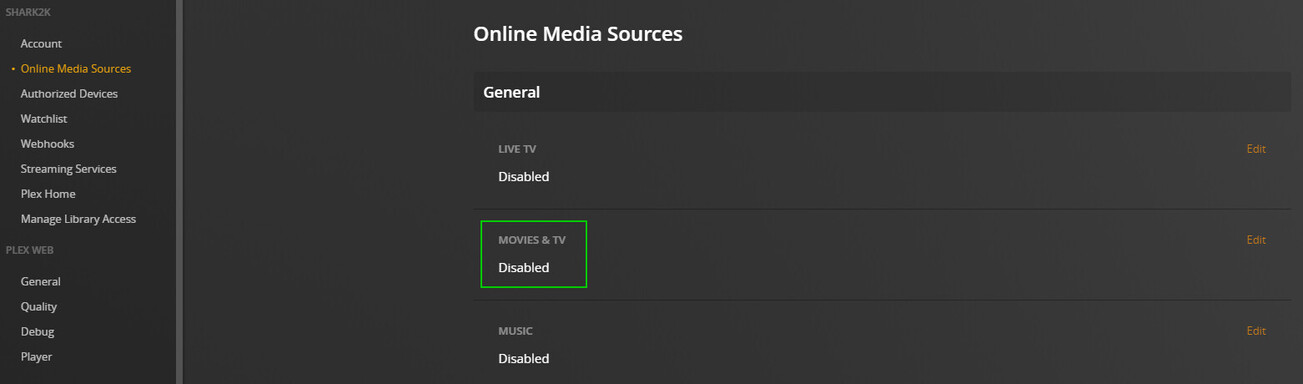
-Shark2k
Thanks, I’ve set everything to Disabled, so we’ll see if that fixes it.
What’s the media you’re playing? Titles etc
We only show ads in our own ad-supported content. We do not, and never will, show ads in your own personal content.
