Why my hardware acceleration (cpu Intel Quick Sync) is not working?

Server Version#: 1.14.1.5488
Player Version#:
Hello.
I made a Plex server with linux based configuration.
The CPU have quick sync (i5 2500K pass mark 6478)
My issue is that i never seen (hw) decoding or transcoding into my dashboard when i play
and transcode H264 mkv 1080 to 720p movies.
image
I had checked the option “use hardware acceleration” into the transcoder settings.

Is there any other settings that i need to setup to get it work ?

this is an old processor with limited quicksync support.

that said I would expect it work with plain x264 1080/720 files.

i’m not familiar with xpenology but from google it appears to be some kind of synology clone.

It may not have the proper drivers or kernel stuff to support transcoding.

No, Plex is not running into docker.
I use Plex directly from DSM 6.1.7-15284 Update 2

Does Plex use is own library package to invoke the hardware acceleration ?
Or
Plex depend from the library of the DSM to use the QuickSync ?

If I may add,

Plex provides the necessary libraries.
The XPEnology version you are using must be the 64-bit distribution.

PMS must also be the 64-bit PMS as downloaded from Plex.tv/downloads.

The 2 conditions are met here.
XPENOLOGY is 64-bit distri
and PMS too
and i Use PMP 3.83.1

then ? why I can’t see the (HW) that seem to say my Plex use only software transcoding …

Your Initial post shows HW decode and HW encoding are engaging. Thhe (hw) in the status.

If you’re still having a pegged CPU problem, the most likely cause is subtitles.

Regardless, I will need to see the DEBUG-enabled, VERBOSE-disabled logs

  1. Verify DEBUG enabled, VERBOSE disabled, in Settings - Server - General
  2. Start Playback
  3. Let playback for 30 seconds
  4. Stop Playback
  5. Wait 30 seconds
  6. Settings - Server - Troubleshooting- Download Logs
  7. Attach the ZIP file it gives you.

Thank You ChuckPa to review this log file.
I really appreciate your help.
Plex Media Server Logs_2019-02-09_06-21-55.zip (5.2 MB)

There are several problems here.

  1. Slow database – Please manually optimize
Feb 09, 2019 06:19:24.344 [0x7fc0ea7ff700] WARN - SLOW QUERY: It took 260.000000 ms to retrieve 57 items.
Feb 09, 2019 06:19:30.852 [0x7fc0ea7ff700] WARN - SLOW QUERY: It took 260.000000 ms to retrieve 0 items.
Feb 09, 2019 06:19:31.113 [0x7fc0ea7ff700] WARN - SLOW QUERY: It took 260.000000 ms to retrieve 0 items.
Feb 09, 2019 06:19:31.374 [0x7fc0ea7ff700] WARN - SLOW QUERY: It took 260.000000 ms to retrieve 0 items.
Feb 09, 2019 06:19:31.903 [0x7fc0ea7ff700] WARN - SLOW QUERY: It took 250.000000 ms to retrieve 0 items.
Feb 09, 2019 06:19:39.271 [0x7fc0ea7ff700] WARN - SLOW QUERY: It took 260.000000 ms to retrieve 40 items.
  1. Either you have DNS rebinding protection active in your modem/router/DNS resolver and/or it needs the exclusion to allow plex.direct as a private domain (which exists only on your LAN)… It says no error but is. It means it can’t connect directly to the server (no “NearBy” indication)
Feb 09, 2019 06:19:12.429 [0x7fc0e3c47700] ERROR - Error issuing curl_easy_perform(handle): 28
Feb 09, 2019 06:19:13.448 [0x7fc0e3f35700] ERROR - Error issuing curl_easy_perform(handle): 7
Feb 09, 2019 06:19:13.448 [0x7fc0e3f35700] WARN - HTTP error requesting GET https://192-168-1-10.aa411637742c456e8531454e322dd223.plex.direct:32400 (0, No error) (Failed connect to 192-168-1-10.aa411637742c456e8531454e322dd223.plex.direct:32400; No route to host)
Feb 09, 2019 06:19:15.626 [0x7fc0e3c47700] ERROR - Error issuing curl_easy_perform(handle): 7
Feb 09, 2019 06:19:15.626 [0x7fc0e3c47700] WARN - HTTP error requesting GET https://192-168-1-36.a28acba4e9b94410a920377a669285c6.plex.direct:32400 (0, No error) (Failed connect to 192-168-1-36.a28acba4e9b94410a920377a669285c6.plex.direct:32400; No route to host)
  1. The primary issue here is you have no device detected even though enabled.
Feb 09, 2019 06:20:27.042 [0x7fc0e3c47700] WARN - avcodec_open2 returned -1313558101 for encoder 'h264_nvenc'
Feb 09, 2019 06:20:27.043 [0x7fc0e3c47700] DEBUG - Codecs: hardware transcoding: testing API vaapi
Feb 09, 2019 06:20:27.043 [0x7fc0e3c47700] ERROR - [FFMPEG] - No VA display found for device: /dev/dri/renderD128.
Feb 09, 2019 06:20:27.043 [0x7fc0e3c47700] DEBUG - Codecs: hardware transcoding: opening hw device failed - probably not supported by this system, error: Invalid argument
Feb 09, 2019 06:20:27.043 [0x7fc0e3c47700] DEBUG - Scaled up video bitrate to 14227Kbps based on 1.500000x fudge factor.
Feb 09, 2019 06:20:27.043 [0x7fc0e3c47700] DEBUG - Streaming Resource: Reducing playback quality for 3809kbps stream bitrate: video resolution to 1280x694, audio channels to 6, quality to 12, disable video DS as 44021kbps is > the 3418kbps available, disable audio DS as 1509kbps is > the 345kbps available
Feb 09, 2019 06:20:27.043 [0x7fc0e3c47700] DEBUG - Codecs: testing h264_nvenc (encoder)
  1. Stop PMS
  2. Remove the package.
  3. Your data will be safely stored in the Plex share
  4. Reinstall Plex

These steps verify the hardware access rules are written.

To verify yourself, SSH into the unit.

If you do not see /dev/dri/renderD128 then XPEnology does not recognize your IGPU. Perhaps a motherboard settting?

Thank You

1.slow database=> I got more than 50 000 music files, this is maybe why

2.No DNS rebinding into the router, but multiple Lan ports on synology with one VPN
I can remotely access the server past thru plex.tv or direct IP:port forwarding and device inside network can find proximity server … where do in need to put the exclusion “plex.direct” ?

3.OK, will goes into the unit with SSH and check if i find /dev/dri/renderD128

but this mean Plex don’t use completely his own libraries to manage the Hardware ?
may I manually create the /dev/dri/renderD128 ?

About the motherboard settings, what are the one that must be check ?

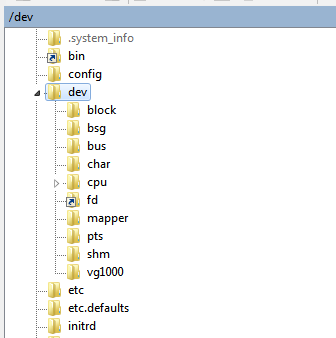
no dri into dev :frowning:

image

image

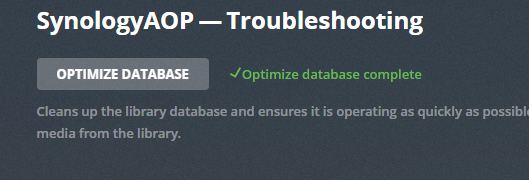
I need to optimize myself and go to sleep :slight_smile:
2 days now in one row,
I will continue the search and work on this HW issue later .

The Linux kernel creates all entries in /dev when it starts. There is nothing you create.
It is recreated each time the kernel starts.

Without the appropriate kernel drivers already compiled into DSM, there will be no detection of the iGPU. If the ASIC isn’t detected, there are no inodes created. With no inodes created, the Plex Libraries (supplied with Plex) have nothing to connect to).

I do not know your hardware, nor do I know which version of DSM (customized) you have. I do know DSM from Synology does not include kernel drivers for the intel core series processors because Synology doesn’t sell any. They only include drivers for the J-series processors at this time.

This topic was automatically closed 90 days after the last reply. New replies are no longer allowed.