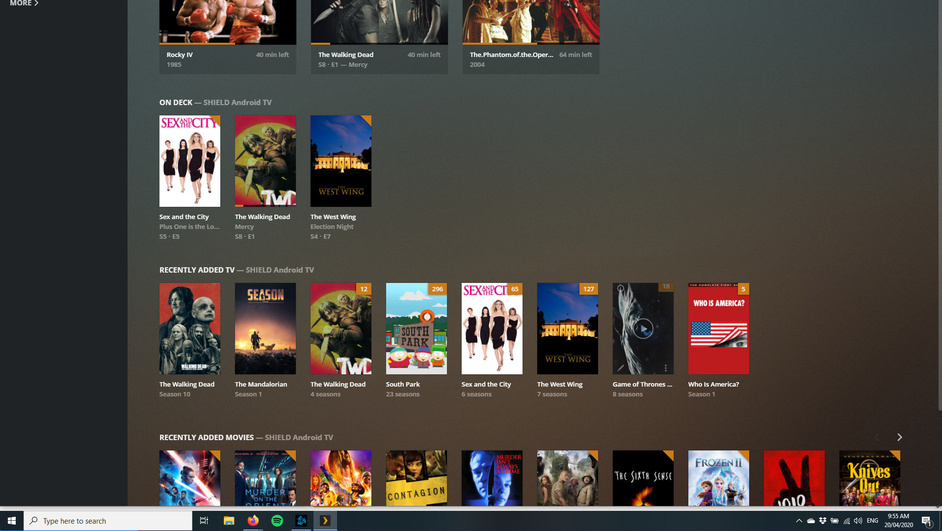
I have been happily using Plex media player on W10 for a few months now. I run it on my second monitor plugged into a laptop through HDMI and it mostly has been working fine.
A couple of days ago an update came out and now I am like super zoomed in on the app - I can no longer see options menus and things like that. I did lots of fruitless research for like a couple of hours, and then tried to de-install / re-install it.
That made it worse. Now, I am still super zoomed in, but cannot connect to any movie sources. Screenie attached.
After some fiddling, I managed to get my movies back, but I cant seem to find any way to fix the screen resolution issues. This is a shot of the entire screen:
Further to this, if I play a movie, and double click on it while playing, it goes into full screen mode and fits the screen correctly.
If I close the movie by hitting ‘X’ it goes back into my movie catalogue and still fits the screen correctly in full screen mode. If I take it off full screen mode, it then has the same problems shown above, and the only way to fix it is to play a movie and double click on it, then close it.
Any thoughts on a solution? Am I posting this in the right place?
Yeah I’m having similar issues in my multi monitor setup. the only way I can make it work correctly is to drag Plex to the screen of my surface and drag it back to one of my other monitors. That seems to work ok but by default the zooming is completely off, or it opens on the wrong screen.