Server Version#: 1.40.1.8227
Player Version#: Version 1.89.1.107-20abacd1
I recently got a new PC with Windows 11 and when I play any video on Plex I have no sound. I have tried EAC3 5.1 and AAC 2.0 audio files and neither have any sound whatsoever. They both play fine on the webapp.
I tried messing around with a bunch of the settings for the Plex player, but nothing seemed to help. I have a USB audio interface and a USB wireless headset and neither of them will play sound from Plex.
Not sure if relevant, but I downloaded the latest version of the Plex player today and I have the latest nvidia drivers. Any ideas why there is no sound?
set up the Windows sound output as required (i.e. number of speakers mainly)
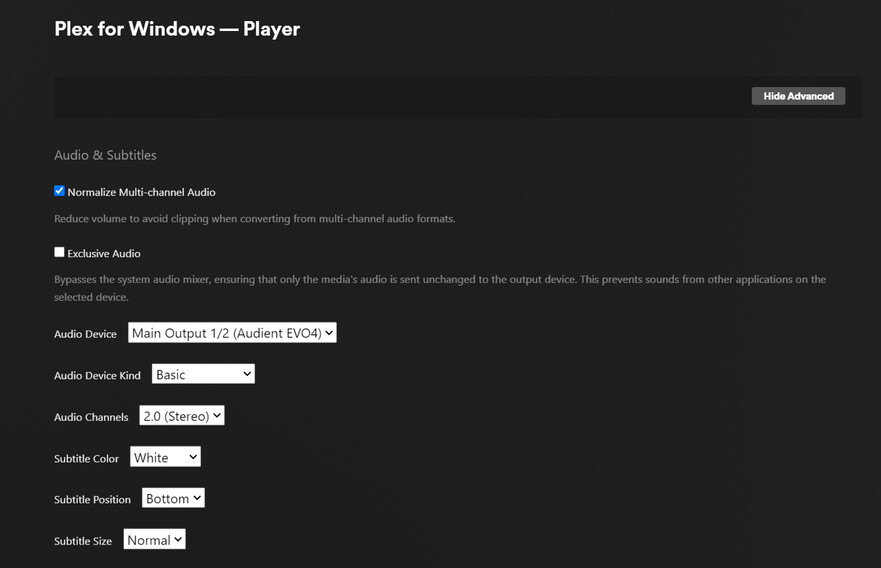
enter the settings of the player app. Settings - Plex for Windows - ‘Show Advanced’ - Player
set audio device from Auto to one of your soiund interfaces. Check the proper number of sapeakers there as well.
start playback and verify that the volume hasn’t been muted, or turned down all the way. The volume slider is in the same position as in the Plex web app, bottom right of the Player control overlay.
I did manage to get the audio to work, but I have no idea what actually changed.
The only thing I can think of was installing the drivers for my audio interface. The interface works plug and play with Windows AFAICT (it was playing sound from any other app, including the Plex webapp through Chrome). Maybe the driver included some audio codecs I needed?
