Server Version#:v1.40.1.8227-c0dd5a73e
Player Version#:1.90.1.118-a4bc1429
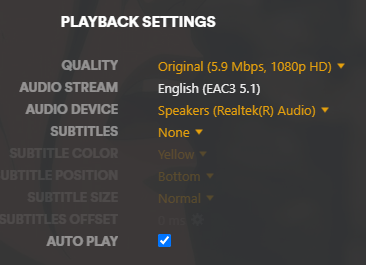
I am unable to out put any sound from the media player on windows. Sound output works fine when played through the web browser interface or from other apps on FireTV and Android.. I have the server installed on the same machine. I have had this working in the past, but I re-installed windows recently, and the player no longer outputs sound.
I also noticed some wierdness in the log when I try to play a new media file:
Audio:
Codec: ?
Bitrate: ?
Channels: ? → ?
Output driver: ?
I can upload more logs if required.
Thanks for any help.
Gee
Close the player app and restart it.
Make sure that all external equipment, like AVR, Soundbar, TV are all connected and switched on before starting the app.
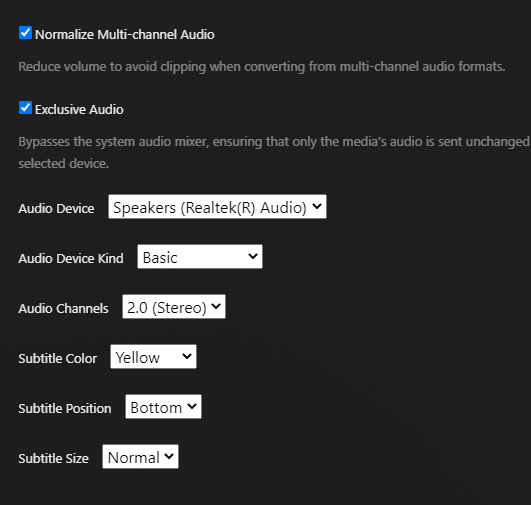
Go into the settings of the player app and see whether there is a named sound interface selected, or if it only sits at “automatic”.
Hi Ottto,
Thank you for responding!
I have closed and restarted my player several times. I have also uninstalled and re-installed it. as well as fully removed the installation folder, the temp folder in %appdata\local\plex and removed the registry settings before re-installation.
I also thought maybe it was a server problem, so I have uninstalled and re-installed it as well. Since this was after a windows re-install, I’ve had my plex server spun up as migration from my old system, and I’ve also installed it fresh with no migration.
All my external equipment is working properly, the web player on that same machine is outputting sound properly.
I have verified that a sound device is selected when I am viewing the video, and when I go into the “Player Settings” I have a sound device selected. I also am in the habit of disabling unused sound devices within the windows control panel, so I only have my primary sound output device to choose form.
Note, I just installed Plexamp, and it works properly.
Thanks,
Gee
Is the sound interface actually an HDMI port?
Have you tried to toggle “exclusive mode” in the sound interface dialog?
Try triggering “Analyze” on the non-working title, a few seconds before starting playback.
Sorry for asking this, but have you checked the volume slider’s position during playback?
Hi Otto,
My sound output is analogue stereo heading to an eq then to amps. I have my HDMI/DP monitors disabled in windows.

I have tried exclusive mode, which doesn’t seem to take control of the audio device, other apps still play sounds.
I have tried the analyze on several media files, no change.
No worries, I have verified the volume slider was all the way up. 
Thanks again, for your attention with this issue.
Gee
I think it’s time to share the whole log file of the player.
Please zip the log before uploading it.
https://support.plex.tv/articles/windows-mac-app-logs/
not sure if this means anything, but it doesn’t look like the plex player is registering itself as a windows sound application.
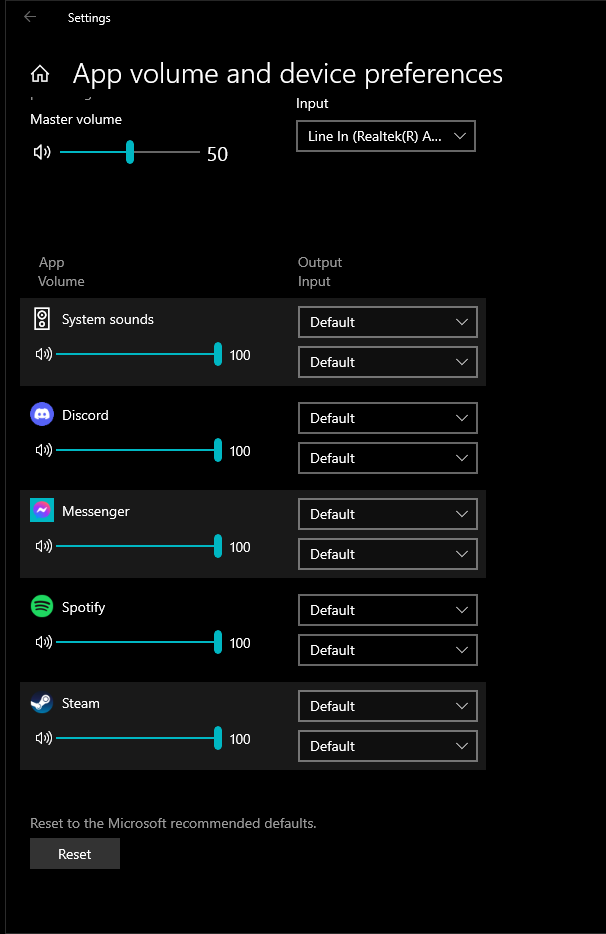
Logs:
Gee_Logs.zip (146.4 KB)
Thanks again,
Gee
The log appears to say that it is still set to “automatic” sound interface selection.
Could you switch that directly to the Realtek interface?
In your last screenshot, select the Realtek interface, then Configure and make sure that the speaker configuration is actually set to stereo, if you have only 2 speakers connected.
On the same screen, go also into properties and disable all sound processing and “enhancements”.
Set the default playback format to 48kHz 24 bit (or 96kHz 24 bit if available).
Hi Otto,
Sorry, I wasn’t clear, It was set to automatic audio device, and I did change it to the realtek device in the player (while watching the video). I also made the same change in the Player settings.
The realtek device is set to stereo (2 speakers). and the default format is set to 24 bit, 48000Hz.
Thanks,
Gee
I don’t think that has any influence during playback. You would need to stop playback, make the changes, then start a new playback.
OK, I have done that several times. The plex app has been restarted a dozen+ times.
During these experiments, did you have other apps open which use the audio output?
If one of them is also claiming “exclusive audio”, then it can shut out Plex.
Hi Otto,
I have had some apps, such as steam and chrome running. I just tried by shutting down all apps that use sound, including the plex player. Then I started up only the plex player, and same problem. I have now restarted my browser to reply to this message.
Thanks,
Gee
Unfortunately I am almost out of ideas.
The only thing that’s left to try is to see if there are more up-to-date drivers are available for your sound interface.
I just got a tip from a developer.
Apparently, the player tries to use an EAC3 decoder which is installed in the system (systemwide installed codecs are always used preferably).
And that one doesn’t look like it works.
See what you have installed in “codec packs” and the like and remove them.
(Or remove them all but one, like the LAVfilter collection.)
Hi Otto,
Thank you for the tips, I was able to determine that I am running a specific version of windows 10 that does not enable some HD audio codecs. Windows 10 IoT Enterprise LTSC. The ISO was sourced from Windows LTSC Download | MAS
See here: Reddit - Dive into anything
After following the instructions found from the reddit link, I am now outputting sound from the Plex Media Player.
Thanks Again,
Best Regards,
Gee